

Linux · Internet
Konversation
Konversation is a mature, user-friendly KDE IRC client supporting multiple servers, SSL, and DCC file transfers in a single window.
- License
- GPL-2.0+
- Latest version
- 1.10.26043 (July 2, 2026)
- Developer
- KDE
- Installs
- 624 (Flathub, 30 days)
What is Konversation?
Konversation is a long-standing Internet Relay Chat client developed by the KDE community. It has been part of the KDE ecosystem for years, providing a stable and consistent interface for text-based communication. The software is well-maintained, with regular updates ensuring compatibility with modern IRC networks and security standards like SSL/TLS. Its history is tied to the growth of KDE itself, making it a reliable choice for users who prefer a graphical interface over terminal-based clients.
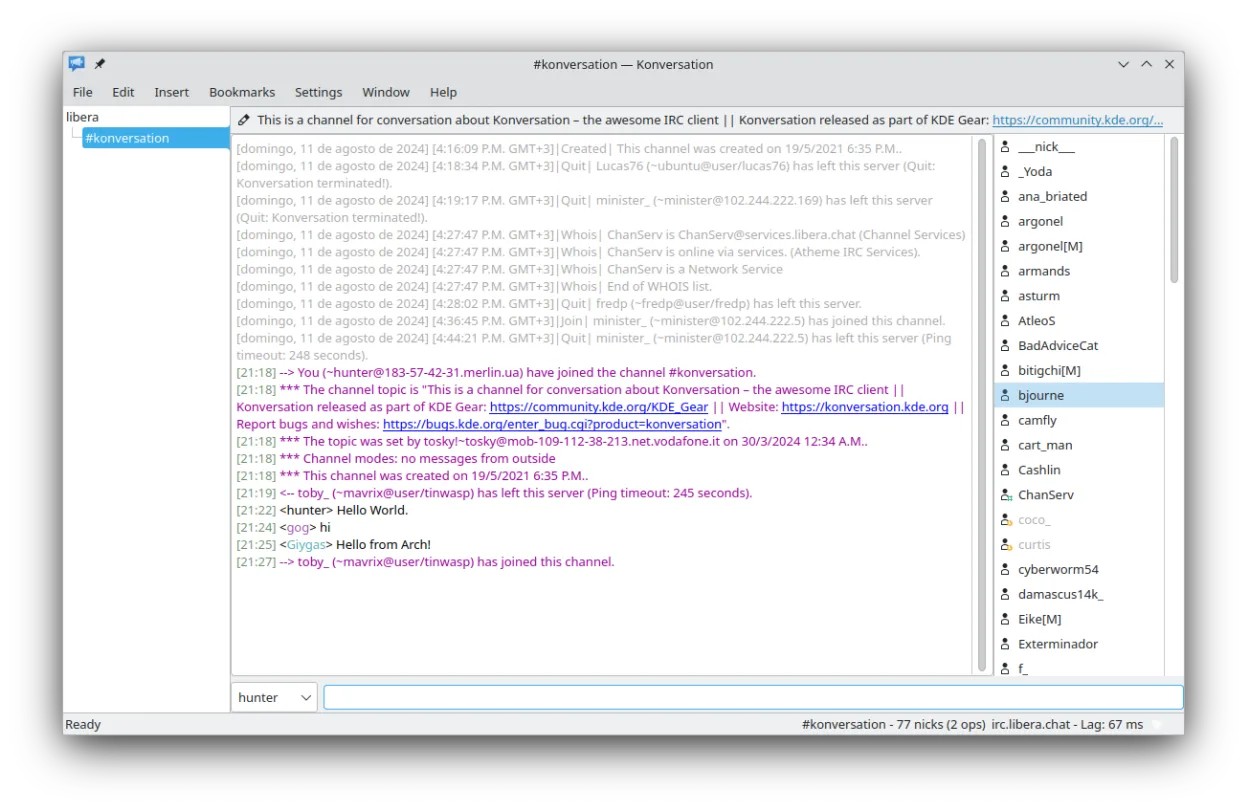
This tool is ideal for users who need a straightforward way to join IRC channels without complex configuration. It suits both casual users joining specific communities and power users managing multiple identities and servers simultaneously. If you are used to Windows-based IRC clients, Konversation offers a familiar layout with tabs for different channels and servers, making the transition relatively smooth. It is particularly useful for those already using KDE Plasma or other desktop environments that integrate well with KDE applications.
Compared to mIRC, Konversation feels lighter and more integrated into the Linux desktop environment. While mIRC is known for its extensive scripting capabilities, Konversation focuses on usability and standard IRC features. The interface is clean and uncluttered, which may appeal to users who find mIRC’s interface dated or overly complex. However, if you rely heavily on mIRC-specific scripts or plugins, you will need to find alternative solutions or write new ones for Konversation, as the scripting engines are not compatible.
Best for: KDE users who want a reliable, easy-to-use IRC client with standard features and good security support.
Key features of Konversation
- Support for multiple servers and channels in a single window
- SSL server support for secure connections
- DCC file transfer capability
- Multiple identities for different servers
- Text decorations, colors, and theme support for nick icons
- On-screen display for notifications
- Automatic UTF-8 detection and per-channel encoding support
- Bookmarking support for quick access to channels
Pros
- Highly configurable interface with theme support
- Native integration with KDE desktop environment
- Supports modern security standards like SSL
- Lightweight and efficient resource usage
- Active development and regular updates
Cons
- Limited scripting capabilities compared to mIRC
- Best experience is within KDE; may feel out of place on other desktops
- No direct compatibility with mIRC scripts or plugins
- Interface may feel less feature-rich to users accustomed to advanced Windows IRC clients
Windows programs Konversation replaces
 mIRC
mIRCHow to install Konversation on Linux
flatpak install flathub org.kde.konversationsudo apt install konversationsudo apt install konversationsudo dnf install konversationsudo pacman -S konversationsudo zypper install konversationTips for Windows users
When switching from mIRC, note that Konversation does not import mIRC configuration or scripts directly. You will need to manually re-enter server settings, channel lists, and identity information. The workflow is similar, with tabs for channels and servers, but you may need to adjust your expectations regarding scripting. Use Konversation’s built-in settings to configure SSL, nicknames, and channel bookmarks. If you rely on specific mIRC plugins, look for equivalent KDE tools or consider using a different IRC client that supports similar scripting if that is a critical need.
Recent releases
- 1.10.26043 —
- 1.10.26042 —
- 1.10.26041 —
- 1.10.26040 —
Konversation: frequently asked questions
Does Konversation support SSL connections?
Yes, Konversation supports SSL server connections, allowing you to connect securely to IRC networks that require encrypted traffic.
Can I use Konversation on GNOME or other desktop environments?
Yes, it runs on any Linux desktop environment, but it is designed for KDE and may look or behave slightly differently outside of KDE Plasma.
How do I transfer files in Konversation?
You can use DCC (Direct Client-to-Client) file transfers. Right-click on a user in the channel and select the option to send a file, or use the DCC menu.
Is Konversation actively maintained?
Yes, Konversation is actively maintained by the KDE community, with regular releases and bug fixes.
Updated