

Linux · Office
PDFedit
PDFedit is a free, open‑source PDF editor for Linux that lets you modify raw PDF objects or use simple GUI tools.
- License
- GPL-2.0
- Latest version
- 0.4.5.fl2 (December 20, 2020)
- Developer
- The PDFedit authors
- Installs
- 1,459 (Flathub, 30 days)



What is PDFedit?
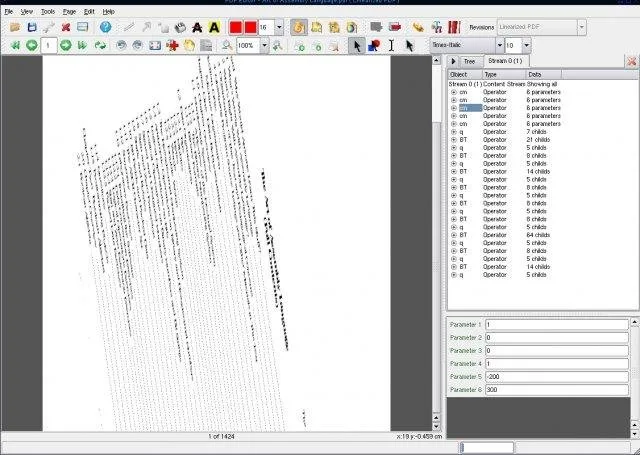
PDFedit originated in the early 2000s as a Qt‑3 based tool for low‑level PDF manipulation. It lets you edit the internal object tree of a PDF, which is useful for precise fixes or experiments, but it relies on old, unmaintained libraries, so the project is effectively frozen. The last release was in 2020 and the software is considered legacy, with no security updates.
The program targets power users who need direct access to PDF internals rather than a polished WYSIWYG experience. If you are comfortable with the structure of PDF files and need to tweak fonts, streams, or metadata, PDFedit can do the job. For casual editing, the interface feels dated and the workflow is more manual than modern Windows tools.
Compared with Adobe Acrobat on Windows, PDFedit lacks many high‑level features such as form creation, OCR, or cloud integration. It feels more like a developer’s console than a consumer product, and the UI reflects its Qt‑3 heritage. Expect a simple layout, limited shortcuts, and the need to copy files into the allowed folders because of its sandboxed Flathub packaging.
Best for: Advanced users who need low‑level PDF object editing on Linux.
Key features of PDFedit
- Edit raw PDF object tree
- GUI functions for common tasks (add/remove pages, edit text)
- Search and replace within PDF objects
- Export object data as plain text
- Support for basic annotation editing
- Batch processing via command‑line options
Pros
- Complete control over PDF internals
- Free and open‑source under GPL‑2.0
- Lightweight and runs on modest hardware
- Works offline with no external services
Cons
- Uses obsolete Qt‑3 and Xpdf libraries; no security updates
- Interface is dated and not intuitive for beginners
- Limited high‑level editing features compared to Acrobat
Windows programs PDFedit replaces
 Adobe Acrobat
How to install PDFedit on Linux
flatpak install flathub net.sourceforge.PdfeditTips for Windows users
Copy your PDFs into the Downloads or Documents folder so PDFedit can access them, then open them from the file chooser. The program uses a tree view rather than a page preview, so you’ll spend more time navigating objects than scrolling pages. Keyboard shortcuts are minimal; rely on the menus for actions like adding pages or editing text. Save often, as the app lacks autosave.
Recent releases
- 0.4.5.fl2 —
- Workarounds for HiDPI (use bigger fonts and bigger icons). - Don't show hidden files/dirs in filechooser by default.
- 0.4.5.fl1 —
Initial release from 'flatpak' branch. Contains some new Xpdf crash fixes (taken from poppler project).
PDFedit: frequently asked questions
Can PDFedit open encrypted PDFs?
It can open PDFs with simple passwords, but it does not support modern encryption methods.
Is there a way to edit PDF forms with PDFedit?
Form editing is very limited; you can modify the underlying objects but there is no dedicated form designer.
What alternatives exist for PDF editing on Linux?
LibreOffice Draw, Okular’s annotation tools, and the commercial PDF Studio are common modern alternatives.
Does PDFedit run on Wayland?
It runs under X11; on Wayland you may need to launch it with XWayland compatibility.
Updated