

Linux · Programming
Spyder
Spyder is a free, open-source Python IDE built specifically for scientific computing, data analysis, and debugging.
- License
- MIT
- Latest version
- v6.1.6 (July 28, 2026)
- Developer
- The Spyder Project Contributors
- Installs
- 1,115 (Flathub, 30 days)
What is Spyder?
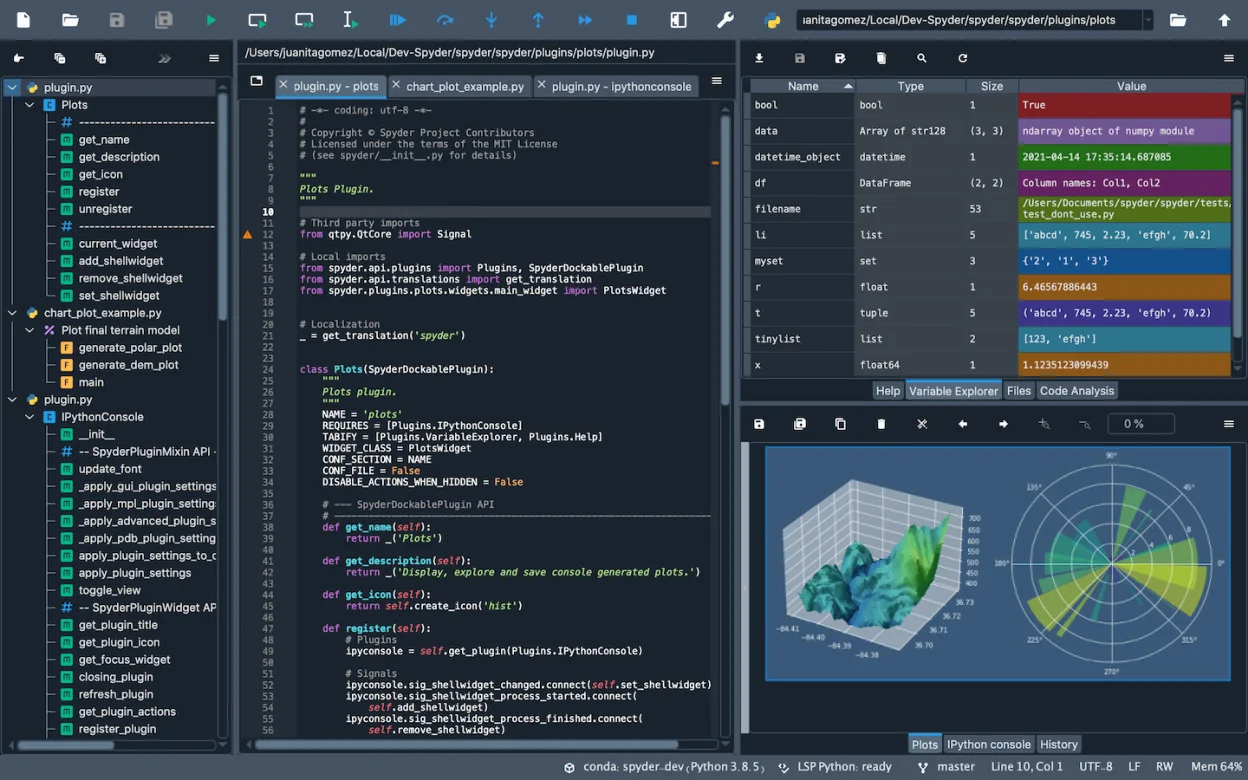
Spyder has been a staple in the scientific Python community for over a decade, evolving from a simple editor into a full-featured integrated development environment. It is designed by scientists for scientists, prioritizing data inspection and interactive execution over general-purpose coding. The project is mature, with a stable release cycle and a large user base across academia and industry. It integrates tightly with the core scientific Python stack, making it feel like a native part of the NumPy and Pandas ecosystem rather than just another code editor.
This tool is ideal for researchers, data analysts, and engineers who spend most of their time manipulating datasets, running simulations, or visualizing results. If your workflow revolves around JNotebooks, Matplotlib plots, and debugging complex numerical algorithms, Spyder reduces the friction between writing code and seeing results. It is less suited for large-scale web development or non-Python projects, as its features are heavily optimized for scientific workflows rather than general application architecture.
Compared to PyCharm, Spyder feels lighter and more focused. PyCharm offers superior code refactoring and general IDE features, but Spyder excels at immediate data feedback. Where PyCharm might require extra plugins or configuration to handle large arrays efficiently, Spyder’s variable explorer and interactive console are built for it. The interface is less cluttered, allowing you to focus on the data rather than the tooling, though you may miss some of the advanced static analysis features found in heavier IDEs.
Best for: Scientists and data analysts who need a focused, efficient environment for Python-based data exploration and numerical computing.
Key features of Spyder
- Interactive IPython console with rich output rendering
- Variable explorer for inspecting large NumPy arrays and Pandas DataFrames
- Integrated debugging with step-through execution and breakpoint management
- Built-in support for Matplotlib, SymPy, and SciPy visualization
- Plugin architecture for extending functionality with custom tools
- Project manager for organizing multiple files and configurations
- Code analysis and linting via Pylint and PEP8 integration
Pros
- Deep integration with the scientific Python stack out of the box
- Excellent variable explorer for quick data inspection without running separate scripts
- Lightweight compared to full-featured IDEs like PyCharm or VS Code
- Active community and regular updates ensuring compatibility with latest Python versions
Cons
- Lacks advanced code refactoring tools found in heavier IDEs
- Interface can feel dated compared to modern, highly customizable editors
- Performance may lag when opening extremely large projects or files
- Limited support for non-Python languages or frameworks
Windows programs Spyder replaces
How to install Spyder on Linux
flatpak install flathub org.spyder_ide.spydersudo apt install spydersudo apt install spydersudo dnf install spydersudo pacman -S spydersudo zypper install spyderTips for Windows users
If you are moving from PyCharm, expect a different workflow. Spyder does not rely on heavy project indexing, so opening a folder is instant. Your .py files will open directly, but you will need to reconfigure your interpreter paths in the settings. The interactive console replaces the need to run scripts repeatedly; you can execute cells or lines directly and inspect variables in the right-hand pane. Shortcuts differ slightly, so check the preferences for debugging commands. Note that Spyder is not a replacement for PyCharm if you do heavy web development or need advanced database tools; it is strictly for Python scientific work.
Recent releases
- v6.1.6 —
- v6.1.5 —
- v6.1.4 —
- v6.1.3 —
Spyder: frequently asked questions
Can I use Spyder with virtual environments?
Yes, Spyder allows you to select a specific Python interpreter or virtual environment in the settings. This ensures it uses the correct packages and dependencies for your project.
Is Spyder better than Jupyter Notebooks?
Spyder is better for writing and debugging full scripts, while Jupyter is better for linear, narrative-style data exploration. Many users use both, with Spyder for code development and Jupyter for final presentations.
Does Spyder work on Linux without a GUI?
No, Spyder is a graphical application and requires a desktop environment. It will not run in a headless server environment.
How do I install Spyder on Ubuntu?
You can install it via the package manager using 'sudo apt install spyder' or through Flathub. Installing via pip is also possible but may conflict with system packages.
Updated