
Linux · Programming
Thonny
Thonny is a lightweight Python IDE aimed at beginners, providing an integrated debugger and package manager.
- License
- MIT
- Latest version
- 4.1.7 (December 16, 2024)
- Developer
- Aivar Annamaa
- Installs
- 3,543 (Flathub, 30 days)
What is Thonny?
Thonny was created by Aivar Annamaa as a teaching tool for Python, first released in 2013. It has grown steadily, now available on major Linux distributions and Flathub, and is maintained with regular updates.
The IDE targets students, hobbyists, and anyone new to Python. Its simple interface removes the clutter of commercial IDEs, letting users focus on learning syntax and logic.
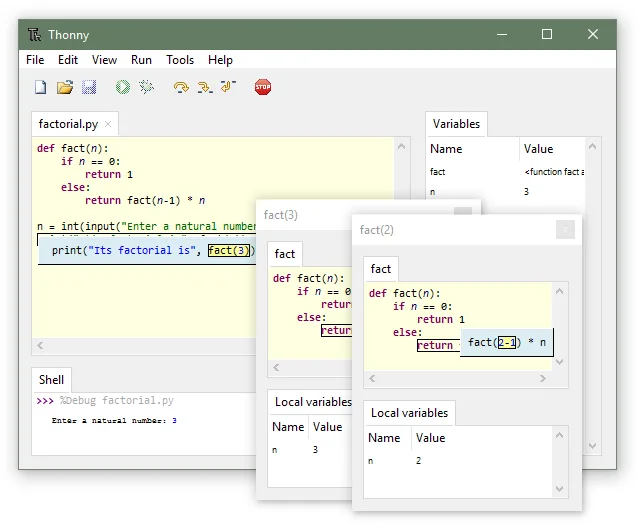
Compared to Windows‑centric IDEs like PyCharm, Thonny feels more approachable: fewer settings, a single‑window layout, and a debugger that visualises each step rather than stepping through compiled bytecode.
Best for: Students and hobbyists who want a straightforward Python development environment.
Key features of Thonny
- Integrated debugger with step‑by‑step visualization
- GUI package installer
- Special reference‑mode for learning memory management
- Simple, single‑window layout
- Python 3.10+ support
- Cross‑platform (Linux, Windows, macOS)
- Open source (MIT)
Pros
- Easy to learn for beginners
- Clear visual debugging
- No heavy configuration needed
- Free and open source
Cons
- Limited advanced features compared to PyCharm
- No built‑in version control integration
- Not ideal for large projects
- Occasional UI lag with many files
Windows programs Thonny replaces
How to install Thonny on Linux
flatpak install flathub org.thonny.Thonnysudo apt install thonnysudo apt install thonnysudo dnf install thonnysudo zypper install thonnyTips for Windows users
When moving from PyCharm, note that Thonny uses a single project folder and stores settings in a simple config file. File formats are standard .py and .ipynb; you can open existing scripts directly. Shortcuts differ: e.g., F5 runs the script, F9 runs the current line, and the debugger controls are in the toolbar. Workflow is linear: write code, run, debug, install packages via the GUI, then repeat.
There is no built‑in VCS integration; use git from the terminal or a separate GUI client.
The package manager installs to the user’s site‑packages, so you don’t need root access.
Recent releases
- 4.1.7 —
Bug-fix release.
- 4.1.6 —
Bug-fix release.
- 4.1.4 —
Bug-fix release.
- 4.1.3 —
Bug-fix release.
Thonny: frequently asked questions
Does Thonny support virtual environments?
Yes, you can create and select virtual environments from the settings menu. Thonny will use the interpreter from the chosen environment.
Can I use Thonny for data science projects?
It works for small scripts, but lacks integrated Jupyter support and advanced libraries. For larger data science work, consider VS Code or PyCharm.
Is Thonny available on Windows?
Yes, it is cross‑platform. The Windows installer can be downloaded from the official site or via the Microsoft Store.
How do I install third‑party packages?
Use the built‑in GUI under the Tools menu, which opens a package manager dialog that runs pip for you.
Updated