
 MapiviLinux
vs
MapiviLinux
vs
 ACDSeeWindows
Mapivi as a Linux alternative to ACDSee
Updated
Our verdict
Mapivi can serve as a basic replacement for ACDSee if you only need fast image viewing, simple tagging/rating and folder‑based browsing. It works well on Debian/Ubuntu and is lightweight, but it lacks RAW support, non‑destructive editing, advanced metadata handling and any facial‑recognition features. For users who rely heavily on ACDSee's catalog, RAW workflow, or batch processing, Mapivi will feel limited; casual photographers or users who mainly sort JPEG/PNG files will find it adequate.
- License
- GPL-3.0
- Price
- Free
- Latest version
- 097
- Rating
- —
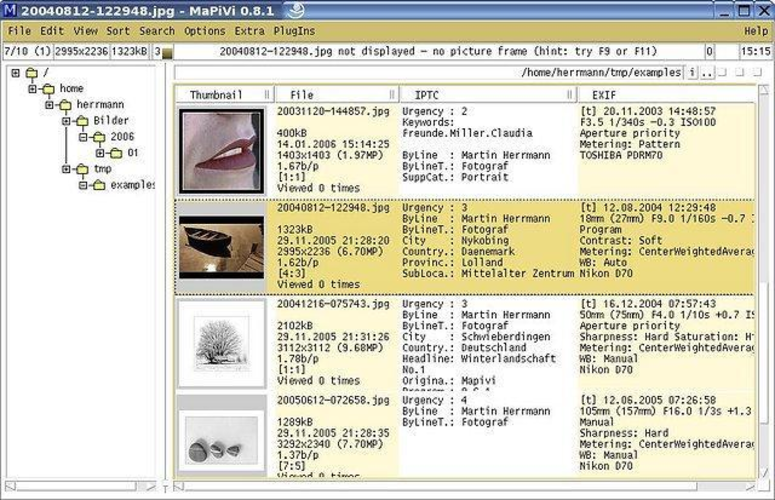
What works the same
- Fast image preview
- Tagging and rating of pictures
- Folder‑based browsing
- Keyboard shortcuts for navigation
- Supports common raster formats (JPEG, PNG, TIFF, BMP)
What is different
- No RAW image support or non‑destructive editing
- No facial detection/recognition
- Lacks a catalog/database; relies on filesystem hierarchy
- Limited batch operations and metadata (EXIF/IPTC) editing
- Export limited to ZIP archives, no advanced export formats
Opening your ACDSee files
Mapivi can open the standard image formats that ACDSee handles (JPEG, PNG, TIFF, BMP). It does not understand proprietary ACDSee catalog files (.adb) or any special RAW processing pipelines, so direct migration of ACDSee libraries is not possible. Exporting from ACDSee to a folder of supported files will allow Mapivi to view them.
Switching from ACDSee to Mapivi, step by step
- Export or copy your ACDSee image folders to a location accessible from Linux.
- If you use ACDSee catalogs, flatten the structure or export a CSV of tags/ratings.
- Install Mapivi via the Ubuntu/Debian package manager (sudo apt install mapivi).
- Launch Mapivi and point it to the imported image directories.
- Re‑apply tags and ratings within Mapivi as needed.
- For RAW files, consider a separate RAW processor (e.g., darktable) alongside Mapivi.
Key features of Mapivi
- Fast image preview
- Tagging and rating
- Folder browsing
- Keyboard shortcuts
- Export to ZIP
- Supports JPEG, PNG, TIFF, BMP
How to install Mapivi on Linux
sudo apt install mapivisudo apt install mapiviFrequently asked questions
Can Mapivi edit RAW files?
No, Mapivi does not support RAW formats or non‑destructive editing; use a dedicated RAW editor for that.
Does Mapivi have facial recognition?
No, it does not include any face detection or recognition capabilities.
Will my ACDSee tags and ratings transfer automatically?
Only if they were stored in the image files' EXIF/IPTC fields; otherwise you will need to re‑tag manually in Mapivi.
4 other alternatives to ACDSee
 digiKamdigiKam is a comprehensive KDE photo manager for organizing, tagging, and editing digital photos with strong…Open sourceFreeFlatpakdigiKam vs ACDSee
 Eye of GNOMEEye of GNOME is a lightweight image viewer for GNOME, designed for browsing and rotating images with minimal…Open sourceFreeFlatpakEye of GNOME vs ACDSee
 GwenViewGwenView is KDE's fast image viewer with basic editing and annotation tools, ideal for browsing photo…Open sourceFreeFlatpakGwenView vs ACDSee
 F-SpotF-Spot is a discontinued GNOME photo organizer with basic editing features.Open sourceFreeDiscontinuedF-Spot vs ACDSee