
 OliveLinux
vs
PowerDirectorWindows
Olive as a Linux alternative to PowerDirector
Updated
Our verdict
Olive is a partial replacement for PowerDirector, best suited for users who need basic non-linear editing on Linux and value open-source software. It handles multi-track timelines, keyframing, and standard export formats, but lacks polish and advanced features. While it supports common codecs and basic color correction, missing GPU acceleration and professional effects limits performance and workflow. Not ideal for heavy editing tasks or those reliant on PowerDirector’s full feature set. Use Olive if you prioritize simplicity and open-source tools over speed and advanced capabilities.
- License
- GPL-3.0
- Price
- Free
- Latest version
- 0.1.2 (November 11, 2019)
- Rating
- —
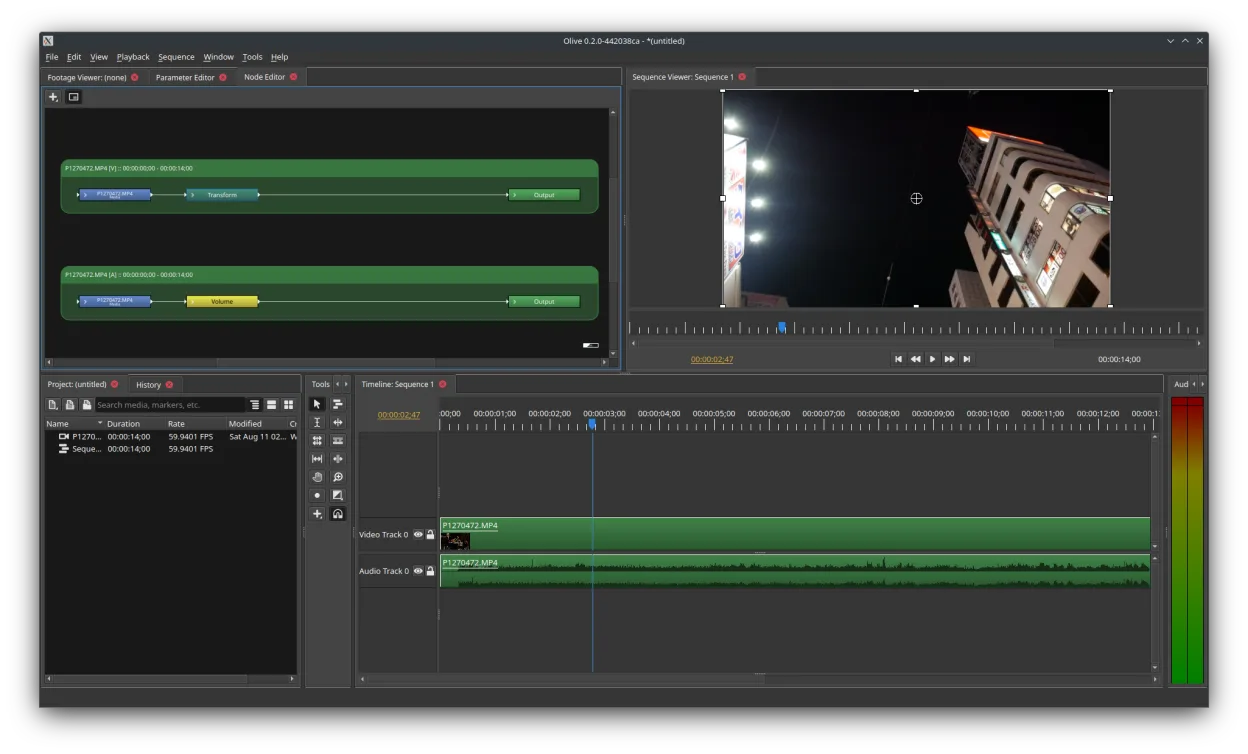
What works the same
- Non-linear multi-track timeline editing
- Support for common video formats like MP4, MOV, and AVI
- Basic video transitions and effects with keyframe animation
- Audio mixing with volume envelopes across tracks
- Export options for H.264 and other standard codecs
What is different
- Olive lacks GPU-accelerated rendering, leading to slower performance
- No built-in export presets for common platforms like YouTube or Vimeo
- Basic color correction tools in Olive are more limited
- PowerDirector has a more mature interface and broader effects library
- Olive does not support all professional codecs out of the box
Opening your PowerDirector files
Olive does not support opening PowerDirector project files (.pds). You cannot directly import or edit projects created in PowerDirector. You must manually re-import source media and reconstruct the timeline. Export formats like H.264 are compatible, so final videos can be shared similarly. There is no known converter or workaround for project file compatibility.
Switching from PowerDirector to Olive, step by step
- Install Olive via Flathub or Fedora repositories
- Export media files from PowerDirector as MP4 or MOV
- Import media into Olive and rebuild the timeline manually
- Apply transitions, effects, and color correction as needed
- Export using H.264 or other supported codecs
Key features of Olive
- Multi‑track timeline
- Basic video transitions and effects
- Keyframe animation
- Audio mixing and volume envelopes
- Support for common formats (MP4, MOV, AVI)
- Undo/redo history
- Export to H.264 and other codecs
How to install Olive on Linux
flatpak install flathub org.olivevideoeditor.Olivesudo dnf install oliveFrequently asked questions
Can I open PowerDirector project files (.pds) in Olive?
No, Olive does not support PowerDirector project files. You must manually recreate the edit using source media.
Is Olive stable enough for regular video editing?
Olive is usable but still experimental. Expect occasional crashes, especially on complex timelines.
Does Olive support 4K editing?
Yes, Olive can import and edit 4K footage, but performance depends on your hardware and lack of GPU acceleration.
4 other alternatives to PowerDirector
 KdenliveKdenlive is a free, feature‑rich non‑linear video editor built on the MLT framework.Open sourceFreeFlatpakKdenlive vs PowerDirector
 ShotcutShotcut is a free, open-source video editor for Linux with support for a wide range of formats via FFmpeg.Open sourceFreeFlatpakShotcut vs PowerDirector
 FlowbladeFlowblade is a fast, stable, multitrack non-linear video editor for Linux, suitable for beginners to…Open sourceFreeFlatpakFlowblade vs PowerDirector
 OpenShotOpenShot is a free, open-source, non-linear video editor for Linux and other platforms, built with Python and…Open sourceFreeFlatpakOpenShot vs PowerDirector