
 OpenRGBLinux
vs
ASUS Armoury CrateWindows
OpenRGB as a Linux alternative to ASUS Armoury Crate
Updated
Our verdict
OpenRGB is a solid replacement for ASUS Armoury Crate if you primarily want RGB lighting control across multiple brands, including ASUS, and want to avoid vendor-specific software. It supports many ASUS motherboards, GPUs, and peripherals for RGB customization, works natively on Linux, and doesn’t require Windows. However, it does not handle fan speed curves or power/performance mode switching, so users needing full thermal and performance tuning will still need additional tools like fancontrol or custom scripts. It’s best for Linux users who prioritize unified RGB control over deep hardware tuning.
- License
- GPL-2.0-or-later
- Price
- Free
- Latest version
- 1.1 (October 16, 2026)
- Rating
- —
What works the same
- Controls RGB lighting on ASUS motherboards, GPUs, and compatible devices
- Supports custom lighting effects and color profiles
- Offers real-time synchronization of lighting across devices
- Runs natively on Linux without requiring Windows
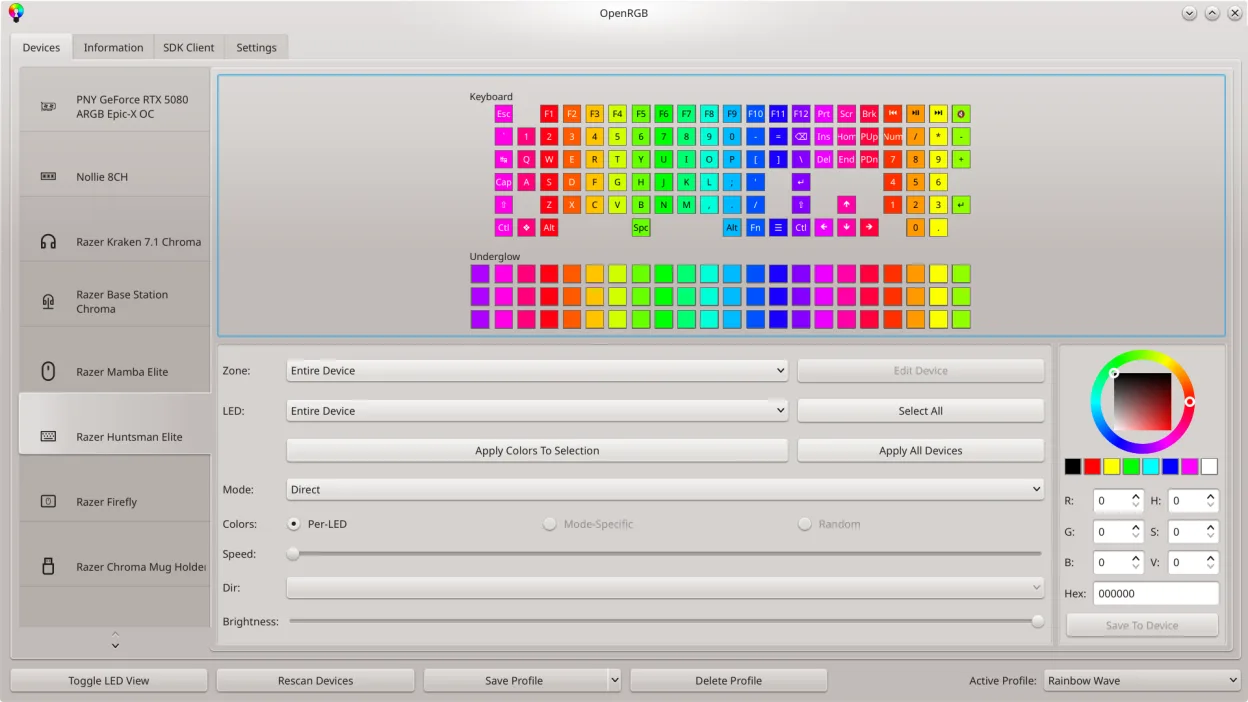
- Provides a graphical interface for designing LED patterns
What is different
- OpenRGB does not control fan speeds or allow manual fan curve adjustments
- Lacks integration with performance or power modes like 'Silent' or 'Turbo'
- No built-in system monitoring for temperatures or fan RPMs
- Does not require or use ASUS accounts or cloud services
- Supports non-ASUS hardware from other brands under one interface
Opening your ASUS Armoury Crate files
OpenRGB cannot open or import configuration files created by ASUS Armoury Crate. The two programs use entirely different formats and structures for storing profiles. You’ll need to recreate your lighting setups manually in OpenRGB. However, once configured, OpenRGB allows exporting and sharing profiles between systems, enabling reuse across clean installs or multiple machines.
Switching from ASUS Armoury Crate to OpenRGB, step by step
- Install OpenRGB via your distribution’s package manager or Flathub
- Update your BIOS and ensure RGB firmware is current
- Launch OpenRGB and scan for detected devices
- Manually recreate desired lighting effects using the graphical LED editor
- Save custom profiles and set OpenRGB to start at boot if needed
Key features of OpenRGB
- Control colors and effects for many RGB devices
- Save and load custom profiles
- SDK for third‑party integration
- Command‑line interface for scripting
- Multi‑instance sync across PCs
- Standalone or client/server mode
- Graphical LED map for pattern design
- Device info viewer
How to install OpenRGB on Linux
flatpak install flathub org.openrgb.OpenRGBsudo dnf install openrgbsudo pacman -S openrgbsudo zypper install OpenRGBFrequently asked questions
Does OpenRGB work with all ASUS motherboards?
It supports many ASUS motherboards with Aura Sync, but compatibility varies. Check the OpenRGB GitHub for a full device list. Older or niche models may lack full support.
Can OpenRGB control fans like Armoury Crate does?
No. OpenRGB only manages RGB lighting. For fan control on Linux, use alternatives like fancontrol (part of lm-sensors) with manual PWM configuration.
Is OpenRGB safe to use on a daily basis?
Yes. It’s stable and widely used. It communicates directly with hardware via kernel interfaces, but bugs can occasionally cause lighting glitches—rarely any system instability.
2 other alternatives to ASUS Armoury Crate
 fancontrolfancontrol is a Linux utility for automatically adjusting fan speeds based on system temperature sensors.Open sourceFreeFlatpakfancontrol vs ASUS Armoury Crate