
 OpenRGBLinux
vs
Logitech G HubWindows
OpenRGBLinux
vs
Logitech G HubWindows
OpenRGB as a Linux alternative to Logitech G Hub
Updated
Our verdict
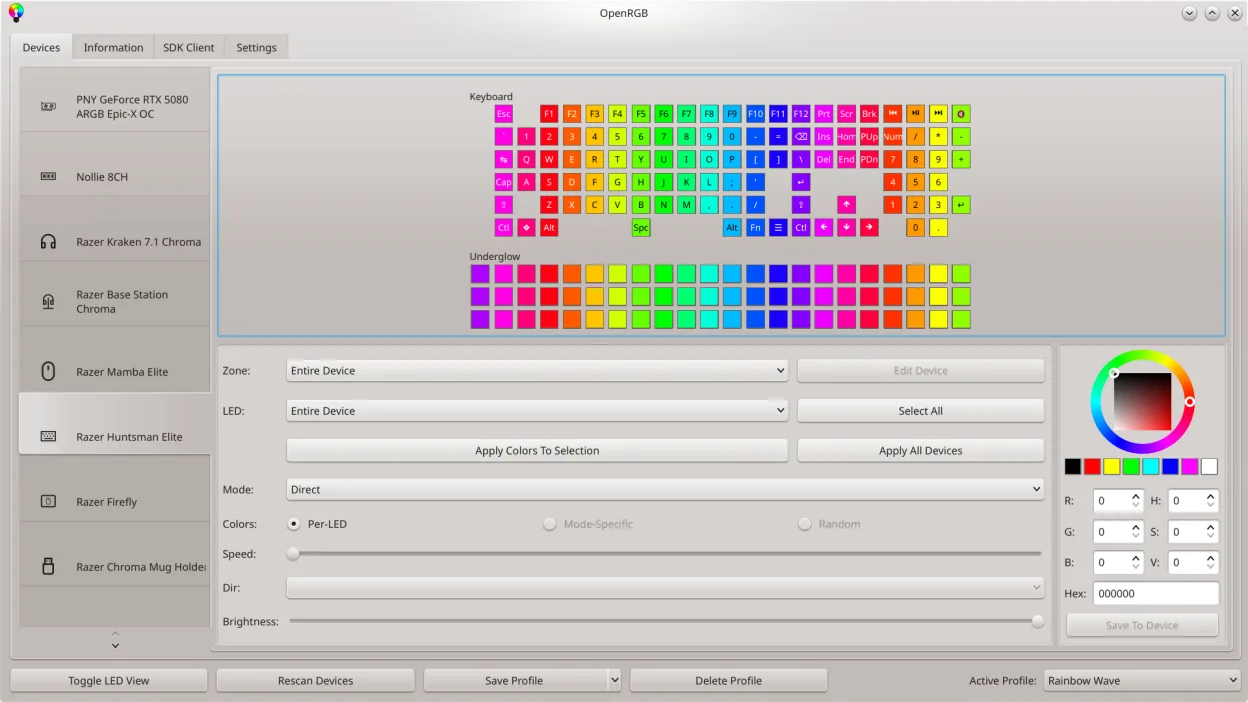
OpenRGB can replace Logitech G Hub for users who mainly need RGB lighting control and basic device configuration on Linux. It supports many Logitech devices, lets you set colors, create profiles, and even script lighting changes. However, it lacks the full macro recording, advanced button mapping, and firmware‑update features that G Hub offers. It is best suited for gamers who are comfortable with a more manual setup and who do not rely on the proprietary Windows‑only features of G Hub.
- License
- GPL-2.0-or-later
- Price
- Free
- Latest version
- 1.1 (October 16, 2026)
- Rating
- —
What works the same
- Both allow setting RGB colors and saving/loading profiles
- Both provide a graphical interface for device selection
- Both can control multiple devices at once
- Both support scripting/command‑line control
What is different
- OpenRGB does not offer macro recording or button mapping
- Firmware updates are handled by Logitech’s own tools, not OpenRGB
- OpenRGB relies on community drivers; some newer devices may not be fully supported
- OpenRGB lacks the integrated online account and cloud sync of G Hub
- OpenRGB’s UI is more utilitarian, lacking the polished design of G Hub
Opening your Logitech G Hub files
OpenRGB does not import Logitech G Hub configuration files. Users must manually recreate profiles in OpenRGB. There is no export/import path between the two applications.
Switching from Logitech G Hub to OpenRGB, step by step
- Identify the Logitech devices you use and confirm OpenRGB support list
- Install OpenRGB from your distribution’s package manager or Flathub
- Launch OpenRGB and connect to each device, then configure lighting and create profiles
- If you use macros, set them up in a separate tool like AutoHotkey or use Logitech’s Windows software on a dual‑boot system
Key features of OpenRGB
- Control colors and effects for many RGB devices
- Save and load custom profiles
- SDK for third‑party integration
- Command‑line interface for scripting
- Multi‑instance sync across PCs
- Standalone or client/server mode
- Graphical LED map for pattern design
- Device info viewer
How to install OpenRGB on Linux
flatpak install flathub org.openrgb.OpenRGBsudo dnf install openrgbsudo pacman -S openrgbsudo zypper install OpenRGBFrequently asked questions
Can I use OpenRGB to update firmware?
No. Firmware updates must be done with Logitech’s official software on Windows.
Does OpenRGB support all Logitech gaming mice?
Most common models are supported, but newer devices may need a community driver update. Check the supported devices list.
Will OpenRGB conflict with other RGB control apps?
It is best to uninstall other vendor apps to avoid conflicts, as OpenRGB takes direct control of the hardware.
5 other alternatives to Logitech G Hub
 SolaarSolaar is a Linux tool that manages Logitech keyboards, mice, and trackpads, handling pairing, battery…Open sourceFreeFlatpakSolaar vs Logitech G Hublibratbaglibratbag is a Linux library and CLI tool that manages gaming mice profiles, replacing Logitech G Hub.Open sourceFreelibratbag vs Logitech G Hub
 PiperPiper is a Linux GUI for configuring gaming mice via ratbagd.Open sourceFreeFlatpakPiper vs Logitech G HubKeydKeyd is a lightweight key remapping daemon for Linux, similar in purpose to AutoHotkey on Windows.Open sourceFreeKeyd vs Logitech G HubInput RemapperInput Remapper lets you map keyboard and mouse inputs to other actions on Linux, replacing Logitech G Hub's…Open sourceFreeInput Remapper vs Logitech G Hub