
Windows · Sound & Video
Best Linux alternatives to Premiere Pro
Professional non-linear video editor for cutting, color grading, and audio mixing, part of the Adobe ecosystem.
Updated
Quick answer
The best Linux alternative to Premiere Pro is Kdenlive. Other strong options: Shotcut, OpenShot, Blender.
5 Linux alternatives to Premiere Pro
-

Kdenlive is a free, feature‑rich non‑linear video editor built on the MLT framework.
Kdenlive is a solid replacement for Premiere Pro if you are moving away from Adobe's subscription model and do not rely on After Effects integration. It handles multi-track editing, color grading, and audio mixing well, covering the core needs of most editors. However, it lacks the deep ecosystem…
Feature parity85% -

Shotcut is a free, open-source video editor for Linux with support for a wide range of formats via FFmpeg.
Shotcut is a solid, free alternative for hobbyists and small studios, but it is not a direct drop-in replacement for professional broadcast workflows. It handles standard non-linear editing, color correction, and audio mixing well. However, it lacks the deep integration with Adobe After Effects and…
Feature parity65% -

OpenShot is a free, open-source, non-linear video editor for Linux and other platforms, built with Python and MLT.
OpenShot is a decent replacement for Premiere Pro only for beginners or casual users. It handles basic non-linear editing, multi-track timelines, and simple effects well, with support for common formats and decent export presets. However, it lacks the precision tools, advanced color grading…
Feature parity45% -

Blender is a free, open-source 3D suite for modeling, animation, rendering, and video editing.
Blender is a capable alternative for basic video editing, but it is not a direct drop-in replacement for Premiere Pro. It excels in compositing and 3D integration, which Premiere Pro lacks natively. However, for pure linear editing workflows, Blender’s interface is less intuitive and its timeline…
Feature parity45% -
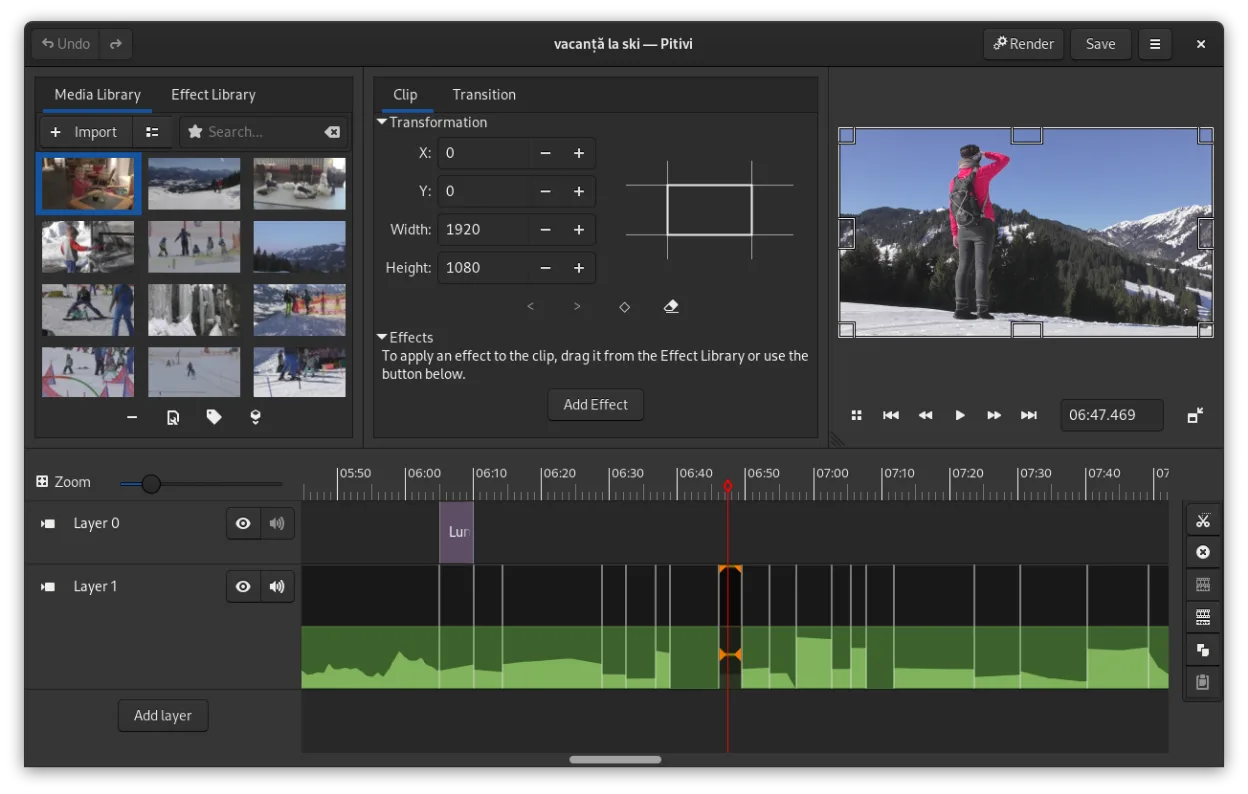
PiTiVi is a free, open-source, non-linear video editor for Linux built on GStreamer with a clean GNOME-integrated interface.
PiTiVi is not a direct replacement for Premiere Pro for professional users. It works well for hobbyists or light semi-professional editing on Linux, offering clean timeline editing, basic color adjustments, and solid format support via GStreamer. However, it lacks advanced features like…
Feature parity40%


What is Premiere Pro?
Adobe Premiere Pro is the industry standard for professional video editing. Editors, filmmakers, and content creators use it to assemble footage, apply visual effects, and mix audio. It handles complex timelines with multiple tracks, allowing for precise frame-by-frame adjustments and integration with other Adobe tools like After Effects and Audition.
The software operates on a subscription model through Adobe Creative Cloud. There is no perpetual license; users pay a monthly or annual fee to access the latest version and cloud storage. This cost structure can be prohibitive for independent creators, students, or those who prefer one-time purchases for professional-grade software.
Many users seek Linux alternatives to escape high subscription costs or to work within a fully open-source environment. Some prefer the stability and customization of Linux for their workflow. Others need a solution that runs natively on Linux without the overhead of virtualization, ensuring better performance for heavy rendering tasks.
What a replacement for Premiere Pro must do
- Non-linear editing with multi-track timelines
- Color grading and correction tools
- Audio mixing and synchronization
- Support for various video codecs and containers
- Export options for web and broadcast standards
- Integration with external effects or plugins
- Keyboard shortcuts and customizable interface
Can you run Premiere Pro on Linux?
Adobe Premiere Pro does not have a native Linux version. It is not available through Wine or Proton in a reliable, fully functional way for professional use, as complex UI elements and hardware acceleration often fail. While some users report partial success with Bottles, it is not recommended for critical work. The only official way to use it on Linux is via a Windows virtual machine, which requires a valid Windows license and significant system resources.
Which alternative should you choose?
Kdenlive is the best fit for users wanting a feature-rich, professional interface similar to Premiere, with strong support for proxies and color grading. Shotcut is ideal for those who prefer a simpler, more direct interface without a steep learning curve. OpenShot is suitable for beginners or hobbyists who need basic editing tools without complexity. Blender is not a traditional video editor but is excellent for users who need to integrate 3D animation or visual effects directly into their workflow. PiTiVi is a lightweight option for simple cuts and transitions, though it has seen less development recently.
Moving your Premiere Pro files and habits
Transferring projects from Premiere Pro to Linux editors is not seamless. You will likely need to export your timeline as an EDL or XML file, though support varies by application. Media files remain compatible if they use standard codecs like H.264 or ProRes. However, specific effects, transitions, and audio adjustments created in Premiere will not transfer and must be recreated in the new software. Always back up your original project files before switching.
Side-by-side comparison
Premiere Pro: frequently asked questions
Can I import Premiere Pro project files directly?
Generally, no. Most Linux editors do not support .prproj files. You will need to export an EDL or XML and re-import your media, then rebuild your timeline.
Is Kdenlive as powerful as Premiere Pro?
Kdenlive covers most professional editing needs, including color grading and audio mixing. However, it lacks deep integration with the Adobe ecosystem and some advanced VFX features found in Premiere.
Do these editors support hardware acceleration?
Yes, Kdenlive and Shotcut support GPU acceleration for playback and rendering, provided you have the correct drivers installed for your graphics card.
Which editor is best for 4K editing?
Kdenlive and Shotcut handle 4K well, especially with proxy workflows. Ensure your system has sufficient RAM and a fast SSD to maintain smooth performance.
How important is Premiere Pro to you?
Know a better alternative? Suggest an alternative