
 PiTiViLinux
vs
Corel VideoStudioWindows
PiTiVi como alternativa Linux ao Corel VideoStudio
Atualizado em
Nossa avaliação
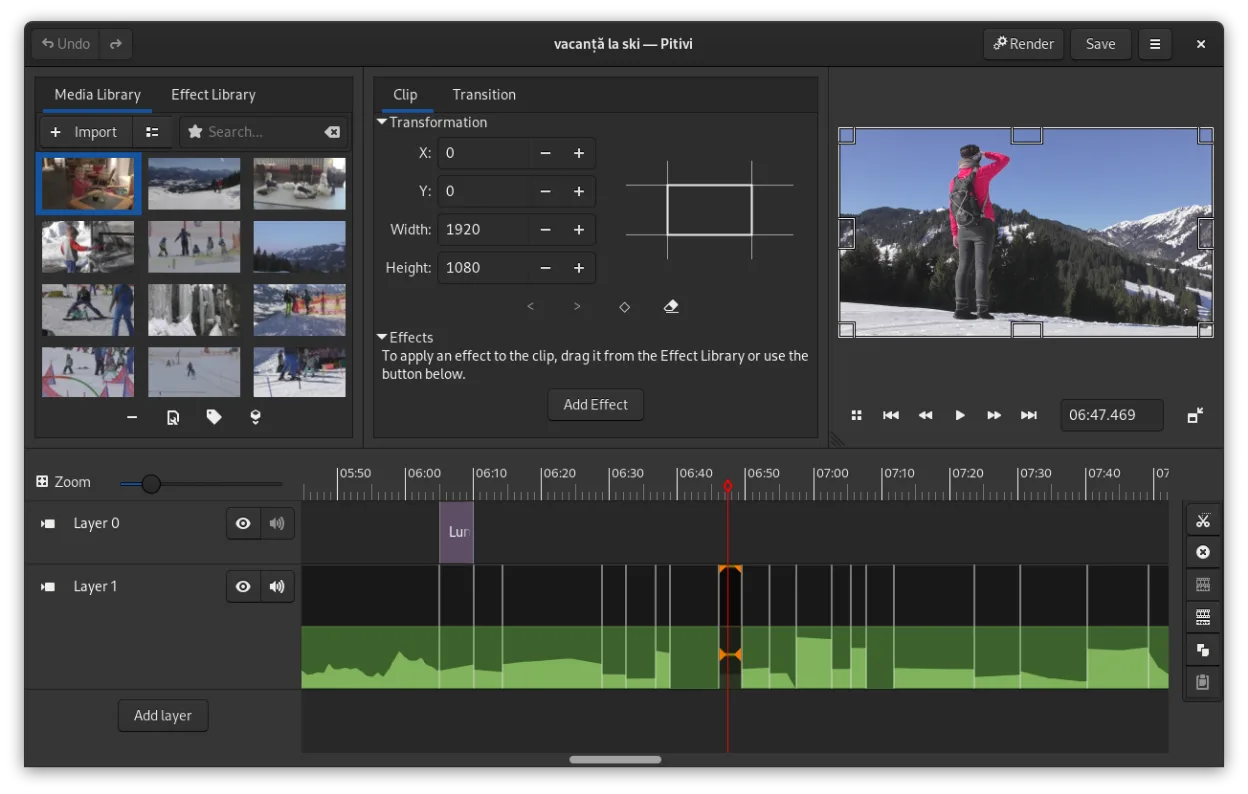
PiTiVi is a solid, native Linux replacement for Corel VideoStudio, particularly for users who prioritize a clean, non-modal workflow over advanced effects. It handles standard timeline editing, codec support via GStreamer, and basic audio mixing well. However, it lacks the extensive library of pre-made titles and transitions found in Corel. If you need heavy motion graphics or specific proprietary effects, look at Kdenlive or Shotcut. For straightforward cutting, trimming, and exporting standard MP4s, PiTiVi is stable, efficient, and integrates nicely with GNOME.
- Licença
- LGPL-2.0+
- Preço
- Grátis
- Versão mais recente
- 2023.03 (26 de março de 2023)
- Avaliação
- —
O que funciona igual
- Timeline-based non-linear editing interface
- Support for common codecs like H.264 and H.265 via GStreamer
- Basic audio track management and syncing
- Export to standard formats like MP4
- Crossfade and standard video transitions
O que muda
- Lacks a large library of pre-made title templates and motion graphics
- No dedicated color grading suite comparable to Corel's tools
- Interface is simpler, which may feel less feature-dense to power users
- Relies on GStreamer for plugin support rather than proprietary effect engines
- Fewer built-in social media-specific export presets
Abrindo seus arquivos do Corel VideoStudio
PiTiVi does not open Corel VideoStudio project files (.vpro) directly. You must export your edited video from Corel as a high-quality intermediate format (like ProRes or DNxHD) or keep your raw footage separate. To migrate, you will need to re-import your original media files into PiTiVi and rebuild the timeline. Exporting from PiTiVi to standard MP4 or MOV files is straightforward and compatible with most Windows systems for final delivery.
Trocando o Corel VideoStudio pelo PiTiVi, passo a passo
- Install PiTiVi via your package manager or Flathub
- Export your current Corel project as a high-quality video file for reference
- Gather all original raw footage and audio assets
- Create a new project in PiTiVi and set the correct resolution and framerate
- Import media and rebuild the timeline using ripple editing to save time
- Render the final video to MP4 for testing
Principais recursos do PiTiVi
- Edição não linear com linha do tempo independente da taxa de quadros
- Suporta qualquer formato processado pelo GStreamer
- Animação de keyframes para efeitos e filtros
- Edição ripple e roll para ajustes eficientes na linha do tempo
- Proporções de tela, taxas de quadros e presets de renderização personalizados
- Crossfades e transições padrão SMPTE
- Painéis de interface destacáveis para configurações com múltiplos monitores
- Fluxo de trabalho de edição não modal com design centrado no playhead
Como instalar o PiTiVi no Linux
flatpak install flathub org.pitivi.Pitivisudo apt install pitivisudo apt install pitivisudo dnf install pitivisudo pacman -S pitivisudo zypper install pitiviPerguntas frequentes
Does PiTiVi support H.265/HEVC?
Yes, if your GStreamer installation includes the appropriate plugins. Most modern Linux distributions include these by default, but you may need to install additional codec packages if you encounter errors.
Is PiTiVi stable enough for daily use?
It is generally stable for standard editing tasks. However, as an open-source project, it may have fewer features than commercial rivals. Keep your system updated and save your project frequently.
Can I use PiTiVi on non-GNOME desktops?
Yes. While designed for GNOME, it runs well on KDE, XFCE, and other environments. The interface remains consistent, though some integration features may be less prominent.
Outras 4 alternativas ao Corel VideoStudio
 KdenliveO Kdenlive é um editor de vídeo não linear gratuito e repleto de recursos, construído sobre o framework MLT.Código abertoGrátisFlatpakKdenlive vs Corel VideoStudio
 ShotcutShotcut é um editor de vídeo gratuito e de código aberto para Linux, com suporte a uma ampla variedade de…Código abertoGrátisFlatpakShotcut vs Corel VideoStudio
 OpenShotOpenShot é um editor de vídeo não linear gratuito, de código aberto, para Linux e outras plataformas…Código abertoGrátisFlatpakOpenShot vs Corel VideoStudio
 BlenderBlender é uma suíte 3D gratuita e de código aberto para modelagem, animação, renderização e edição de vídeo.Código abertoGrátisFlatpakBlender vs Corel VideoStudio