
 PiTiViLinux
vs
Premiere ProWindows
PiTiVi como alternativa Linux ao Premiere Pro
Atualizado em
Nossa avaliação
PiTiVi is not a direct replacement for Premiere Pro for professional users. It works well for hobbyists or light semi-professional editing on Linux, offering clean timeline editing, basic color adjustments, and solid format support via GStreamer. However, it lacks advanced features like professional color grading, multi-cam editing, and robust audio tools. If you need fast, simple cuts and transitions with a lightweight, open-source tool, PiTiVi is usable. But for complex workflows, effects, or studio-grade output, it falls short.
- Licença
- LGPL-2.0+
- Preço
- Grátis
- Versão mais recente
- 2023.03 (26 de março de 2023)
- Avaliação
- —
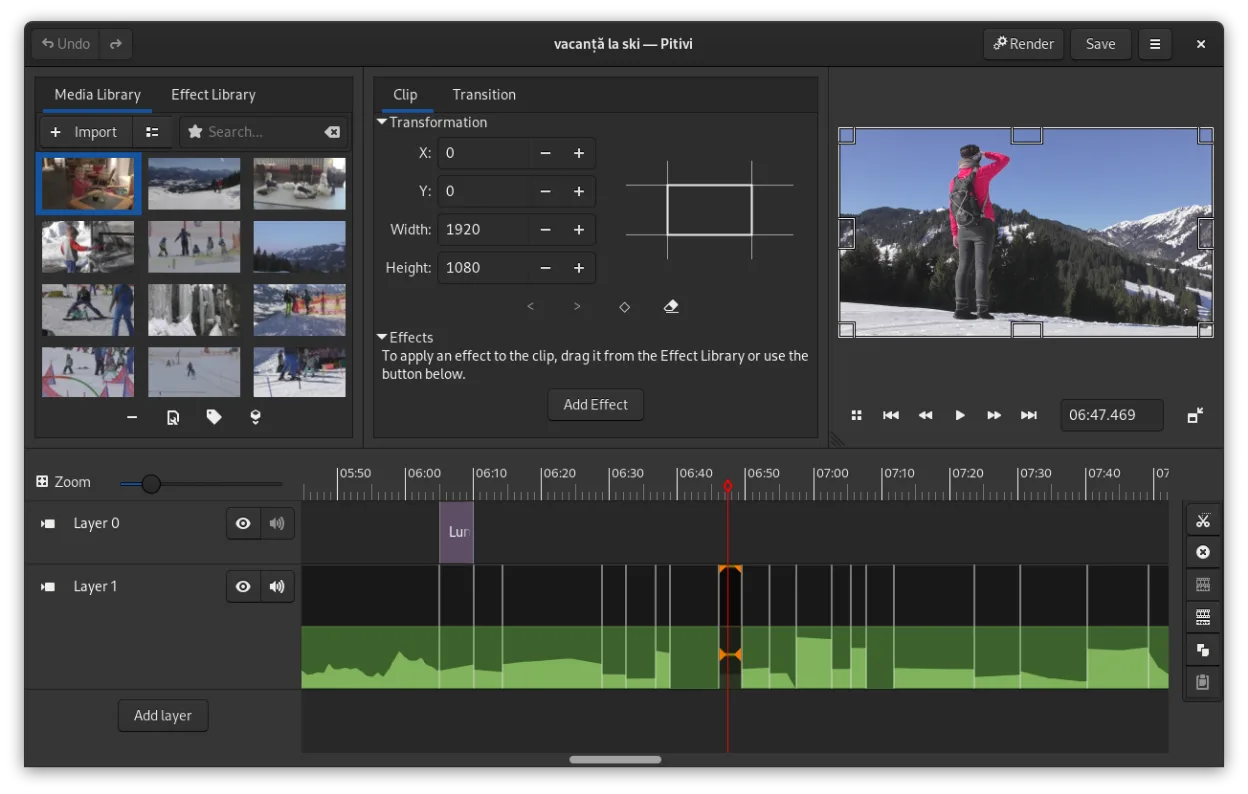
O que funciona igual
- Non-linear, multi-track timeline editing
- Supports a wide range of video formats through GStreamer
- Keyframe animation for effects and filters
- Crossfades and standard video transitions
- Customizable interface with detachable panels
O que muda
- No professional color grading tools like Lumetri
- Limited audio mixing and no advanced sync features
- No plugin ecosystem comparable to Adobe's
- Lacks multi-cam editing and advanced export presets
- Fewer keyboard shortcuts and less interface customization
Abrindo seus arquivos do Premiere Pro
PiTiVi cannot open Premiere Pro project files (.prproj). There is no direct import support, and no known third-party tools reliably convert them. You would need to export media and edits from Premiere Pro as intermediate files or sequences, then import those clips into PiTiVi manually. Exported videos from PiTiVi can be saved in common formats (MP4, WebM, etc.), but broadcast-specific presets and metadata handling are limited.
Trocando o Premiere Pro pelo PiTiVi, passo a passo
- Export your source media from Premiere Pro projects
- Organize clips and assets in a shared directory
- Import media into PiTiVi and rebuild the timeline
- Use keyframes and transitions for basic effects
- Render using custom presets for target format
Principais recursos do PiTiVi
- Edição não linear com linha do tempo independente da taxa de quadros
- Suporta qualquer formato processado pelo GStreamer
- Animação de keyframes para efeitos e filtros
- Edição ripple e roll para ajustes eficientes na linha do tempo
- Proporções de tela, taxas de quadros e presets de renderização personalizados
- Crossfades e transições padrão SMPTE
- Painéis de interface destacáveis para configurações com múltiplos monitores
- Fluxo de trabalho de edição não modal com design centrado no playhead
Como instalar o PiTiVi no Linux
flatpak install flathub org.pitivi.Pitivisudo apt install pitivisudo apt install pitivisudo dnf install pitivisudo pacman -S pitivisudo zypper install pitiviPerguntas frequentes
Can PiTiVi handle 4K video editing?
Yes, PiTiVi can edit 4K footage if your system has enough RAM and a capable GPU. Performance depends on GStreamer's ability to decode the codec and your hardware.
Does PiTiVi support VST plugins?
No, PiTiVi does not support VST or other third-party audio plugins. Audio effects are limited to those provided by GStreamer.
Is PiTiVi actively developed?
Yes, PiTiVi is under active development, with the latest stable release in March 2023 and ongoing updates from the GNOME and open-source community.
Outras 4 alternativas ao Premiere Pro
 KdenliveO Kdenlive é um editor de vídeo não linear gratuito e repleto de recursos, construído sobre o framework MLT.Código abertoGrátisFlatpakKdenlive vs Premiere Pro
 ShotcutShotcut é um editor de vídeo gratuito e de código aberto para Linux, com suporte a uma ampla variedade de…Código abertoGrátisFlatpakShotcut vs Premiere Pro
 OpenShotOpenShot é um editor de vídeo não linear gratuito, de código aberto, para Linux e outras plataformas…Código abertoGrátisFlatpakOpenShot vs Premiere Pro
 BlenderBlender é uma suíte 3D gratuita e de código aberto para modelagem, animação, renderização e edição de vídeo.Código abertoGrátisFlatpakBlender vs Premiere Pro