
 ZulipLinux
vs
Microsoft Teams (2026 version with enhanced AI features)Windows
Zulip como alternativa Linux ao Microsoft Teams (2026 version with enhanced AI features)
Atualizado em
Nossa avaliação
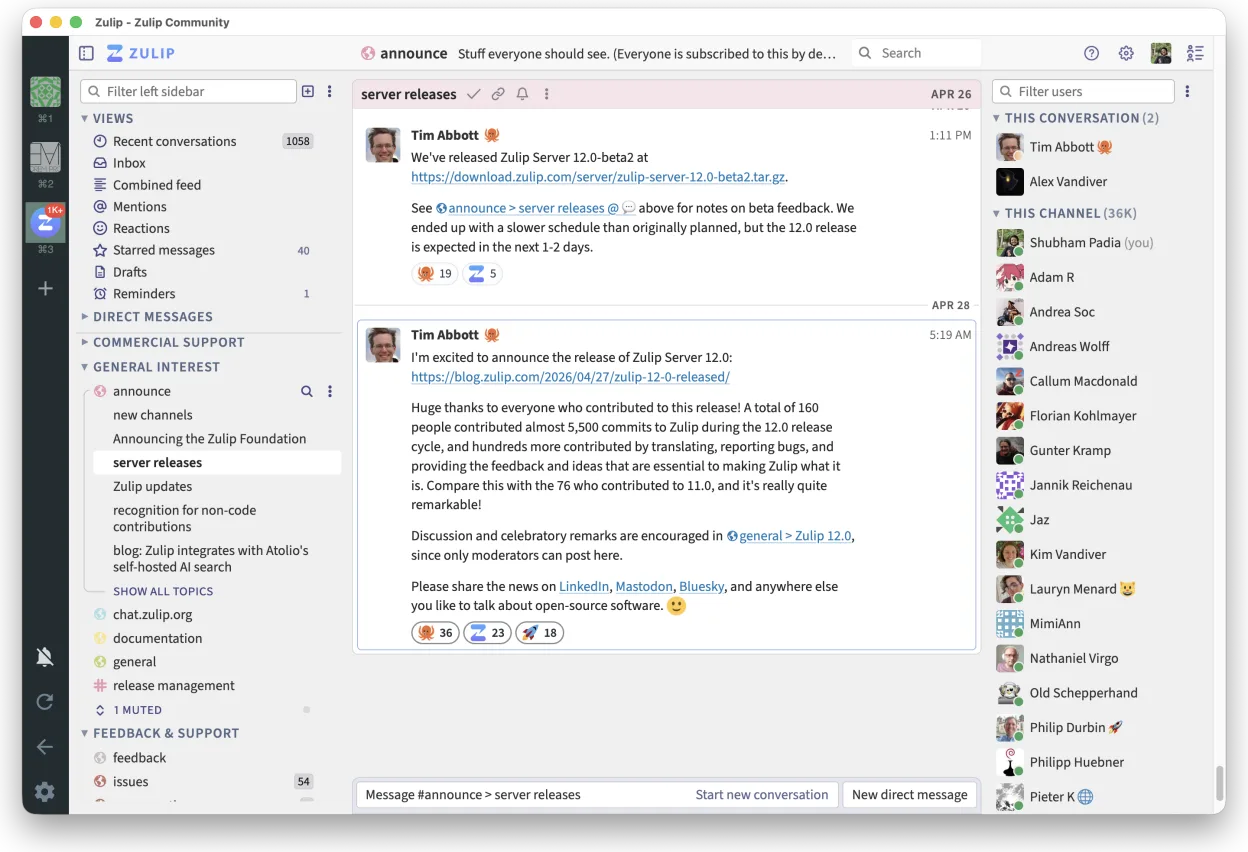
Zulip is a strong replacement for the core chat and file-sharing aspects of Microsoft Teams, particularly for teams that value organized, threaded discussions over chaotic channels. It is not a drop-in replacement for the full Teams ecosystem, as it lacks built-in video conferencing, AI meeting summaries, and deep integration with Microsoft 365 calendars and email. It is best suited for Linux-centric organizations or open-source communities that prioritize self-hosting, data privacy, and readable conversation history, and who are willing to use external tools like Jitsi or BigBlueButton for meetings.
- Licença
- Apache-2.0
- Preço
- Grátis
- Versão mais recente
- 5.14.2 (30 de outubro de 2026)
- Avaliação
- —
O que funciona igual
- Supports persistent group chats and direct messaging
- Offers file sharing and collaboration features
- Provides cross-platform desktop and mobile clients
- Includes robust search functionality across message history
O que muda
- Lacks built-in native video and voice conferencing capabilities
- Does not include AI-assisted meeting summaries or Copilot integration
- No native integration with Microsoft Outlook calendars or email
- Uses a threaded conversation model rather than flat channel feeds
- Requires self-hosting or third-party hosting, unlike Teams' SaaS model
Abrindo seus arquivos do Microsoft Teams (2026 version with enhanced AI features)
Zulip does not natively open or export Microsoft Teams-specific file formats or chat archives. You can share standard document types (PDF, DOCX, XLSX) within Zulip conversations, but you cannot migrate existing Teams chat history or meeting recordings directly. For file collaboration, you would typically integrate Zulip with an external file storage system like Nextcloud or S3, rather than relying on Teams' built-in OneDrive integration.
Trocando o Microsoft Teams (2026 version with enhanced AI features) pelo Zulip, passo a passo
- Install Zulip server on your infrastructure or subscribe to a hosted instance
- Create user accounts and import your team directory from LDAP or manual entry
- Set up channels to mirror your existing Teams team structure
- Configure integrations with your existing calendar and email systems via webhooks or Zapier
- Share the Zulip desktop client link with users and guide them through initial setup
- Establish a parallel run period to ensure all critical workflows are functional
Principais recursos do Zulip
- Conversas em tópicos para discussões organizadas
- Código aberto e auto-hospedável
- Disponível como cliente de desktop nativo para Linux
- Suporta grupos grandes e alto volume de mensagens
- Compatibilidade multiplataforma
- Funcionalidade de busca forte em todo o histórico
Como instalar o Zulip no Linux
flatpak install flathub org.zulip.ZulipPerguntas frequentes
Can I use Zulip for video calls?
No, Zulip does not have built-in video conferencing. You need to integrate it with an external service like Jitsi Meet or BigBlueButton to handle voice and video meetings.
Does Zulip support AI features like Microsoft Copilot?
No, Zulip does not include native AI features for meeting summaries or content generation. You would need to build custom integrations with external AI APIs if you require this functionality.
Is Zulip free to use?
The Zulip server software is open-source under the Apache-2.0 license and free to self-host. However, if you choose a hosted solution from the vendor, there are subscription costs based on the number of users.
Outras 5 alternativas ao Microsoft Teams (2026 version with enhanced AI features)
 SlackO Slack é um aplicativo proprietário de comunicação para equipes no Linux que centraliza conversas…FlatpakSlack vs Microsoft Teams (2026 version with enhanced AI features)
 MattermostO Mattermost é uma plataforma de colaboração de código aberto e autohospedada, criada para equipes de…Código abertoGrátisFlatpakMattermost vs Microsoft Teams (2026 version with enhanced AI features)
 Rocket.ChatPlataforma de comunicação em equipe de código aberto para chat, vídeo e colaboração, frequentemente usada…Código abertoGrátisFlatpakRocket.Chat vs Microsoft Teams (2026 version with enhanced AI features)
 ElementO Element é um cliente de chat e videoconferência baseado em matriz, de código aberto, para Linux.Código abertoGrátisFlatpakElement vs Microsoft Teams (2026 version with enhanced AI features)
 JamiJami é um cliente de chat e videochamada peer‑to‑peer gratuito que funciona sem servidores centrais.Código abertoGrátisFlatpakJami vs Microsoft Teams (2026 version with enhanced AI features)
Todas as alternativas ao Microsoft Teams (2026 version with enhanced AI features)