
 ZulipLinux
vs
Microsoft Teams (classic version)Windows
Zulip como alternativa Linux ao Microsoft Teams (classic version)
Atualizado em
Nossa avaliação
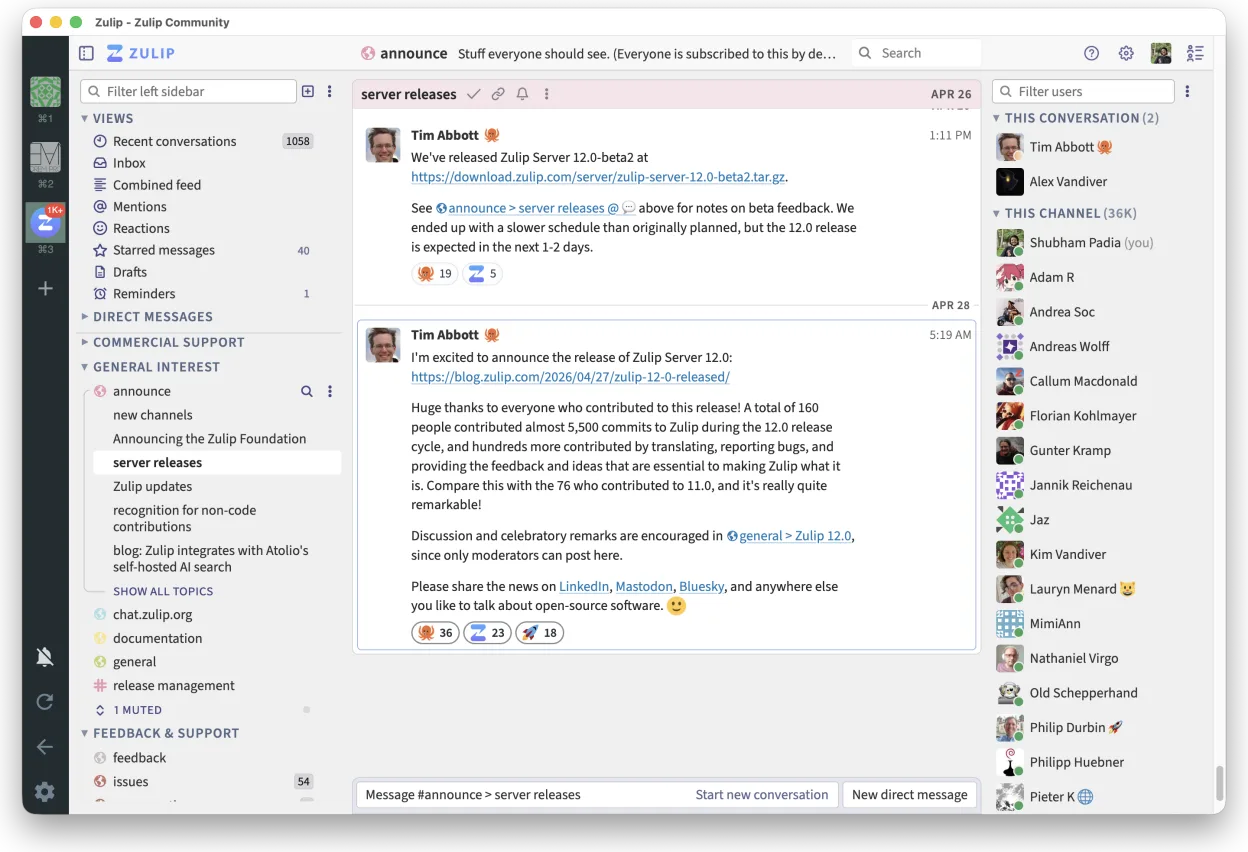
Zulip is a strong replacement for Teams if you prioritize organized, threaded communication over deep Microsoft 365 integration. It handles persistent channels, video calls, and file sharing well, and being open-source allows self-hosting. However, it lacks native Outlook calendar and email integration, which is a significant gap for many Teams users. It is ideal for teams willing to adopt a different workflow that favors clarity over real-time noise, but not for those deeply embedded in the Microsoft ecosystem.
- Licença
- Apache-2.0
- Preço
- Grátis
- Versão mais recente
- 5.14.2 (30 de outubro de 2026)
- Avaliação
- —
O que funciona igual
- Persistent team chat channels for group communication
- Video conferencing with screen sharing capabilities
- File sharing and storage within conversations
- Cross-platform client support including Linux, Windows, and macOS
- Open-source or self-hostable options for data control
O que muda
- Lacks native integration with Microsoft Outlook calendar and email
- Uses threaded conversations instead of flat chat streams
- No direct collaborative editing with Microsoft Office tools
- Different user interface and workflow logic compared to Teams
- Self-hosting requires more technical setup than cloud-based Teams
Abrindo seus arquivos do Microsoft Teams (classic version)
Zulip does not natively open or edit Microsoft Office files like .docx or .xlsx. You will need to install separate Linux applications such as LibreOffice or OnlyOffice to handle these files. Files shared in Zulip can be downloaded and opened in these external editors, but there is no built-in collaborative editing feature for Microsoft formats within the Zulip client itself.
Trocando o Microsoft Teams (classic version) pelo Zulip, passo a passo
- Install the Zulip desktop client from Flathub or your distribution's package manager
- Set up a self-hosted Zulip server or sign up for a cloud instance
- Create channels in Zulip that mirror your existing Teams team structure
- Invite team members to the new Zulip workspace via email
- Migrate important files and documents to Zulip or a linked storage service
- Update team documentation to reflect the new communication workflow
Principais recursos do Zulip
- Conversas em tópicos para discussões organizadas
- Código aberto e auto-hospedável
- Disponível como cliente de desktop nativo para Linux
- Suporta grupos grandes e alto volume de mensagens
- Compatibilidade multiplataforma
- Funcionalidade de busca forte em todo o histórico
Como instalar o Zulip no Linux
flatpak install flathub org.zulip.ZulipPerguntas frequentes
Can I use Zulip with my existing Microsoft 365 account?
No, Zulip is a standalone platform. You cannot log in with a Microsoft account directly. You will need to create a new account on your Zulip server or use SSO if configured by your administrator.
Does Zulip support video calls like Teams?
Yes, Zulip has built-in video conferencing with screen sharing. However, it is a separate feature from the chat interface and may require additional configuration for large meetings compared to Teams.
Is Zulip free to use?
Zulip is open-source under the Apache-2.0 license. You can self-host it for free, or use a cloud provider's service which may have paid tiers for larger organizations.
Outras 5 alternativas ao Microsoft Teams (classic version)
 SlackO Slack é um aplicativo proprietário de comunicação para equipes no Linux que centraliza conversas…FlatpakSlack vs Microsoft Teams (classic version)
 MattermostO Mattermost é uma plataforma de colaboração de código aberto e autohospedada, criada para equipes de…Código abertoGrátisFlatpakMattermost vs Microsoft Teams (classic version)
 DiscordUm cliente de mensagens, voz e vídeo multiplataforma para comunidades, jogos e encontros casuais.FlatpakDiscord vs Microsoft Teams (classic version)
 Rocket.ChatPlataforma de comunicação em equipe de código aberto para chat, vídeo e colaboração, frequentemente usada…Código abertoGrátisFlatpakRocket.Chat vs Microsoft Teams (classic version)
 ElementUm cliente Matrix seguro e de código aberto para mensagens privadas, bate-papos em grupo e chamadas de vídeo…Código abertoGrátisFlatpakElement vs Microsoft Teams (classic version)