
 QtractorLinux
vs
Studio OneWindows
QtractorLinux
vs
Studio OneWindows
Qtractor as a Linux alternative to Studio One
Updated
Our verdict
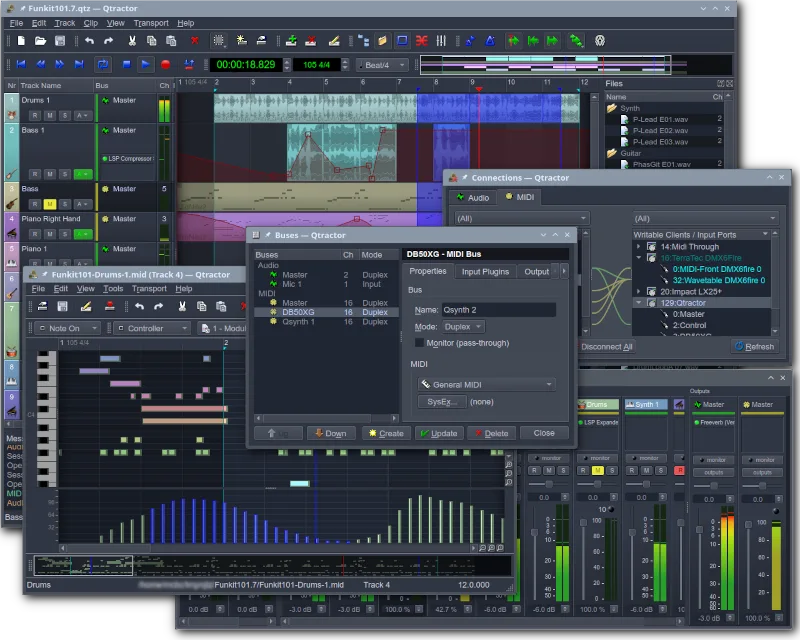
Qtractor is a solid, lightweight DAW for Linux but lacks the depth of Studio One. It handles multi-track recording, MIDI sequencing, and basic mixing well, making it suitable for home studios and podcasters. However, it is not a direct professional replacement for high-end production. If you need advanced routing, complex mastering tools, or video sync, you will hit limits quickly. It is best for users who prioritize open-source stability and simple workflows over feature-rich professional suites.
- License
- GPL-2.0+
- Price
- Free
- Latest version
- 1.6.5 (October 31, 2026)
- Rating
- —
What works the same
- Multi-track audio and MIDI recording capabilities
- Support for VST and LADSPA plugins
- Non-destructive editing and mixing console
- Session management and project saving
What is different
- Lacks native video synchronization features
- No built-in advanced mastering suite or loudness metering
- Relies on JACK/ALSA, requiring specific Linux audio configuration
- Simpler routing and automation compared to Studio One
Opening your Studio One files
There is no native support for opening or exporting Studio One (.song) project files. You will need to export audio stems and MIDI data from Studio One and import them into Qtractor. Direct project file conversion is not possible, so you must manually rebuild the session structure in Qtractor.
Switching from Studio One to Qtractor, step by step
- Export all audio tracks as WAV files from Studio One
- Export MIDI data as standard MIDI files (.mid)
- Install Qtractor and configure JACK audio server
- Create a new project in Qtractor and import audio/MIDI files
- Re-arrange tracks and apply necessary plugins manually
Key features of Qtractor
- Multi-track audio and MIDI recording
- Integration with JACK audio server
- ALSA support for MIDI devices
- Support for VST and LADSPA plugins
- Non-destructive editing and mixing
- Built-in effects and processing
- Session management and project saving
- Cross-platform compatibility via Qt
How to install Qtractor on Linux
flatpak install flathub org.rncbc.qtractorsudo apt install qtractorsudo apt install qtractorsudo dnf install qtractorsudo pacman -S qtractorsudo zypper install qtractorFrequently asked questions
Does Qtractor support VST plugins?
Yes, Qtractor supports VST plugins, allowing you to use many of your existing Windows VSTs if they are compatible with Linux or run via Wine.
Can I sync video in Qtractor?
No, Qtractor does not have built-in video synchronization. You would need to use external tools or a different DAW for video-centric workflows.
Is Qtractor suitable for professional mastering?
It is limited for professional mastering. While it has basic effects, it lacks the advanced metering and processing chains found in dedicated mastering software or Studio One.
4 other alternatives to Studio One
 ArdourArdour is a professional open-source digital audio workstation for recording, editing, and mixing audio and…Open sourceFreeFlatpakArdour vs Studio One
 LMMSLMMS is a free digital audio workstation for composing, sequencing, and mixing music using synths and samples.Open sourceFreeFlatpakLMMS vs Studio One
 MuseScoreMuseScore is free, open-source music notation software for creating and playing back professional-quality…Open sourceFreeFlatpakMuseScore vs Studio One
 HydrogenHydrogen is an open‑source drum machine and sequencer for creating and arranging drum patterns on Linux.Open sourceFreeFlatpakHydrogen vs Studio One