

Linux · Sound & Video
Qtractor
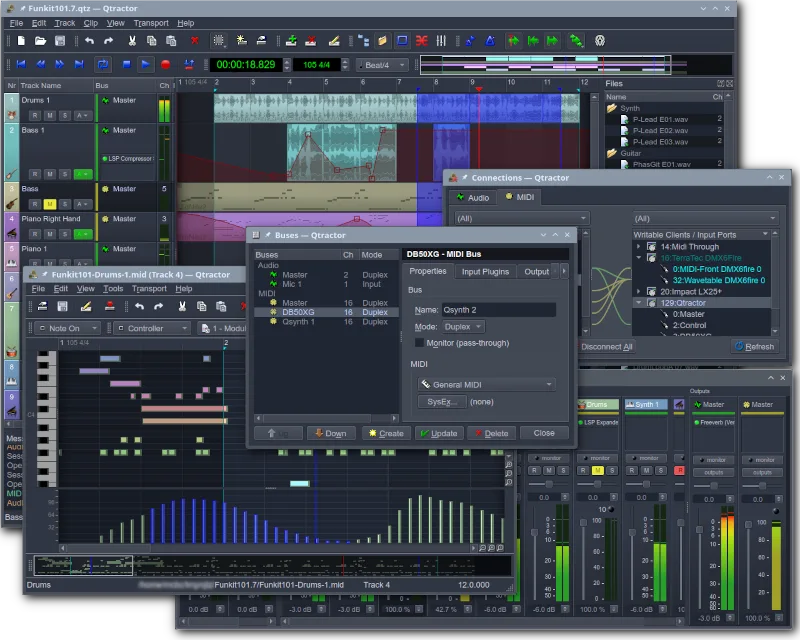
Qtractor is a free, open-source Audio/MIDI multi-track sequencer for Linux, designed as a desktop audio workstation.
- License
- GPL-2.0+
- Latest version
- 1.6.4 (September 6, 2026)
- Developer
- rncbc aka. Rui Nuno Capela
- Installs
- 666 (Flathub, 30 days)
What is Qtractor?
Qtractor is a C++ application built on the Qt framework, serving as a multi-track audio and MIDI sequencer. It relies on JACK for audio and ALSA for MIDI, targeting the Linux desktop environment. Developed by Rui Nuno Capela, it has been a staple in the Linux audio scene for years, offering a stable foundation for recording and mixing without proprietary dependencies.
This tool is aimed at home studio users and Linux enthusiasts who need a full-featured DAW. It suits those who prefer open-source software and are comfortable configuring audio backends like JACK. It is not a lightweight editor but a complete workstation for arranging, recording, and mixing projects on a personal computer.
Compared to Logic Pro, Qtractor lacks the polished, drag-and-drop interface and extensive built-in plugin library. However, it provides a similar core workflow for sequencer-based production. The learning curve is steeper due to the need for manual plugin management and JACK configuration, but it offers a cost-effective alternative for users who do not require Apple-specific features.
Best for: Linux users who need a reliable, free multi-track sequencer for home studio recording and mixing.
Key features of Qtractor
- Multi-track audio and MIDI recording
- Integration with JACK audio server
- ALSA support for MIDI devices
- Support for VST and LADSPA plugins
- Non-destructive editing and mixing
- Built-in effects and processing
- Session management and project saving
- Cross-platform compatibility via Qt
Pros
- Completely free and open-source
- Lightweight compared to commercial DAWs
- Strong integration with Linux audio infrastructure
- Stable and mature codebase
Cons
- Interface can feel dated and complex
- Requires manual JACK configuration
- Limited built-in instruments and effects compared to Logic Pro
- Smaller community and fewer tutorials
Windows programs Qtractor replaces
How to install Qtractor on Linux
flatpak install flathub org.rncbc.qtractorsudo apt install qtractorsudo apt install qtractorsudo dnf install qtractorsudo pacman -S qtractorsudo zypper install qtractorTips for Windows users
Coming from Logic Pro, expect a different workflow. You will need to set up JACK audio connections manually before starting Qtractor. File formats are not directly compatible, so you will need to export audio stems or MIDI files for migration. Shortcuts differ significantly, so take time to learn the new key bindings. The plugin management is more manual, requiring you to select VST or LADSPA plugins individually rather than using a unified browser.
Recent releases
- 1.6.4 —
- 1.6.3 —
- 1.6.2 —
- 1.6.1 —
Qtractor: frequently asked questions
Does Qtractor support VST plugins?
Yes, Qtractor supports VST plugins, allowing you to use many Windows-based instruments and effects on Linux.
Is Qtractor suitable for beginners?
It has a steeper learning curve than Logic Pro due to JACK configuration and a less intuitive interface, but it is manageable with patience.
Can I import Logic Pro projects directly?
No, direct project import is not supported. You must export MIDI and audio files from Logic Pro and import them into Qtractor separately.
Does Qtractor work with USB audio interfaces?
Yes, it works with USB audio interfaces via ALSA and JACK, provided the drivers are correctly installed on your Linux system.
Updated