
Windows · Accessories
Best Linux alternatives to Sticky Notes
Sticky Notes is a lightweight desktop tool for creating quick, on‑screen text notes.
Updated
Quick answer
The best Linux alternative to Sticky Notes is Xpad. Other strong options: KNotes, Gnote, Tomboy-ng.
5 Linux alternatives to Sticky Notes
-
A lightweight, multi-window sticky note application for Linux that mimics the behavior of Windows Sticky Notes with customizable colors and fonts.
Xpad is a solid replacement for Windows Sticky Notes for users who need a lightweight, always‑on‑top note taking tool on Linux. It lets you create, edit, delete, move, resize and pin notes, and offers color and font customization. It lacks richer formatting (bold, lists) and any sync feature, so it…
Feature parity80% -
KNotes is a lightweight note‑taking app for KDE, providing sticky‑note‑like functionality on Linux.
KNotes is a solid replacement for Windows Sticky Notes for users who already run a KDE desktop or want a lightweight note app that stays on top and can be dragged freely. It covers the core functions of creating, editing, moving, resizing, and color‑coding notes, and adds optional sync via KDE…
Feature parity85% -
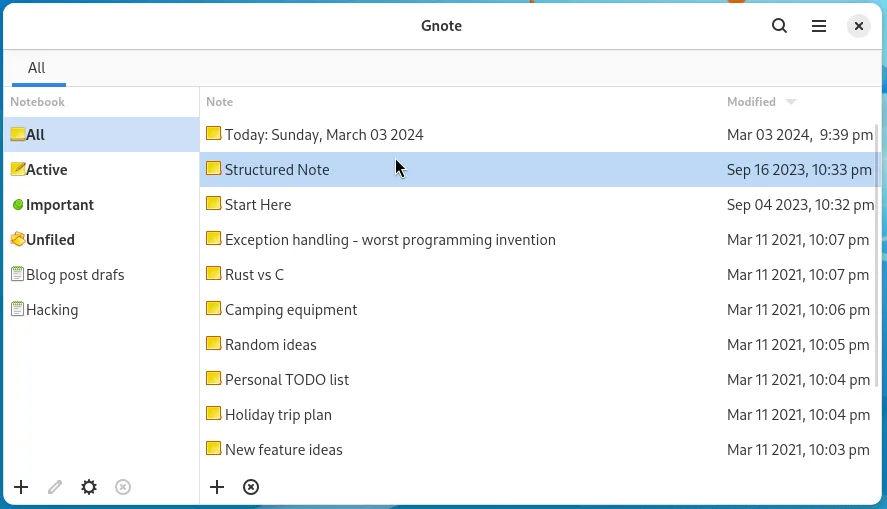
Gnote is a lightweight GNOME note‑taking app that lets you create, link, and organize notes with wiki‑style links and notebooks, and export them as HTML.
Gnote is a solid replacement for Sticky Notes for Linux users who need a lightweight, local note‑taking tool. It lets you create, edit, move, resize, and pin notes just like Sticky Notes, and adds notebooks, wiki‑style links, and optional Markdown support. It’s best for GNOME desktop users who want…
Feature parity80% -
Tomboy-ng is a lightweight note‑taking app for Linux, forked from Tomboy, designed to replace Sticky Notes with Markdown support and cloud sync.
Tomboy-ng is a solid replacement for Sticky Notes for users who want a lightweight note‑taking tool on Linux but also need a bit more structure. It covers the core Sticky Notes functions—creating, editing, moving, resizing, and pinning notes to the desktop—while adding Markdown support, tagging…
Feature parity85% -
Notejot is a lightweight KDE sticky note application that pins notes to your desktop for quick reminders.
Notejot is a solid, lightweight replacement for Windows Sticky Notes, particularly for KDE users. It handles the core tasks: pinning notes to the desktop, resizing them, and keeping them on top. It is open-source and active, which ensures long-term stability. However, it lacks advanced formatting…
Feature parity75%

What is Sticky Notes?
Sticky Notes is used by anyone who needs to jot down short reminders, to‑do items or snippets of information without opening a full‑blown editor. It’s popular among office workers, students and power users who keep a few notes visible while they work.
The Windows version is bundled with the OS and is free for personal use; it stores notes locally in a simple format. Linux alternatives are typically open‑source and distributed under permissive licenses, meaning they can be installed at no cost.
People look for a Linux replacement when they switch operating systems or prefer software that integrates with their desktop environment, offers more customization, or stores notes in plain text for easy backup.
What a replacement for Sticky Notes must do
- Create, edit and delete simple text notes
- Pin notes to the desktop and keep them visible
- Resize and move notes freely
- Support basic formatting (bold, lists) if needed
- Store notes locally in a portable format
- Sync or export notes optionally
- Run without heavy dependencies
Can you run Sticky Notes on Linux?
There is no native Linux version of Microsoft Sticky Notes. The program can be run through compatibility layers like Wine, but functionality is limited and not officially supported. Users typically choose a native Linux note‑taking app instead.
Which alternative should you choose?
If you want a minimal, widget‑style note pad, Xpad works well on most desktops. KNotes integrates tightly with KDE and offers calendar reminders. Gnote and Tomboy‑ng provide richer note organization with tagging and search. Notejot is a simple GTK app for those who prefer a straightforward interface.
Moving your Sticky Notes files and habits
Sticky Notes stores its data in a proprietary binary format under the user’s AppData folder. The easiest migration is to copy each note’s text manually or use a small script to extract the content, then paste it into the new app. Most Linux alternatives accept plain‑text or markdown files, so saving notes as .txt first ensures compatibility.
Side-by-side comparison
Sticky Notes: frequently asked questions
Can I sync Sticky Notes across devices on Linux?
The Windows app syncs via Microsoft OneNote; Linux alternatives generally rely on file‑based sync (e.g., Dropbox) or manual export.
Do any of the Linux apps support rich text?
Gnote and Tomboy‑ng support basic rich‑text features like bold and lists, while Xpad and Notejot are plain‑text only.
Is there a way to keep notes on the lock screen?
KNotes can display notes on the lock screen in KDE; other apps may need a screen‑locker that shows desktop widgets.
Will the notes survive a system upgrade?
All listed Linux apps store notes in user directories, so they persist across upgrades as long as the config files are retained.
How important is Sticky Notes to you?
Know a better alternative? Suggest an alternative