
 ZulipLinux
vs
Microsoft Teams (classic desktop client)Windows
Zulip as a Linux alternative to Microsoft Teams (classic desktop client)
Updated
Our verdict
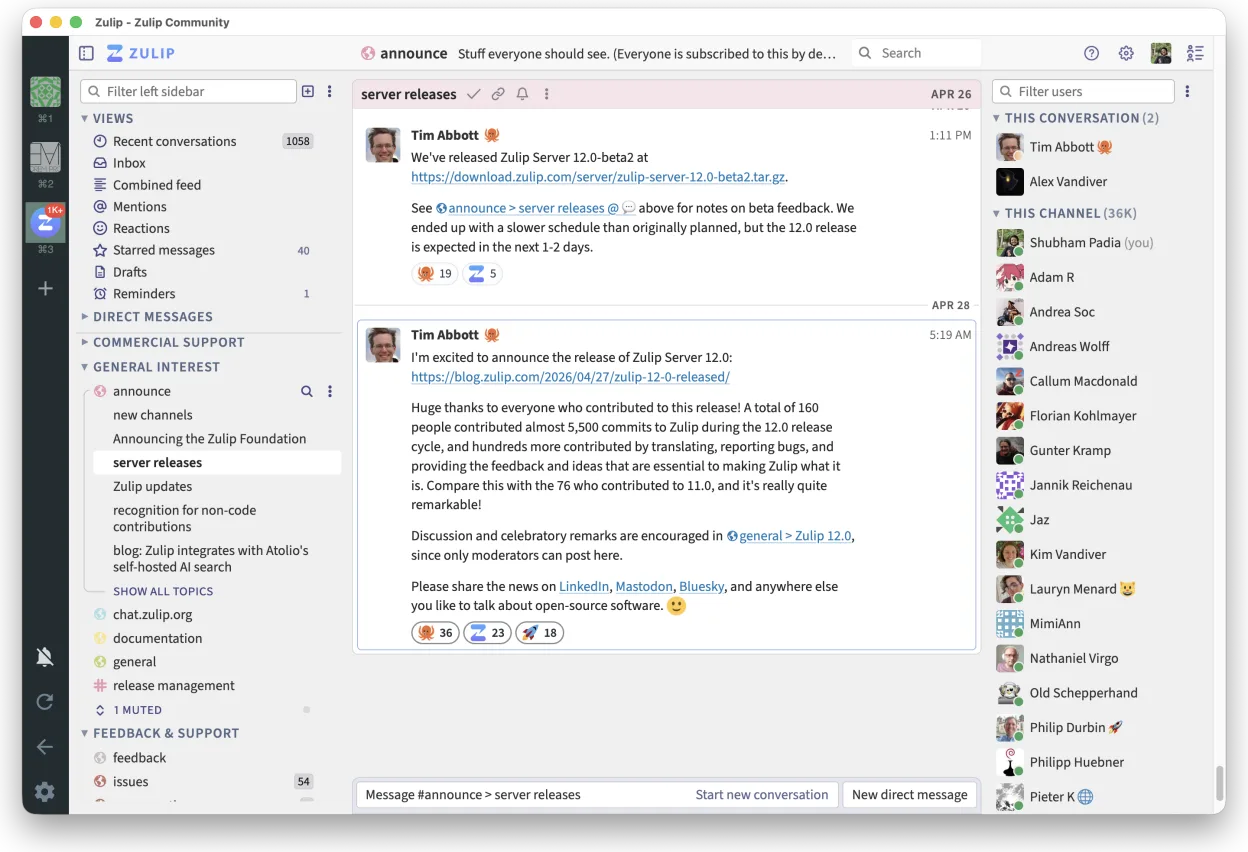
Zulip is a strong alternative for teams that prioritize organized, threaded discussions over real-time interruptions. It offers a native Linux client and self-hosting options, which Microsoft Teams lacks. However, it is not a direct drop-in replacement if you rely heavily on Microsoft 365 integrations like Outlook calendar or OneDrive. For open-source projects or companies willing to manage their own infrastructure, Zulip provides superior message organization and search capabilities for high-volume channels, though it requires a shift in workflow habits compared to Teams.
- License
- Apache-2.0
- Price
- Free
- Latest version
- 5.14.2 (October 30, 2026)
- Rating
- —
What works the same
- Channel and thread-based messaging structure
- Video and audio conferencing capabilities
- File sharing within chat conversations
- Cross-platform support including Linux, Windows, and macOS
What is different
- Lacks native integration with Microsoft 365 services like Outlook and OneDrive
- Requires self-hosting or a third-party cloud provider, unlike Teams' built-in Microsoft backend
- Threaded conversation model differs from Teams' flat channel view, requiring user adaptation
- No direct compatibility with existing Teams meeting links or calendar invites
Opening your Microsoft Teams (classic desktop client) files
Zulip does not natively open or export Microsoft Teams specific file formats or chat history archives. You can share standard document types (PDF, DOCX, etc.) within Zulip, but migrating historical chat logs or shared OneDrive links from Teams to Zulip is not supported. You would need to manually export and re-upload files, and there is no tool to convert Teams meeting recordings or calendar events into Zulip formats.
Switching from Microsoft Teams (classic desktop client) to Zulip, step by step
- Set up a Zulip server instance or subscribe to a Zulip Cloud plan
- Create channels and topics that mirror your existing Teams team structure
- Install the Zulip desktop client on all Linux, Windows, and macOS machines
- Invite users and configure authentication methods (email, SSO, or LDAP)
- Manually upload critical shared files to the appropriate Zulip topics
- Update team documentation to reflect the new threaded conversation workflow
Key features of Zulip
- Threaded conversations for organized discussions
- Open-source and self-hostable
- Available as a native Linux desktop client
- Supports large groups and high message volumes
- Cross-platform compatibility
- Strong search functionality across history
How to install Zulip on Linux
flatpak install flathub org.zulip.ZulipFrequently asked questions
Does Zulip work with Microsoft Outlook?
No, Zulip does not integrate directly with Outlook. You can use calendar links within messages, but there is no two-way sync between Zulip meetings and Outlook calendar events.
Is Zulip free to use?
The software is open-source under the Apache-2.0 license and free to self-host. If you want a managed service without managing servers, you must pay for Zulip Cloud.
Can I join a Teams meeting from Zulip?
No. Zulip has its own video conferencing system. You can paste a Teams meeting link into a Zulip message, but you will need to open the link in a browser or the Teams client to join.
4 other alternatives to Microsoft Teams (classic desktop client)
 SlackSlack is a proprietary team communication app for Linux that centralizes conversations, tools, and workflows…FlatpakSlack vs Microsoft Teams (classic desktop client)
 MattermostMattermost is an open-source, self-hosted collaboration platform for developer teams, offering a secure…Open sourceFreeFlatpakMattermost vs Microsoft Teams (classic desktop client)
 Rocket.ChatOpen-source team communication platform for chat, video, and collaboration, often used to replace Slack or…Open sourceFreeFlatpakRocket.Chat vs Microsoft Teams (classic desktop client)
 ElementElement is an open‑source, matrix‑based chat and video‑conference client for Linux.Open sourceFreeFlatpakElement vs Microsoft Teams (classic desktop client)
All alternatives to Microsoft Teams (classic desktop client)