
Windows · Universal Access
Best Linux alternatives to Adobe Acrobat Reader DC
Adobe Acrobat Reader DC is a paid PDF viewer and editor for Windows, macOS, and Linux, used for reading, signing, and annotating PDFs.
Updated
Quick answer
The best Linux alternative to Adobe Acrobat Reader DC is Okular. Other strong options: Evince, Xournal++, Master PDF Editor.
4 Linux alternatives to Adobe Acrobat Reader DC
-

Okular is a universal document viewer for KDE that handles PDF, EPUB, and comics with annotation support.
Okular is a solid Linux alternative for most everyday PDF tasks. It reads PDFs reliably, lets you highlight, underline, add notes, and fill simple forms, making it suitable for students, developers, and office workers who need basic annotation and form‑filling. It lacks the advanced editing, OCR…
Feature parity68% -

Evince is the standard GNOME document viewer for PDF, PostScript, and comic book archives, offering basic annotation and search.
Evince is a solid replacement for basic PDF reading on Linux, especially for GNOME users. It handles viewing, searching, and light annotation well. However, it is not a direct feature match for Adobe Acrobat Reader DC. If you need to fill complex interactive forms, digitally sign documents with…
Feature parity60% -
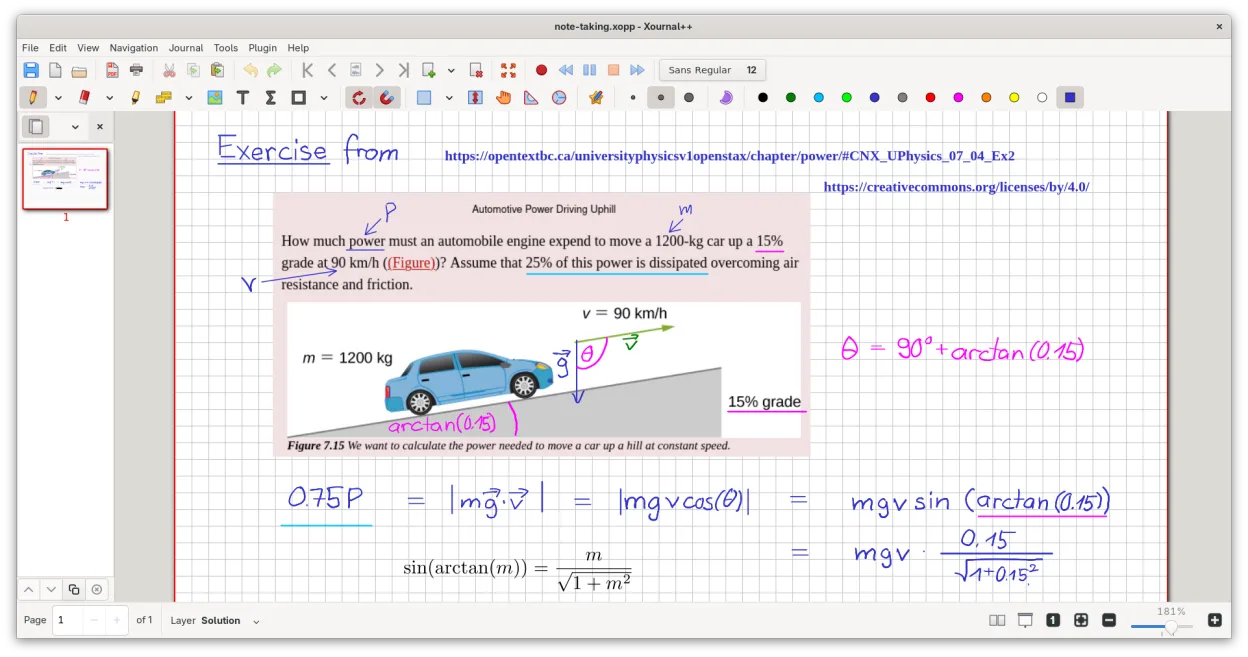
A cross-platform, open-source note-taking app for handwriting, PDF annotation, and whiteboarding with stylus support.
Xournal++ is a good replacement for Adobe Acrobat Reader DC if your main need is annotating PDFs, especially with a stylus. It excels at handwritten notes, drawing, and marking up documents. However, it lacks built-in support for filling complex PDF forms and password-protected PDF handling. While…
Feature parity75% -

A proprietary PDF editor for Linux that handles text editing, forms, and digital signatures with a familiar interface.
Master PDF Editor can replace Adobe Acrobat Reader DC for most Linux users who need more than just viewing PDFs. It offers solid text and image editing, annotation, form filling, and digital signatures, covering the core tasks most users perform with Acrobat Reader. Power users who rely on advanced…
Feature parity80%


What is Adobe Acrobat Reader DC?
Adobe Acrobat Reader DC is a widely used PDF viewer that lets users open, read, and annotate PDF documents. It is popular among professionals, students, and general users who need to view documents, fill forms, or sign electronically. The software is sold as a free download with optional paid features for advanced editing and security.
The free version includes basic viewing, annotation, and form filling. Advanced features such as PDF creation, editing, and digital signatures are available in paid plans or as part of the Adobe Document Cloud subscription.
Many users look for Linux alternatives because the native Windows version is proprietary, and the Linux builds are often outdated or require extra steps to install. Open‑source replacements provide better integration with Linux desktop environments and avoid subscription costs.
What a replacement for Adobe Acrobat Reader DC must do
- View PDFs
- Annotate and highlight
- Fill and sign forms
- Export to common formats (PDF, image, text)
- Print support
- Security features (password protection)
- Cross‑platform compatibility
Can you run Adobe Acrobat Reader DC on Linux?
Adobe Acrobat Reader DC does not ship a native Linux binary; the official Linux package is a 32‑bit Debian package that is no longer maintained. Users can run the Windows version under Wine, but stability varies. There is no official web version that matches the desktop functionality.
Which alternative should you choose?
For basic viewing and light annotation, Evince or Okular are sufficient. If you need advanced editing and form filling, Master PDF Editor offers a full feature set. For users who also need drawing or note‑taking on PDFs, Xournal++ is ideal. LibreOffice Draw works best when you need to edit PDF content as part of a larger office workflow.
Moving your Adobe Acrobat Reader DC files and habits
All listed alternatives can open standard PDF files without conversion. Exporting is usually supported via PDF, PNG, or text formats. No special migration steps are required; simply open the file in the new application and save or export as needed.
Side-by-side comparison
| App | License | Flatpak | Latest version | Feature parity | Rating |
|---|---|---|---|---|---|
| Okular | GPL-2.0+ and GFDL-1.3 | ✓ | 26.08.3 | 68% | — |
| Evince | GPL-2.0-or-later | ✓ | 48.5 | 60% | — |
| Xournal++ | GPL-2.0 | ✓ | 1.3.8 | 75% | — |
| Master PDF Editor | LicenseRef-proprietary | ✓ | 5.9.99 | 80% | — |
Adobe Acrobat Reader DC: frequently asked questions
Is Adobe Acrobat Reader DC free?
The base reader is free, but advanced features require a paid subscription.
Can I use Adobe Reader on Linux?
There is no official native Linux version; you need to use Wine or a virtual machine.
Do Linux alternatives support form filling?
Yes, Okular, Evince, and Master PDF Editor support form filling; Xournal++ does not.
What about digital signatures?
Master PDF Editor and LibreOffice Draw support digital signatures; Okular and Evince have limited support.
How important is Adobe Acrobat Reader DC to you?
Know a better alternative? Suggest an alternative