

Windows · Sound & Video
Best Linux alternatives to Adobe Premiere
Adobe Premiere Pro is a professional, timeline‑based video editor used by filmmakers, broadcasters, and content creators.
Updated
Quick answer
The best Linux alternative to Adobe Premiere is Cinelerra. Other strong options: PiTiVi.
2 Linux alternatives to Adobe Premiere
-

Cinelerra is a professional‑grade, open‑source non‑linear video editor and compositor for Linux.
Cinelerra can serve as a competent replacement for Adobe Premiere for users who need a free, open‑source, Linux‑only editor with robust timeline editing, keyframe animation, and color‑grade support up to 8K. It is best suited for hobbyists, independent filmmakers, and small studios that prefer a…
Feature parity70% -
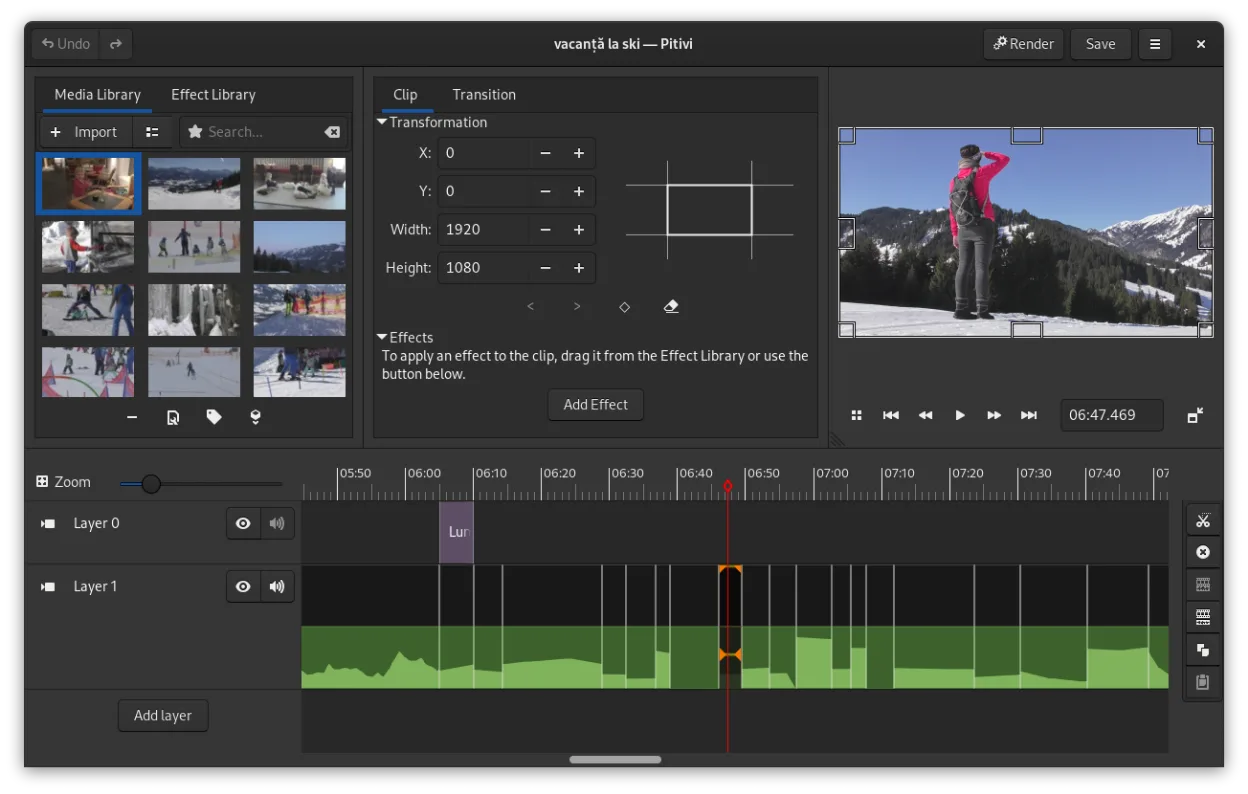
PiTiVi is a free, open-source, non-linear video editor for Linux built on GStreamer with a clean GNOME-integrated interface.
PiTiVi can serve as a functional replacement for Adobe Premiere for hobbyists, educators, and small‑scale content creators who need basic multi‑track editing, keyframe animation, and simple colour work. It won’t satisfy professional film‑oriented workflows that rely on deep colour‑grading suites…
Feature parity45%


What is Adobe Premiere?
Adobe Premiere Pro is a feature‑rich video editing suite that lets users cut, splice, color‑grade, and add effects to footage. Professionals in film, television, and online media use it to produce polished productions from raw footage to final export. The software is part of Adobe Creative Cloud, requiring a monthly or yearly subscription.
Premiere’s licensing model is subscription‑based, with plans ranging from individual creators to enterprise teams. The cost can be high, especially for long‑term use, and the software is only available natively on Windows and macOS.
Because of the price, the lack of a native Linux build, and the desire for a free or open‑source workflow, many Linux users seek alternatives that can handle similar editing tasks without a subscription.
What a replacement for Adobe Premiere must do
- Timeline editing with multi‑track support
- Keyframe animation for effects
- Color grading tools
- Export to common codecs and formats
- Support for 4K and higher resolutions
- Integration with other media tools
Can you run Adobe Premiere on Linux?
Adobe Premiere Pro does not have a native Linux version. Users can run it through Wine or a virtual machine, but performance is limited and not officially supported. No web version exists, and Proton or Bottles are not suitable for the full feature set.
Which alternative should you choose?
Cinelerra is aimed at experienced editors who need a full‑featured, open‑source timeline editor with advanced effects. PiTiVi (now called Pitivi) is a simpler, beginner‑friendly editor that covers basic cutting, trimming, and simple transitions.
Moving your Adobe Premiere files and habits
Both alternatives can open and export to common formats such as MP4, MOV, and AVI, so project files from Premiere can be re‑imported by converting them to a compatible format first. However, complex effects or proprietary formats may not translate directly.
Side-by-side comparison
Adobe Premiere: frequently asked questions
Does Cinelerra support 4K editing?
Yes, Cinelerra supports 4K and higher resolutions with a powerful timeline and effects system.
Can I use Premiere project files directly in PiTiVi?
No, PiTiVi does not import Premiere project files; you must export the media from Premiere and re‑assemble the timeline in PiTiVi.
Is there a free trial for Premiere Pro on Linux?
Premiere Pro is not available on Linux, so no trial exists for that platform.
What codecs can Cinelerra export to?
Cinelerra can export to a wide range of codecs, including H.264, H.265, and ProRes, using its built‑in encoder or external tools like ffmpeg.
How important is Adobe Premiere to you?
Know a better alternative? Suggest an alternative