
Windows · Accessories
Best Linux alternatives to Calculator
A standard utility for performing basic and scientific arithmetic operations on Linux systems.
Updated
Quick answer
The best Linux alternative to Calculator is GNOME Calculator. Other strong options: Qalculate! (GTK UI).
2 Linux alternatives to Calculator
-
GNOME Calculator is the default, lightweight scientific calculator for the GNOME desktop environment, offering standard and advanced calculation modes.
GNOME Calculator is a solid, functional replacement for the standard Windows Calculator. It covers basic arithmetic, scientific functions, and unit conversions cleanly. The interface is minimal and keyboard-friendly, which suits users who prefer efficiency over visual flair. It lacks the specific…
Feature parity85% -
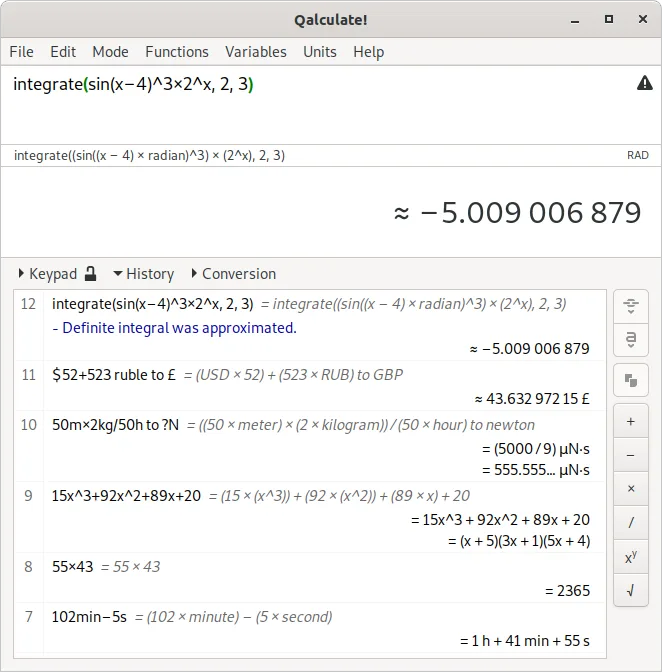
A powerful, multi-purpose desktop calculator with symbolic math, unit conversion, and arbitrary precision capabilities.
Qalculate! is a strong replacement for the standard Windows Calculator, offering significantly more depth for scientific and programmer tasks. It covers all basic arithmetic needs while adding symbolic math, unit conversion, and arbitrary precision. The GTK interface is familiar to Linux users…
Feature parity95%

What is Calculator?
The Calculator is a fundamental utility found in most operating systems, used by students, engineers, and everyday users to perform arithmetic. It handles everything from simple addition and subtraction to complex scientific functions like trigonometry and logarithms. It is a quick-access tool for verifying calculations without opening a full spreadsheet or programming environment.
Windows Calculator is free and included with the operating system. It does not require a separate license or subscription. Microsoft provides updates through Windows Update, ensuring the software remains compatible with the latest system features and security patches at no additional cost to the user.
Users often seek a Linux alternative because they have switched operating systems and need a reliable, native tool for daily math tasks. Relying on compatibility layers for such a basic utility is inefficient. A native Linux calculator ensures low resource usage, instant launch times, and full integration with the desktop environment's keyboard shortcuts and input methods.
What a replacement for Calculator must do
- Basic arithmetic operations
- Scientific and programmer modes
- Keyboard input support
- History of past calculations
- Unit conversion tools
- Memory storage functions
Can you run Calculator on Linux?
Windows Calculator does not run natively on Linux. While it might technically launch via Wine, doing so is impractical for a simple utility due to the overhead of running a full Windows subsystem. There is no official web version that replaces the desktop experience. You should use a native Linux application instead, as compatibility layers are unnecessary for this type of software.
Which alternative should you choose?
GNOME Calculator is the best choice if you want a clean, modern interface that fits the GNOME desktop environment. It is simple and covers standard and scientific modes well. Qalculate! (GTK UI) is better for users who need more depth, such as unit conversions or programming-specific calculations. Choose GNOME Calculator for everyday use and Qalculate! if you require advanced features or prefer a more traditional layout.
Moving your Calculator files and habits
Migrating from Windows Calculator to a Linux alternative is straightforward because the tool stores little to no persistent data. There are no complex file formats to convert. You simply start using the new application. If you rely on specific keyboard shortcuts, you may need to adjust your muscle memory slightly, as Linux calculators often follow standard X11 or Wayland input conventions rather than Windows-specific hotkeys.
Side-by-side comparison
| App | License | Flatpak | Latest version | Feature parity | Rating |
|---|---|---|---|---|---|
| GNOME Calculator | GPL-3.0 | — | 51.1 | 85% | — |
| Qalculate! (GTK UI) | GPL-2.0+ | ✓ | 5.13.0 | 95% | — |
Calculator: frequently asked questions
Is Windows Calculator free?
Yes, it is included with Windows at no extra cost.
Can I run Windows Calculator on Linux?
Technically via Wine, but it is not recommended due to unnecessary complexity.
Which Linux calculator is better for programmers?
Qalculate! offers more specialized modes and features for technical users.
Do Linux calculators support keyboard input?
Yes, both GNOME Calculator and Qalculate! support full keyboard operation.
How important is Calculator to you?
Know a better alternative? Suggest an alternative