
 Claws MailLinux
vs
Windows MailWindows
Claws MailLinux
vs
Windows MailWindows
Claws Mail as a Linux alternative to Windows Mail
Updated
Our verdict
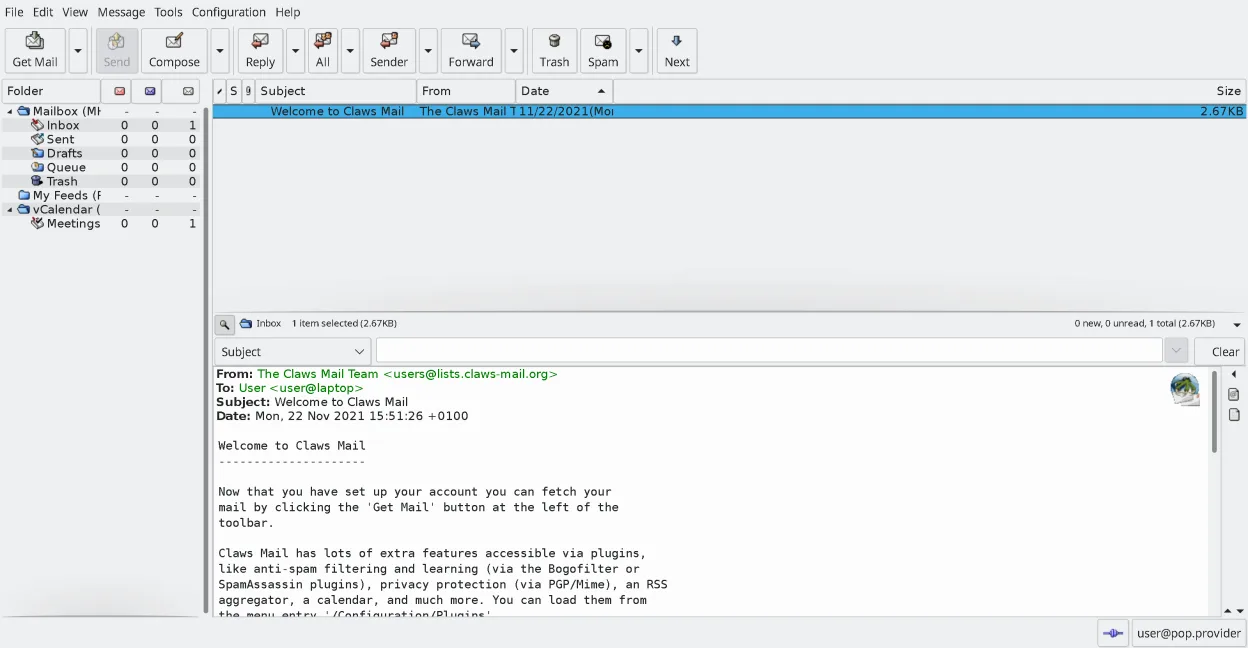
Claws Mail is a strong replacement for Windows Mail if you value speed and keyboard control over visual polish. It handles multiple IMAP/POP3 accounts, offers powerful search, and supports calendar via plugins. The interface is dense and functional rather than modern, which may feel dated to some. It lacks native HTML composition, relying on external editors for plain text. If you want a lightweight, stable client that respects your time and doesn't bloat your system, this is a solid choice. Avoid it if you need a sleek, mouse-driven experience or heavy HTML email creation.
- License
- GPL-3.0-only
- Price
- Free
- Latest version
- 4.4.0 (March 9, 2026)
- Rating
- —
What works the same
- Supports multiple email accounts via IMAP, POP3, and SMTP
- Lightweight resource usage compared to heavier clients
- Built-in search capabilities across message bodies and headers
- Support for importing and exporting mail data
What is different
- No native HTML composition; requires external editors for plain text
- Calendar integration is plugin-based rather than core
- Interface is keyboard-centric and dense, less intuitive for mouse-only users
- Uses MH mailbox format instead of standard EML or PST storage
Opening your Windows Mail files
Windows Mail typically uses EML files for individual messages and may store data in proprietary formats. Claws Mail can import EML files directly into its MH format. It also supports importing from other clients like Thunderbird or Outlook. If your Windows Mail data is in a non-standard container, you may need to export individual messages first. Direct .pst import is not native but possible via conversion tools.
Switching from Windows Mail to Claws Mail, step by step
- Export all messages from Windows Mail as EML files or use a compatible export tool
- Install Claws Mail via your package manager or Flathub
- Configure your email accounts in Claws Mail settings
- Use the Import/Export tool to bring in your EML files
- Install the calendar plugin if you need iCal support
- Test search and folder organization to ensure data integrity
Key features of Claws Mail
- MH mailbox storage for fast access
- Keyboard‑centric operation with full shortcut support
- Plugin system for RSS, calendar, and extra protocols
- Multiple accounts and folder trees
- Built‑in spam filtering (SpamAssassin integration)
- Message threading and powerful search
- External editor support for composing plain‑text mail
- Import/export from most other mail clients
How to install Claws Mail on Linux
flatpak install flathub org.claws_mail.Claws-Mailsudo apt install claws-mailsudo apt install claws-mailsudo dnf install claws-mailsudo pacman -S claws-mailsudo zypper install claws-mailFrequently asked questions
Can I compose HTML emails in Claws Mail?
No, Claws Mail does not have a native HTML composer. You can read HTML mail, but composing requires using a plain-text editor or an external HTML editor via plugins.
Is calendar support built-in?
Calendar functionality is provided through plugins, not the core application. You will need to install the appropriate calendar plugin to manage iCal files or sync with CalDAV servers.
How does Claws Mail handle spam?
It integrates with SpamAssassin for filtering. You can configure rules and thresholds to automatically mark or delete spam messages based on your preferences.
4 other alternatives to Windows Mail
 ThunderbirdThunderbird is a free, open‑source email, newsfeed, chat, and calendar client.Open sourceFreeFlatpakThunderbird vs Windows Mail
 EvolutionEvolution is a full‑featured personal information manager that combines email, calendar, contacts and tasks…Open sourceFreeFlatpakEvolution vs Windows Mail
 MailspringA fast, feature-rich desktop email client for Linux with a C++ sync engine and unified inbox.Open sourceFreeFlatpakMailspring vs Windows Mail
 GearyGeary is a GNOME‑based email client for Linux that lets you send, receive, and organize mail in conversation…Open sourceFreeFlatpakGeary vs Windows Mail