
Windows · Others
Best Linux alternatives to ComicRack
ComicRack is a Windows comic‑book library manager that lets users organize, view, and annotate comic files.
Updated
2 Linux alternatives to ComicRack
-

Calibre is a free, open‑source e‑book manager that catalogs, converts, edits, and serves books across devices.
Calibre is a solid replacement for basic comic organization and reading, but it is not a direct 1:1 swap for ComicRack. It handles CBZ, CBR, and PDF files well, offering fast navigation and multiple viewing modes. However, its annotation tools are basic compared to ComicRack's robust note-taking…
Feature parity65% -
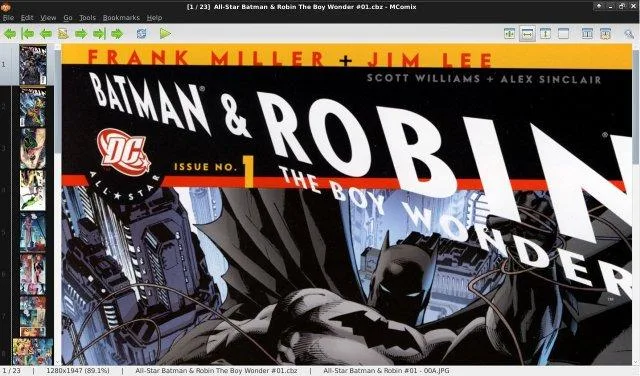
MComix is a free, GPL‑licensed image viewer focused on comic book formats.
MComix can serve as a practical replacement for ComicRack for users who mainly need to read, organize and lightly annotate comics on Linux. It handles the common archive formats, offers dual‑page and continuous scrolling, bookmarks and basic tagging, and runs with a small memory footprint. Power…
Feature parity68%


What is ComicRack?
ComicRack is a desktop application that helps comic readers keep track of their collections, view pages, and add notes or tags. It is mainly used by comic enthusiasts, collectors, and small publishers who need a simple way to browse and annotate large numbers of digital comic files.
The software is sold as a paid download, with a one‑time purchase fee and a free trial. It is distributed under a proprietary license.
Users look for a Linux alternative because they want a native application that runs without emulation, or they prefer an open‑source solution that integrates with the rest of their Linux workflow.
What a replacement for ComicRack must do
- Import and organize comic files (CBZ, CBR, PDF, etc.)
- Fast page navigation and zooming
- Support for multiple viewing modes (single page, double page, continuous)
- Annotation tools (notes, bookmarks, tags)
- Search and filter by metadata
- Export or share annotated pages
Can you run ComicRack on Linux?
There is no native Linux version of ComicRack. Users can run it through Wine, but stability varies and some features may not work correctly. No official web or Proton version exists. No information is available about Bottles support.
Which alternative should you choose?
If you need a lightweight, open‑source tool that works well on most Linux distros, MComix is a good choice. If you prefer a more feature‑rich reader with advanced library management and annotation, Calibre (with its comic‑book plugin) is suitable.
Moving your ComicRack files and habits
ComicRack stores its library in a proprietary database file. Exporting the list of comics is not straightforward, but you can copy the original CBZ/CBR files to the new application’s library folder. Both Calibre and MComix can import CBZ/CBR files directly, so you only need to move the files.
Side-by-side comparison
ComicRack: frequently asked questions
Can I use ComicRack on Linux?
Not natively; you would need to run it under Wine, which may not support all features.
Is there a free version of ComicRack?
There is a free trial, but the full version requires purchase.
Do Calibre or MComix support annotations?
Calibre supports notes and tags via its comic‑book plugin; MComix offers basic bookmarks and notes.
Will my existing library import into Calibre?
Yes, Calibre can read CBZ/CBR files directly, so you can add them to your library without conversion.
How important is ComicRack to you?
Know a better alternative? Suggest an alternative