
 LibreCADLinux
vs
AutoCADWindows
LibreCADLinux
vs
AutoCADWindows
LibreCAD as a Linux alternative to AutoCAD
Updated
Our verdict
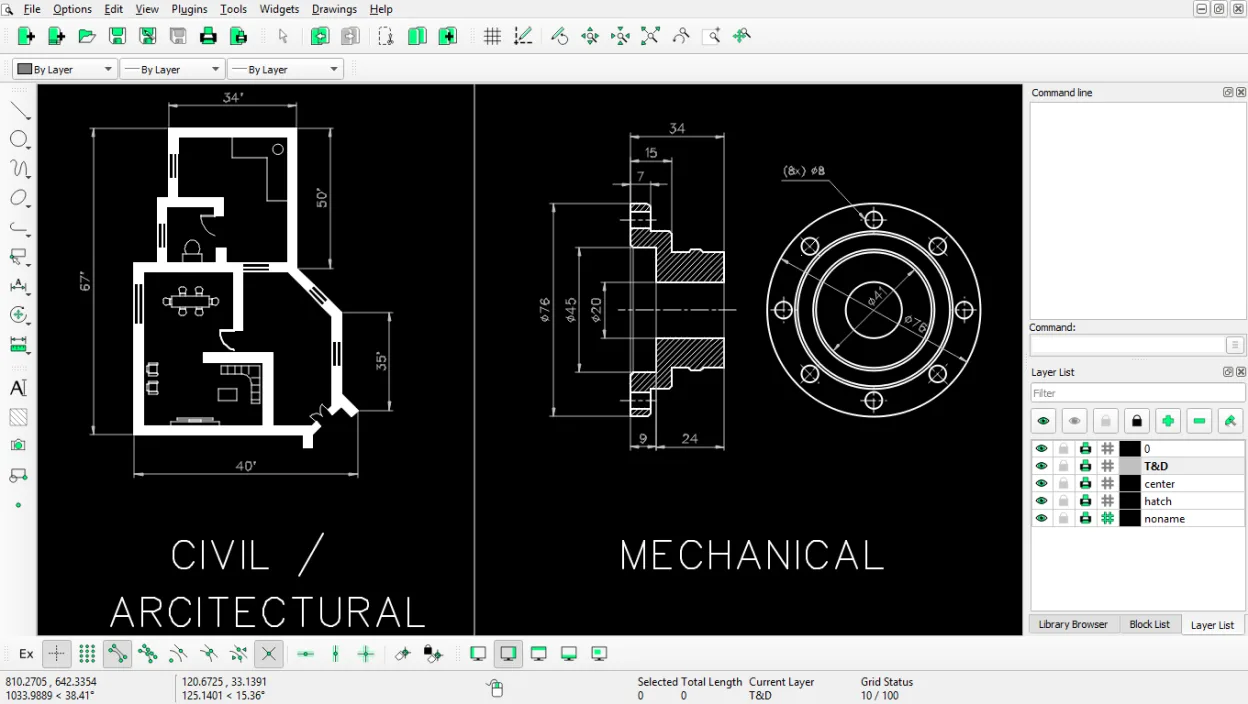
LibreCAD is a solid replacement for AutoCAD if your work is strictly 2D drafting. It handles layers, blocks, and precise geometric construction well, making it suitable for floor plans and simple technical drawings. However, it is not a general-purpose substitute. If you need 3D solid modeling, complex parametric constraints, or advanced scripting, LibreCAD will feel limiting. For pure 2D users on a budget, it is a capable, stable tool. For mixed 2D/3D professionals, you should look at FreeCAD or keep using AutoCAD.
- License
- GPL-2.0
- Price
- Free
- Latest version
- 2.2.1.6 (October 17, 2026)
- Rating
- —
What works the same
- Supports standard 2D vector drawing tools like lines, arcs, and circles
- Includes layer management for organizing complex drawings
- Features a command line for precise coordinate entry
- Allows export to PDF and print preview for documentation
What is different
- Lacks 3D solid modeling capabilities entirely
- No parametric constraint solver for dynamic geometry
- Limited scripting and API access compared to AutoCAD's LISP/Python
- Does not support direct DWG file format, only DXF
Opening your AutoCAD files
LibreCAD does not natively support the proprietary DWG format. You must convert AutoCAD DWG files to DXF before opening them in LibreCAD. While DXF is an open standard and widely compatible, some complex entities, specific linetypes, or 3D data embedded in DWG files may not translate perfectly to DXF. Always verify your converted files for accuracy before relying on them for production work.
Switching from AutoCAD to LibreCAD, step by step
- Install LibreCAD via your package manager or Flathub
- Convert your existing DWG files to DXF using a converter tool
- Import the DXF files into LibreCAD and check for missing entities
- Recreate any custom blocks or linetypes that did not import correctly
- Test your print and PDF export settings to match previous output
Key features of LibreCAD
- Layer management with unlimited layers
- Extensive line, arc, circle and spline tools
- DXF import and export (AutoCAD compatible)
- Measurement and dimensioning utilities
- Customizable keyboard shortcuts
- Print preview and PDF export
- Command line for precise coordinate entry
- Multi‑platform support (Linux, Windows, macOS)
How to install LibreCAD on Linux
flatpak install flathub org.librecad.librecadsudo apt install librecadsudo apt install librecadsudo dnf install librecadsudo pacman -S librecadsudo zypper install librecadFrequently asked questions
Can LibreCAD open DWG files directly?
No. You must convert DWG files to DXF format first. LibreCAD only supports DXF import and export.
Is LibreCAD good for 3D modeling?
No. LibreCAD is strictly a 2D application. For 3D modeling, consider FreeCAD or OpenSCAD instead.
Does LibreCAD support scripting?
It has limited scripting capabilities compared to AutoCAD. It is not designed for heavy automation or custom API development.
4 other alternatives to AutoCAD
 FreeCADFreeCAD is an open‑source parametric 3D CAD modeler for design, engineering and 3D printing.Open sourceFreeFlatpakFreeCAD vs AutoCAD
 QCADQCAD is an open‑source 2D CAD program for creating technical drawings on Linux.Open sourceFreeQCAD vs AutoCAD
 OpenSCADOpenSCAD is a parametric 3D CAD modeller that generates solid models from text-based scripts rather than…Open sourceFreeFlatpakOpenSCAD vs AutoCAD
 BlenderBlender is a free, open-source 3D suite for modeling, animation, rendering, and video editing.Open sourceFreeFlatpakBlender vs AutoCAD