

Linux · Sound & Video
Easy Effects
Easy Effects is a PipeWire-based audio manipulation tool offering EQ, compression, and reverb for system-wide or per-app control.
- License
- GPL-3.0-or-later
- Latest version
- 8.3.0 (September 29, 2026)
- Developer
- Wellington Wallace
- Installs
- 29,174 (Flathub, 30 days)


What is Easy Effects?
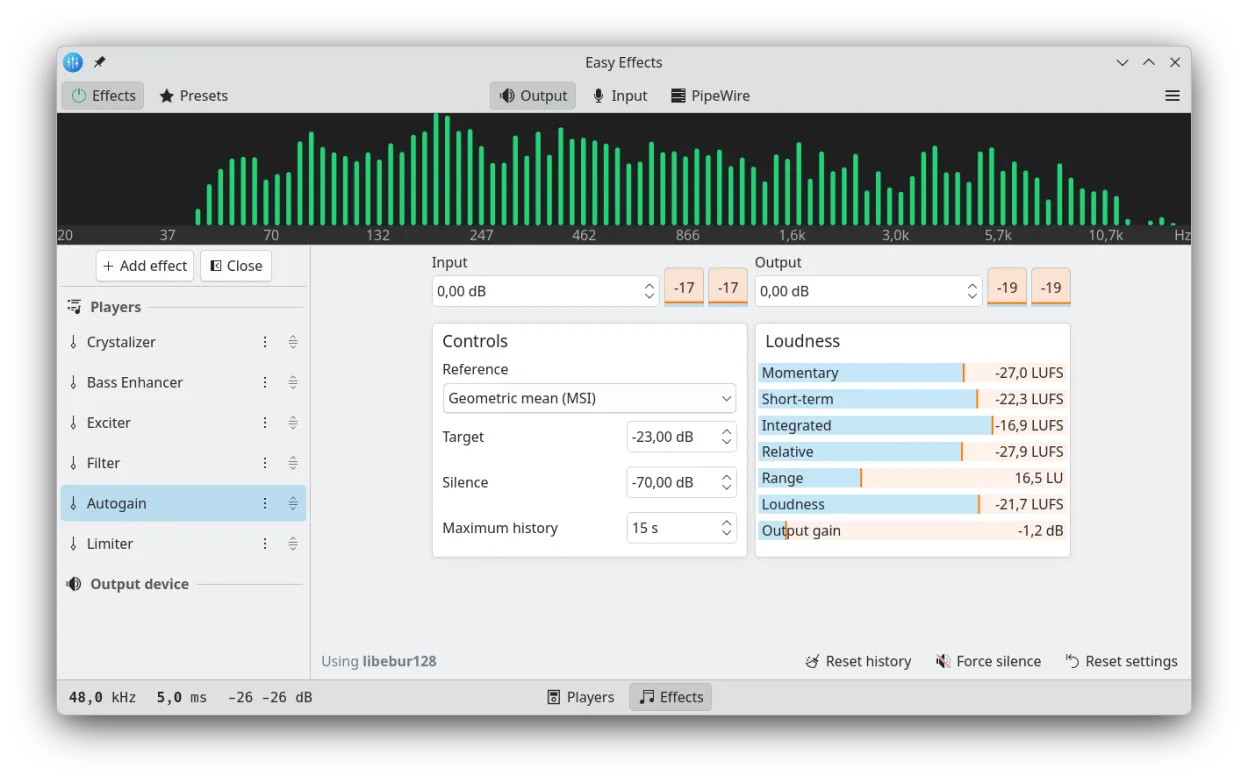
Easy Effects serves as the direct successor to PulseEffects, providing advanced audio processing for Linux systems. It includes a full-featured equalizer, limiter, compressor, and reverb, along with a built-in spectrum analyzer. The software is mature and actively maintained, with recent releases ensuring compatibility with modern audio stacks.
This tool is ideal for Linux users who need granular control over their audio output and input. It works well for musicians, podcasters, and anyone who wants to shape their sound without using complex DAWs. Because it integrates deeply with PipeWire, it handles both playback and microphone capture effectively.
Compared to Equalizer APO on Windows, Easy Effects offers a more graphical, user-friendly interface. While Equalizer APO is powerful but text-based and requires manual configuration files, Easy Effects provides a visual dashboard. This makes it easier for beginners to adjust settings, though it may lack the extreme low-level tweaking options of its Windows counterpart.
Best for: Linux users on PipeWire who want a visual, easy-to-use alternative to Equalizer APO for shaping system and microphone audio.
Key features of Easy Effects
- System-wide and per-application audio effects
- Built-in equalizer with multiple bands
- Compressor and limiter for dynamic range control
- Reverberation and other spatial effects
- Real-time spectrum analyzer
- Microphone input processing for recording and calls
- Profile saving and automatic session restoration
Pros
- Intuitive graphical interface for audio tweaking
- Deep integration with PipeWire for low latency
- Supports both output and input devices
- Active development with regular updates
Cons
- Requires PipeWire; PulseAudio users must use PulseEffects
- May have a slight learning curve for complex effect chains
- Not as lightweight as simple system equalizers
Windows programs Easy Effects replaces
How to install Easy Effects on Linux
flatpak install flathub com.github.wwmm.easyeffectssudo apt install easyeffectssudo apt install easyeffectssudo dnf install easyeffectssudo pacman -S easyeffectssudo zypper install easyeffectsTips for Windows users
Unlike Equalizer APO, which relies on text files for configuration, Easy Effects stores settings internally and allows you to save named profiles. You do not need to edit config files manually. When switching, note that Easy Effects applies effects to specific applications or the whole system via its UI, whereas Equalizer APO typically works at the driver level. If you were using specific VST plugins with Equalizer APO, you will need to find equivalent built-in effects or external PipeWire plugins, as Easy Effects has a fixed set of internal processors.
Recent releases
- 8.3.0 —
- Features: - Now Community Presets using SOFA impulse resposes can be correctly imported to local presets. - Using the share audio and microphone monitoring features together should be better now. - More command line options. - The microphone monitoring…
- 8.2.9 —
- Features: - Duplex devices can now be selected as input/output devices. - Added a new configuration option that allows the automatic global bypass reset on device change to be disabled. - A new Mid-Side Equalizer effect based on the LSP Parametric Equalizer…
- 8.2.8 —
- Features: - A new configuration option that allows Easy Effects virtual devices volume and mute state to be controlled has been added - A new global shortcut that allows audio sharing to be toggled has been added. - Our local server has been improved and it…
- 8.2.7 —
- Features: - Bug fixes: - Fixed more inconsistencies in how our desktop file name is reported to desktop environments. - Other notes:
Easy Effects: frequently asked questions
Does Easy Effects work with PulseAudio?
No, Easy Effects is designed specifically for PipeWire. If you are using PulseAudio, you should use PulseEffects instead, which is the predecessor to this software.
Can I apply effects to my microphone?
Yes, Easy Effects can process input devices. This is useful for adding noise reduction, compression, or EQ to your microphone during voice calls or recording.
How do I set Easy Effects to start automatically?
You can enable autostart within the application settings or add it to your desktop environment's startup applications list to ensure it runs when you log in.
Is Easy Effects better than PulseEffects?
If you are using PipeWire, Easy Effects is the recommended tool as it is actively developed for that stack. PulseEffects is maintained for PulseAudio users but is no longer the primary focus for new features.
Updated