

Linux · Sound & Video
HandBrake
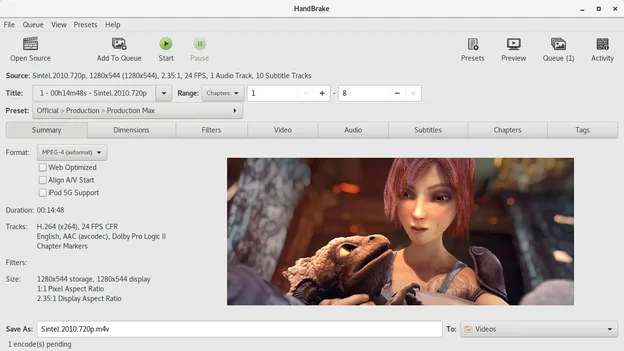
HandBrake is a free, open‑source video transcoder that converts almost any video format to modern codecs.
- License
- GPL-2.0-only
- Latest version
- 1.11.2 (June 7, 2026)
- Developer
- HandBrake Team
- Installs
- 23,870 (Flathub, 30 days)
What is HandBrake?
HandBrake was started in 2003 by the HandBrake Team to provide a simple way to encode video for playback on a wide range of devices. Over the years it has grown into a mature, cross‑platform tool with a large community of contributors and users. The latest release, 1.11.2, continues to add support for new codecs and improve performance.
The program is aimed at anyone who needs to convert videos for archiving, sharing, or playback on older hardware. It works well for hobbyists, content creators, and people who want to keep a clean library of compatible files.
Compared with Windows‑only tools like NinjaRipper, HandBrake feels more straightforward and less specialized. It focuses on general‑purpose transcoding rather than game‑specific extraction, but it offers a rich set of presets and a clean GUI that makes the process fast and reliable.
Best for: Converting personal video collections to device‑friendly formats.
Key features of HandBrake
- Supports over 200 input formats via FFmpeg
- Offers a wide range of output presets for devices
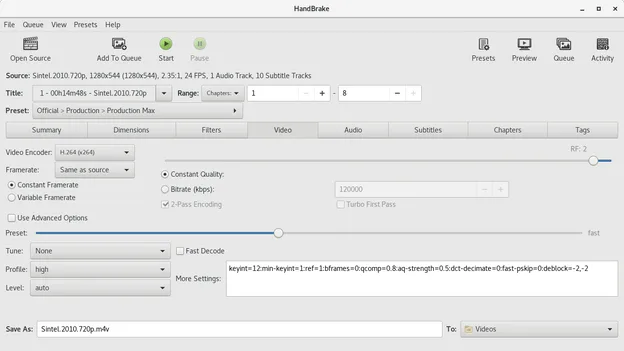
- Allows custom bitrate, resolution, and codec settings
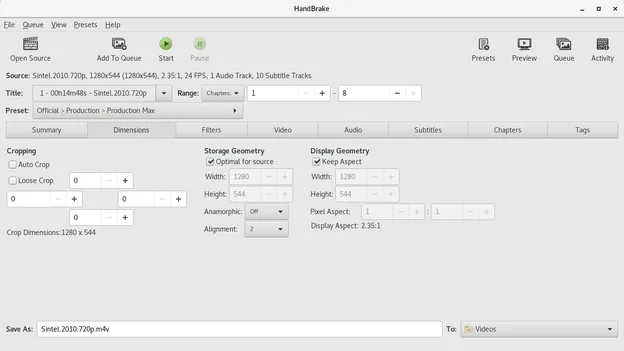
- Includes advanced filters (deinterlace, denoise, crop)
- Batch encoding with queue management
- Keyboard shortcuts for quick navigation
- Export to multiple containers (MP4, MKV, WebM)
- Built‑in subtitle handling
Pros
- Free and open source
- Cross‑platform with consistent UI
- Regular updates and active community
- Extensive documentation and presets
Cons
- No built‑in video editor or cutting tool
- Learning curve for advanced settings
- Occasional bugs with newer codecs
Windows programs HandBrake replaces
How to install HandBrake on Linux
flatpak install flathub fr.handbrake.ghbsudo apt install handbrakesudo apt install handbrakesudo pacman -S handbrakeTips for Windows users
If you’re coming from NinjaRipper, note that HandBrake works with a wide array of file types, not just game captures. Use the "Presets" panel to choose a target device; the "Video" tab lets you tweak bitrate and codec. Shortcuts like Ctrl+S (save preset) and Ctrl+O (open file) speed up workflow. Unlike NinjaRipper’s focus on game assets, HandBrake’s batch queue allows you to process many files at once, saving time.
Recent releases
- 1.11.2 —
- Uses GtkFileLauncher to open files in sandboxed apps. - Added buttons to cycle through previews on summary page. - Added an option to change the UI display language. Fixed issues: - Fixed size calculation for disk space check.
- 1.10.0 —
- Added new "Social 10MB" presets - Improved metadata passthru, preserving additional metadata - Added an option to choose the encoder color range - Added an option to disable track names passthru and autonaming - SubRip/UTF-8 subtitles are now passed through…
- 1.9.2 —
- Allowed muxing NVENC AV1 and VCN AV1 in WebM container - Fixed a crash that could happen when a source contains chapters with no titles
- 1.9.1 —
- Fixed an issue that could happen when chapters titles are not UTF-8 - Improved support for SRT files with overlapping subtitles - Fixed AC3 and EAC3 extradata in MKV
HandBrake: frequently asked questions
Can HandBrake convert 4K video?
Yes, it can encode 4K files, but the speed depends on your CPU and chosen preset. Using the "High Profile" preset keeps quality high while keeping file size reasonable.
Does HandBrake support subtitles?
HandBrake can embed subtitles, either as soft or hardcoded tracks. The "Subtitles" tab lets you add external .srt files or burn them into the video.
Is HandBrake safe to install from the official repository?
Yes. It is signed by the HandBrake Team and available in the official repos for Arch, Debian, Ubuntu, and via Flathub.
Can I use HandBrake on a Raspberry Pi?
The ARM builds exist, but performance is limited; for heavy transcoding you’ll need a more powerful CPU.
Updated