

Linux · Internet
Franz
Franz is a desktop messenger that combines multiple chat services into one interface.
- License
- Apache-2.0
- Latest version
- 6.3.1 (June 12, 2026)
- Developer
- Stefan Maizner
- Installs
- 773 (Flathub, 30 days)
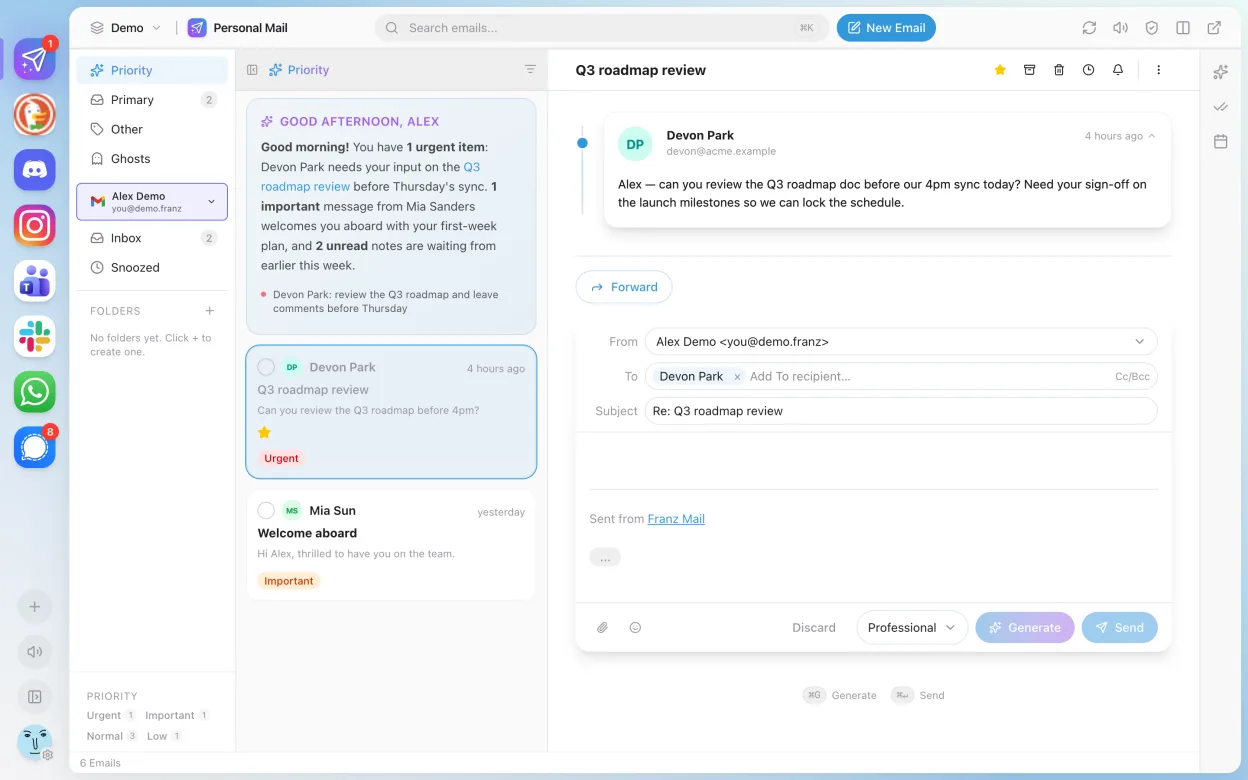
What is Franz?
Franz brings together services like WhatsApp, Slack, Facebook Messenger, and Telegram into a single desktop window. It's built using Electron, similar to many modern messaging apps, and has been around since 2015. Development has slowed in recent years, but the app remains functional and is still updated occasionally, with version 6.3.1 released in 2026.
It's aimed at users who juggle multiple messaging accounts and want to reduce desktop clutter. If you're used to having separate apps for Teams, Slack, or WhatsApp, Franz offers a centralized alternative. It’s most useful for professionals or casual users who don’t want to switch between browser tabs or standalone apps.
Compared to Microsoft Teams on Windows, Franz feels less integrated and lacks native calling or meeting features. It’s more of a visual aggregator than a full collaboration suite. The interface is clean but generic, and performance can lag due to Electron overhead—especially with many services active at once.
Best for: Users who want one window for multiple messaging accounts without running separate apps.
Key features of Franz
- Supports WhatsApp, Slack, Telegram, Facebook Messenger, and others
- Groups multiple services in one window with tabbed sidebar
- Customizable themes and dark mode
- Notification badges and system tray integration
- Basic message sending and receiving across services
- Available as Flatpak via Flathub for Linux
- Cross-platform: also runs on Windows and macOS
Pros
- Reduces need to run multiple messaging apps
- Supports a wide range of popular chat services
- Open source with transparent development
- Available as Flatpak for easy Linux installation
- Customizable interface with theme support
Cons
- Electron-based, so higher memory usage
- No native support for Microsoft Teams meetings or calls
- Some services may break after API changes
- Development updates are infrequent
Windows programs Franz replaces
How to install Franz on Linux
flatpak install flathub com.meetfranz.FranzTips for Windows users
If you're coming from Microsoft Teams, note that Franz doesn’t support Teams meetings or file collaboration—use the web version alongside it. Your chat history doesn’t transfer; Franz acts as a front-end. Use Ctrl+Tab to switch between services instead of Alt+Tab. Keyboard shortcuts are service-specific and may not match Teams exactly.
Recent releases
- 6.3.1 —
Full right-to-left layout for Arabic, Hebrew, Farsi and Urdu. Smaller unread badges in the tab bar. Fixes for lost email-draft attachments, squashed multi-paragraph emails and a Windows startup crash.
- 6.3.0 —
French translation of the whole app. New About page with an optional Beta program. Link preview on hover. Dark-mode preference and email-sync fixes.
- 6.2.0 —
Ghosts view in Franz Mail surfaces cooling relationships, computed on-device. Bring-your-own Google Gemini key for the Pro assistant. Cmd+K searches inside WhatsApp messages.
- 6.1.0 —
Franz 6 ships natively on Linux as AppImage, .deb and snap on x64 and arm64, with system tray, autostart, live OS theme sync and franz:// / mailto: handlers. Mute-all-services button. Email search now reads the message body.
Franz: frequently asked questions
Can Franz replace Microsoft Teams on Linux?
Partially. Franz supports chat via the web view, but lacks calling, meetings, and file integration. For full Teams functionality, use the web app in a browser.
Is Franz secure?
Franz itself doesn’t decrypt messages—security depends on the individual services. Since it’s open source, the code can be audited, but Electron apps carry inherent risks from web-based rendering.
Why is Franz slow sometimes?
It runs on Electron, which uses Chromium and can be memory-heavy. Each service runs in a separate frame, so performance drops with more services active.
Is Franz still being updated?
Yes, but infrequently. Version 6.3.1 was released in 2026. It’s maintained, but not actively developed with new features.
Updated