

Linux · Internet
Element
Element is a secure, open-source messaging and collaboration app based on the Matrix protocol, supporting chat, voice, and video calls.
- License
- AGPL-3.0-only OR GPL-3.0-only
- Latest version
- 1.12.32 (October 16, 2026)
- Developer
- Element Creations Ltd
- Installs
- 7,783 (Flathub, 30 days)
What is Element?
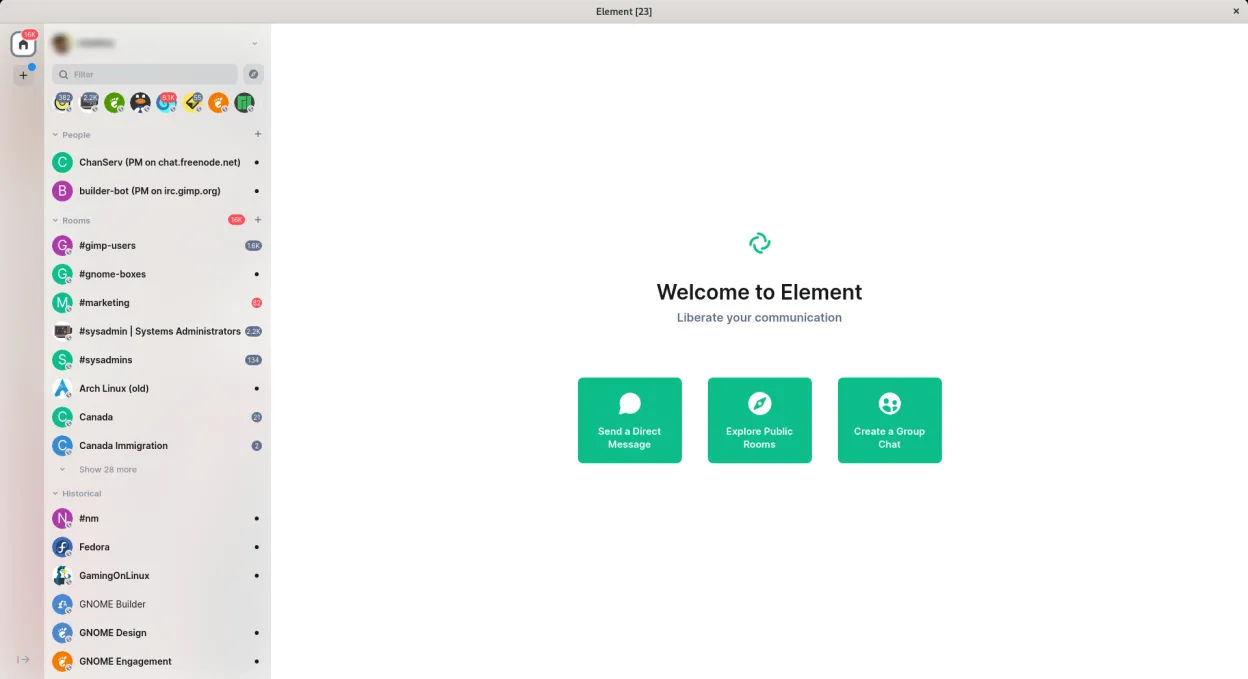
Element is a desktop client for Matrix, an open standard for decentralized, encrypted communication. It evolved from Riot.im and has matured into a stable platform used by teams and individuals who want control over their data. It supports end-to-end encryption by default and works across devices and servers.
It's ideal for organizations, open-source projects, and privacy-conscious users who need reliable, auditable communication without vendor lock-in. If you're leaving Microsoft Teams for compliance, decentralization, or self-hosting needs, Element offers a credible alternative—especially when paired with a private Matrix server.
The interface feels clean and modern, similar to Teams in layout—rooms, threads, mentions, and notifications are well-implemented. However, it lacks some polish in desktop integration on Linux, particularly under GNOME with Wayland. Performance is solid, but native feel lags slightly behind Electron-based Windows counterparts.
Best for: Teams and organizations prioritizing privacy, decentralization, and self-hosting over out-of-the-box polish.
Key features of Element
- End-to-end encryption for all direct and group chats
- Persistent chat rooms with full message history
- Voice and video calling with WebRTC and PipeWire support
- Custom notifications and keyword alerts
- Bot and bridge integrations (e.g., IRC, Slack, Discord)
- Support for self-hosted Matrix servers
- Mentions, replies, and read receipts
- File sharing with encryption
Pros
- Fully open source with strong privacy and encryption
- Decentralized—works across different servers and domains
- Supports calling and conferencing without external dependencies
- Active development and regular security updates
- Integrates well with self-hosted infrastructure
Cons
- Electron-based, so memory usage is high
- Wayland support is preliminary—missing window decorations on GNOME
- Some features lag behind Microsoft Teams, like calendar sync
- Onboarding can be confusing for non-technical users
Windows programs Element replaces
How to install Element on Linux
flatpak install flathub im.riot.RiotTips for Windows users
If you're coming from Microsoft Teams, note that Element doesn’t sync with Outlook or Exchange. Export chat logs manually if needed. Use @mentions and room tags to replicate Teams' notification behavior. Shortcuts are similar (Ctrl+Enter to send, / for commands), but workflows rely more on room structure than channels. Import files directly—there's no OneDrive equivalent, so use shared folders or cloud storage links.
Recent releases
- 1.12.32 —
- 1.12.31 —
- 1.12.29 —
- 1.12.28 —
Element: frequently asked questions
Does Element support voice and video calls on Linux?
Yes, Element supports voice and video calls on Linux using WebRTC with PipeWire for screen and audio sharing. Calls work across Matrix servers.
Is Element secure?
Yes, all one-on-one and group chats use end-to-end encryption by default via the Matrix protocol (using Olm and Megolm).
Can I use Element with my company's server?
Yes, Element can connect to any Matrix server, including self-hosted instances, making it suitable for enterprise deployments.
Why are window controls missing in GNOME?
Due to preliminary Wayland support, window decorations may not appear. Use keyboard shortcuts like Alt+F4 to close or resize with Super+drag.
Updated