

Linux · Office
Super Productivity
Open-source to-do list and time tracker with offline-first sync, Pomodoro modes, and integration with GitHub, Jira, and calendars.
- License
- MIT
- Latest version
- v20.1.0 (November 21, 2026)
- Developer
- Johannes Millan
- Installs
- 4,641 (Flathub, 30 days)


What is Super Productivity?
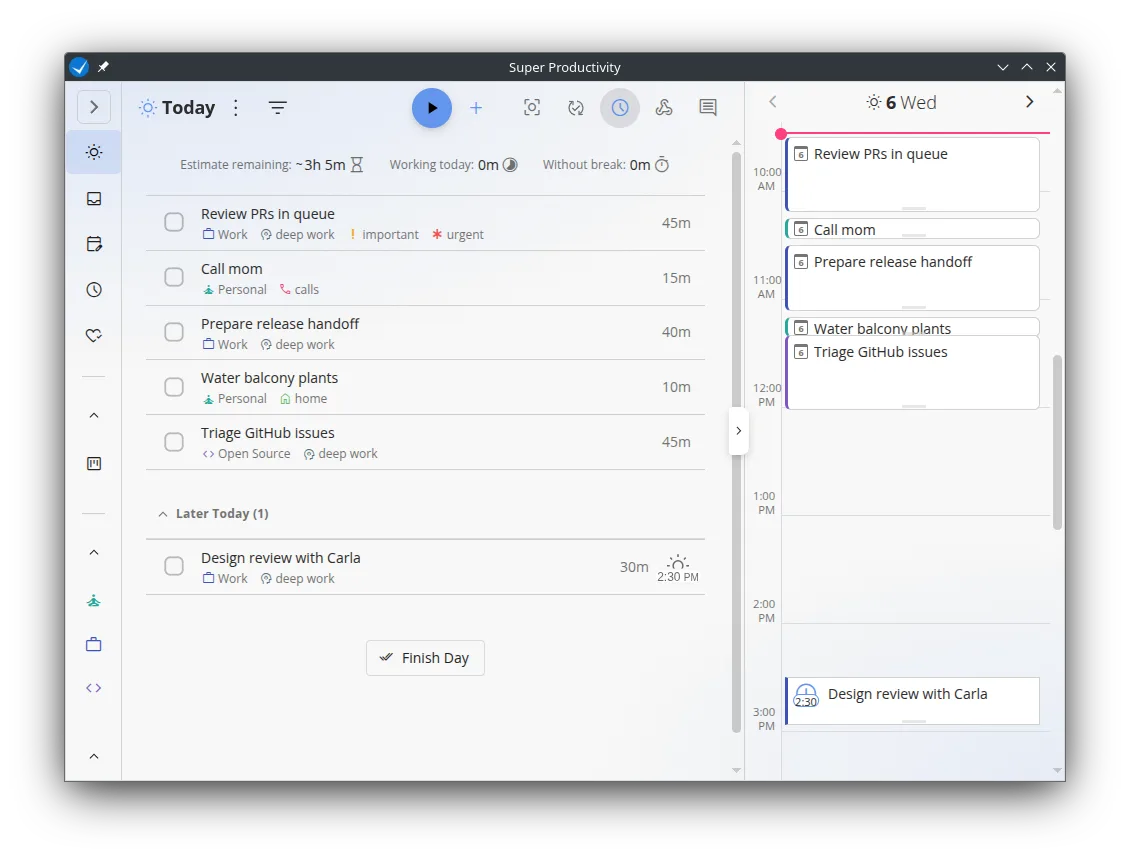
Super Productivity is a self-hosted or local-first productivity suite that combines task management with time tracking. Developed by Johannes Millan since 2016, it has evolved from a simple to-do app into a comprehensive workflow tool. It runs entirely offline by default, ensuring your data stays private unless you explicitly configure cloud sync via Nextcloud, Dropbox, or WebDAV.
It targets developers, freelancers, and power users who need more than a basic checklist. If you manage complex projects with dependencies, deadlines, and time estimates, this tool provides the structure. It is not a lightweight reminder app; it is a full productivity environment designed for people who want to analyze their work habits and optimize their daily schedule.
Compared to TickTick, Super Productivity is more technical and less polished visually. TickTick offers a smoother mobile experience and simpler sync, but Super Productivity wins on integrations and offline capability. You trade some aesthetic simplicity for deep control over your workflow, including Kanban boards, automated rules, and detailed time reports that TickTick does not offer in the same depth.
Best for: Developers and freelancers who need a private, offline-capable tool to combine task management with detailed time tracking and project integrations.
Key features of Super Productivity
- Drag-and-drop daily planner, weekly schedule, and Kanban boards
- Built-in Pomodoro, timeboxing, and Flowtime modes with one-click tracking
- Integrations with Jira, GitHub, GitLab, Gitea, Redmine, and Google Calendar
- Rule-based automations to auto-tag, move, or start tracking tasks
- Optional sync via Nextcloud, WebDAV, Dropbox, or Super Sync
- Plugin system supporting Obsidian and other community tools
- Procrastination helper with CBT techniques and end-of-day reviews
- Fully offline operation with no account or telemetry required
Pros
- True offline-first design with no mandatory account or cloud dependency
- Deep integration with developer tools like GitHub and Jira
- Highly customizable with plugins and automation rules
- MIT-licensed and free to use with no feature paywalls
Cons
- Steeper learning curve than simpler to-do apps like TickTick
- Interface can feel cluttered for users who only need basic lists
- Sync setup requires manual configuration of WebDAV or Nextcloud
- No native mobile app, though web access is available
Windows programs Super Productivity replaces
How to install Super Productivity on Linux
flatpak install flathub com.super_productivity.SuperProductivitysudo pacman -S super-productivityTips for Windows users
If coming from TickTick, expect a denser interface. There is no direct file import, so you will need to recreate your task structure manually or use a plugin if available. Set up your sync backend (like Nextcloud) early if you need access across devices. The workflow is more deliberate: you define your daily plan in the planner, then use the time tracker to log work against specific tasks. Unlike TickTick’s quick-add, Super Productivity encourages you to categorize tasks into projects and tags upfront for better reporting.
Recent releases
- v20.1.0 —
- v20.0.0 —
- Build Smart Lists with multiple tags and pin custom views - Keep links, attachments, and deadlines when duplicating tasks - Review your week with Friday wrap-ups and export worklogs including archived projects - Open New task, Today, or Inbox from desktop…
- v19.3.1 —
- Collapse project task tables in the daily summary - Open downloads directly from the update banner - Sync asks before loading remote data that is missing your previous uploads - Issue and calendar updates pause while offline and catch up on reconnect -…
- v19.3.0 —
- Recently deleted: recover tasks you deleted - New "won't do" option for tasks - End dates for repeating tasks and earlier reminders - Plainspace task sharing and community plugin installation - Fixes for recurring tasks, sync conflicts, backups and task…
Super Productivity: frequently asked questions
Does Super Productivity work without an internet connection?
Yes, it is designed to work fully offline. All data is stored locally on your machine, and you only need an internet connection if you use integrations or sync features.
Can I sync my tasks with GitHub or Jira?
Yes, it has built-in integrations that allow you to import issues from GitHub, GitLab, Jira, and other platforms directly into your task list.
Is there a mobile app for Super Productivity?
There is no dedicated native mobile app. You can access your data via a web interface if you have set up a sync backend like Nextcloud or WebDAV.
How does time tracking work in Super Productivity?
You can start a timer directly on a task using one-click tracking. It supports Pomodoro intervals and logs the time spent, which you can then review in detailed reports.
Updated