

Linux · Office
Zim
Zim is a desktop wiki for taking and organizing notes in plain text files.
- License
- GPL-2.0+
- Latest version
- 0.77.0 (June 11, 2026)
- Developer
- Jaap Karssenberg
- Installs
- 554 (Flathub, 30 days)
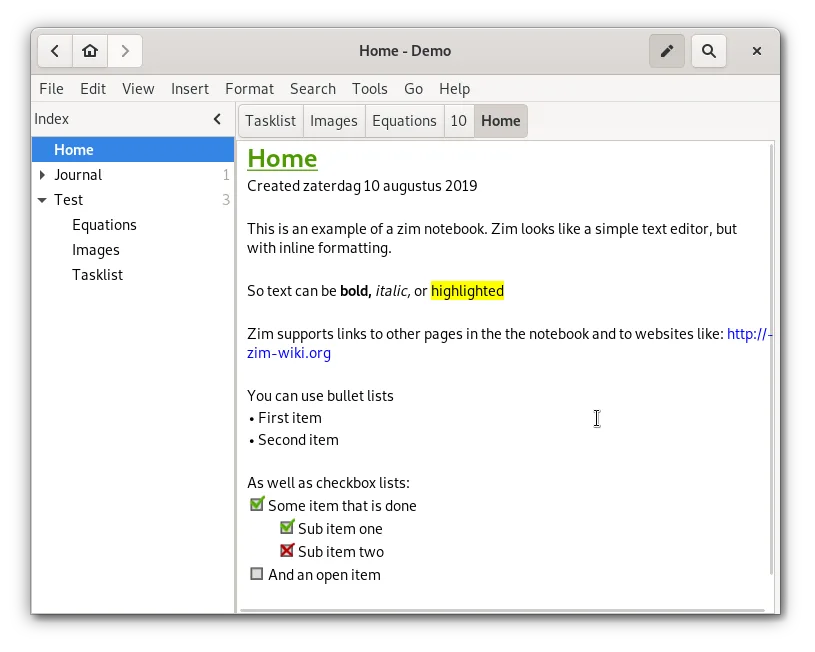
What is Zim?
Zim was first released in 2007 by Jaap Karssenberg and has grown steadily, now at version 0.77.0. It stores each page as a simple text file with wiki markup, making backups and version control straightforward.
The application targets users who want a lightweight, file‑based note system that can be used offline and integrated into existing workflows. It appeals to students, researchers, and anyone who prefers plain text over proprietary formats.
Compared to OneNote, Zim feels more like a text editor with a tree view. It lacks the rich media embedding of OneNote but offers full control over file organization and a consistent keyboard experience across Linux desktops.
Best for: Users who need a simple, file‑based wiki for notes, tasks, and journaling without cloud dependencies.
Key features of Zim
- Hierarchical sidebar tree for page organization
- Automatic plain‑text file storage with wiki markup
- Linking between pages and attachments
- Plugins for tasks, equations, tray icon, and VCS
- Cross‑platform keyboard shortcuts
- Export to HTML, PDF, and plain text
Pros
- Free and open source
- No cloud lock‑in, data stays local
- Extensible via plugins
- Strong version control support
- Lightweight and fast
Cons
- Limited rich media embedding compared to OneNote
- Learning curve for wiki markup
- No native sync across devices
- Plugin ecosystem less mature than commercial tools
Windows programs Zim replaces
How to install Zim on Linux
flatpak install flathub org.zim_wiki.Zimsudo apt install zimsudo apt install zimsudo dnf install Zimsudo pacman -S zimsudo zypper install zimTips for Windows users
Zim stores notes as plain text files with a .zim extension; you can open them in any editor. Importing OneNote files requires exporting to HTML or plain text first. Keyboard shortcuts are similar to other Linux editors (Ctrl+S to save, Ctrl+N for new page). Workflow shifts from a visual notebook to a tree‑structured file system, so plan your folder hierarchy in advance.
Recent releases
- 0.77.0 —
- Merge markdown support as source format for notebooks (experimental) - Allow multiple source formats in one notebook - Refactor page search to be extendable improve speed - Support options for 'case sensitive' and 'word boundaries' in page search - Let find…
- 0.76.3 —
- Add seperator to template for new files - Fix spellcheck state at startup - Fix cursor position after undo indent - Fix test suite release 0.76.2
- 0.76.2 —
- Let new page and quicknote templates place cursor - Let find match within sourceview blocks - Add property with template for filename of pasted images - In InsertLinkDialog translate file to page link - Fix issue with GSPell support
- 0.76.1 —
- Fix bug in auto-save on quit - Fix bug with find for pages with table object - Fix bug with undo deleting table object - Fix bug with out-denting verbatim text - Fix issue with linesorter plugin - Fix issue in commandline parsing for quicknote - Fix…
Zim: frequently asked questions
Can I sync Zim notes across devices?
Yes, by using a cloud service like Dropbox or Git; Zim itself has no built‑in sync feature.
Does Zim support images?
Images can be attached and displayed, but embedding them directly in markup is limited compared to OneNote.
How do I add a task list?
Install the "Task List" plugin from the plugin manager and use the [[task]] syntax in pages.
Is Zim available on all Linux distributions?
It is packaged for Arch, Debian, Fedora, openSUSE, and Ubuntu, and can also be installed via Flathub.
Updated