
Windows · Accessories
Best Linux alternatives to Microsoft Sticky Notes
Microsoft Sticky Notes is a lightweight Windows app for quick desktop notes, often used for reminders and short text snippets.
Updated
Quick answer
The best Linux alternative to Microsoft Sticky Notes is Xpad. Other strong options: Gnote, KNotes, Sticky Notes.
4 Linux alternatives to Microsoft Sticky Notes
-
A lightweight, multi-window sticky note application for Linux that mimics the behavior of Windows Sticky Notes with customizable colors and fonts.
Xpad is a good replacement for Microsoft Sticky Notes if you want simple, always-on-top notes with color coding and basic formatting. It runs natively on Linux, starts quickly, uses few resources, and saves notes between reboots without requiring an account. Users who rely on cloud sync or advanced…
Feature parity85% -
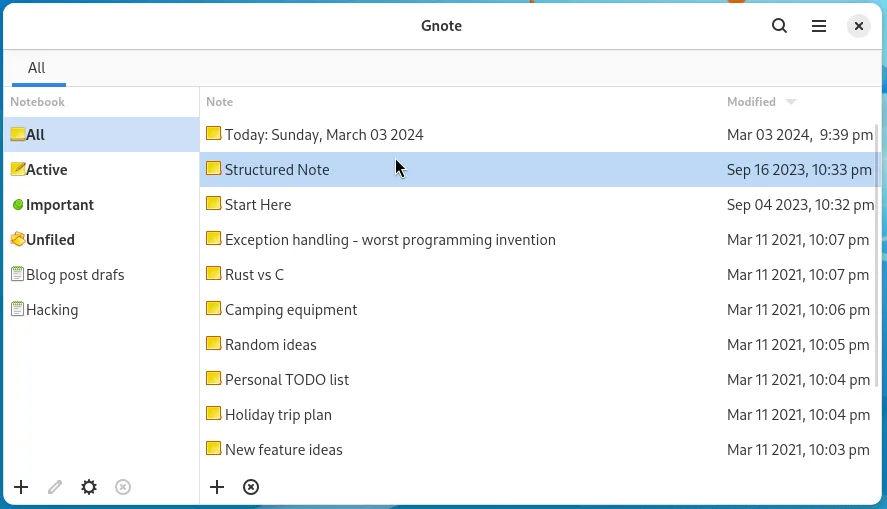
Gnote is a lightweight GNOME note‑taking app that lets you create, link, and organize notes with wiki‑style links and notebooks, and export them as HTML.
Gnote is a viable replacement for Microsoft Sticky Notes if you value organization over speed. It offers persistent, local notes with wiki-style linking and notebook grouping, covering the core need for quick text capture without cloud dependency. However, it is not a direct 1:1 interface swap. It…
Feature parity65% -
KNotes is a lightweight note‑taking app for KDE, providing sticky‑note‑like functionality on Linux.
KNotes is a good replacement for Microsoft Sticky Notes for Linux users who want simple, always-on-top desktop notes with basic formatting and color coding. It handles the core tasks well: quick note creation, persistent storage, and minimal resource use. While it lacks native cloud sync with…
Feature parity90% -
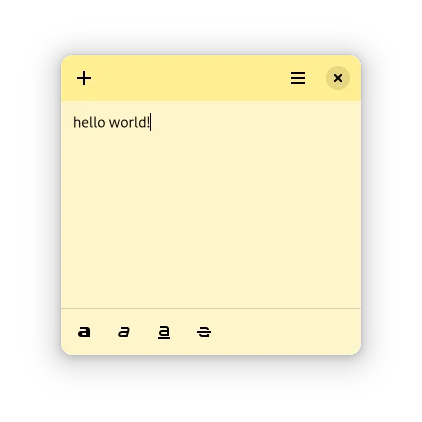
A lightweight desktop sticky notes app for GNOME with basic formatting and color options.
Sticky Notes is a decent replacement for Microsoft Sticky Notes if you're on a GNOME desktop and want basic, lightweight note-taking directly on your desktop. It handles core tasks like persistent, color-coded notes with simple formatting and auto-start. While it lacks some polish and advanced…
Feature parity80%


What is Microsoft Sticky Notes?
Microsoft Sticky Notes is designed for users who want fast, visible reminders right on their desktop. It's commonly used by office workers, students, and anyone needing to jot down quick notes like passwords, tasks, or phone numbers. The notes stay on top of other windows and support basic text formatting and color coding.
The app is free and comes preinstalled on Windows 10 and 11. It syncs across devices via a Microsoft account and integrates with OneNote for expanded functionality. While the core Sticky Notes app is free, deeper features and cloud sync are tied to Microsoft's broader ecosystem, including OneNote and Microsoft 365.
People look for Linux alternatives because Sticky Notes has no native Linux version and relies on Microsoft's cloud services. Linux users prefer open-source, privacy-respecting tools that run locally and integrate with their desktop environments. They also want similar always-on-top notes without depending on proprietary platforms or accounts.
What a replacement for Microsoft Sticky Notes must do
- Create and manage small, always-on-top notes on the desktop
- Support for basic text formatting (bold, lists, colors)
- Persistent notes that survive reboots
- Minimal resource usage and quick access
- Color-coded note labels for organization
- Autostart with the desktop session
- Local storage without forced cloud sync
Can you run Microsoft Sticky Notes on Linux?
There is no native Linux version of Microsoft Sticky Notes. It does not have a web interface. Running it via Wine or Bottles is possible but not recommended — it may launch with significant issues or fail to sync properly. The experience is unstable and lacks integration with Linux desktops. Users are better off using native alternatives that offer the same functionality without compatibility layers.
Which alternative should you choose?
Xpad is ideal for GNOME users wanting a simple, lightweight sticky note app with basic features and system tray integration. Gnote suits those who prefer a more structured note system with search and tagging, similar to Evernote but local-only. KNotes is best for KDE users, offering deep desktop integration and syncing via KDE's ecosystem. Sticky Notes (Linux) is a minimal, Windows-like option for users wanting a familiar interface.
Moving your Microsoft Sticky Notes files and habits
Microsoft Sticky Notes data can be exported by manually copying text from each note or using OneNote if notes are synced there. On Windows, notes are stored in the app's local database, accessible via the Settings > Sync menu. There's no direct import feature in Linux apps, so copying content manually is the most reliable method. Use plain text or Markdown files for portability across tools.
Side-by-side comparison
| App | License | Flatpak | Latest version | Feature parity | Rating |
|---|---|---|---|---|---|
| Xpad | GPL-2.0 | — | 6.0.0 | 85% | — |
| Gnote | GPL-3.0-only | ✓ | 51.0 | 65% | — |
| KNotes | GPL-3.0 | — | 24.02.2 | 90% | — |
| Sticky Notes | MIT | ✓ | 0.2.7 | 80% | — |
Microsoft Sticky Notes: frequently asked questions
Can I sync Sticky Notes across devices on Linux?
Not directly like Microsoft's version. Some apps like Gnote can sync via external tools (e.g., Nextcloud), but most keep notes local by design.
Is there a Linux app that looks exactly like Sticky Notes?
Sticky Notes (Linux) mimics the look and behavior closely. Xpad also offers a similar visual style with colored notes on the desktop.
Do these apps support rich text?
Xpad and KNotes support basic formatting like bold and lists. Gnote supports richer formatting and hierarchical notes.
Will my notes be lost if I switch apps?
Only if you don't back them up. Most apps store notes in plain text or XML files in your home directory, making them easy to back up and migrate.
How important is Microsoft Sticky Notes to you?
Know a better alternative? Suggest an alternative