

Linux · Accessories
Sticky Notes
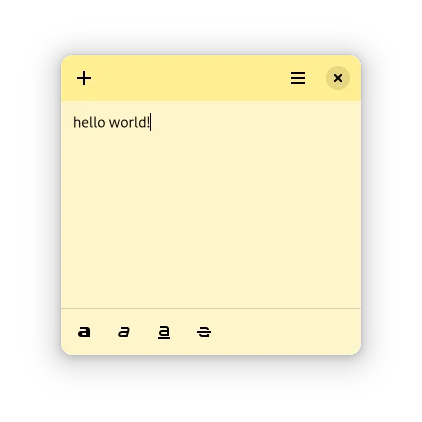
A lightweight desktop sticky notes app for GNOME with basic formatting and color options.
- License
- MIT
- Latest version
- 0.2.7 (April 16, 2025)
- Developer
- Angelo Verlain
- Installs
- 6,440 (Flathub, 30 days)
What is Sticky Notes?
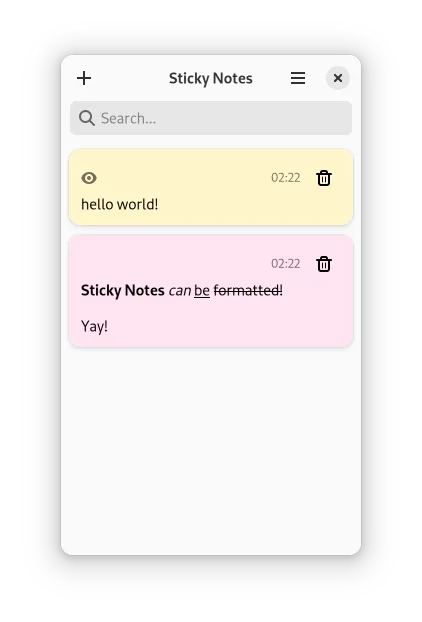
Sticky Notes is a minimal note-taking app designed for GNOME desktops, letting you pin formatted text notes directly on your desktop. Developed by Angelo Verlain and released under the MIT license, it's been steadily updated, with version 0.2.7 arriving in April 2025. It's lightweight and focused, not trying to be a full note manager.
This app suits users who want quick, visible reminders without distractions. If you're used to jotting down tasks or snippets and leaving them on-screen, Sticky Notes delivers that functionality cleanly. It’s ideal for GNOME users who prefer native integration over feature-heavy alternatives.
Compared to Microsoft Sticky Notes, it feels simpler and less polished but gets the core job done. There’s no cloud sync or rich media, but it’s faster and more private. If you value speed and simplicity over integration with a Microsoft account, this is a solid replacement.
Best for: GNOME users who want basic, always-visible desktop notes without bloat.
Key features of Sticky Notes
- Create and pin notes directly to the desktop
- Basic text formatting: bold, italic, underline, strikethrough
- Change note background color for visual grouping
- Supports dark theme for consistent desktop appearance
- Notes persist between sessions if left open
- Lightweight and fast startup
- GNOME-integrated design
- Auto-restores open notes after restart
Pros
- Simple and distraction-free interface
- Fast, low-resource usage
- Notes stay put across reboots
- Clean integration with GNOME
- Open source with permissive license
Cons
- No search across notes
- No sync or backup features
- Limited formatting compared to Microsoft version
- Only works well on GNOME
Windows programs Sticky Notes replaces
How to install Sticky Notes on Linux
flatpak install flathub com.vixalien.stickyTips for Windows users
Coming from Microsoft Sticky Notes, expect fewer features but faster performance. Your notes won’t sync across devices—this app stores locally and doesn’t support .onet file formats. Use Ctrl+mouse drag to move notes freely on desktop. There’s no system tray icon; close the app from the window or dock. Keyboard shortcuts are minimal, so rely on mouse interaction for now.
Recent releases
- 0.2.7 —
Fix an issue where launching the application would exit unsuccessfully
- 0.2.6 —
- Sticky Notes now have a more identifiable name in the activities view - You can now quickly open a new note or the all notes view from the command line - Added the Bulgarian, Hebrew, Hindi, German and Simplified Chinese translations - Writing more list…
- 0.2.5 —
a maintenace update for GNOME 46 - Added or updated the French, Occitan, Spanish, Italian and Turkish translations
- 0.2.4 —
a minimal update in the middle of the summer - added a command line flag `-i` to only open the app if there are open notes. you can now add `com.vixalien.sticky -i` to your autostart scrips or bash_profile to open your notes on boot/login - now the shortcut…
Sticky Notes: frequently asked questions
Does Sticky Notes sync with Microsoft OneNote or the cloud?
No, it doesn’t sync with OneNote or any cloud service. Notes are stored locally on your machine and remain private.
Can I use Sticky Notes on KDE or XFCE?
It’s designed for GNOME and may not integrate well on other desktops. On KDE or XFCE, notes might not stay pinned correctly.
Where are my notes saved on the filesystem?
Notes are stored in plaintext or simple config files in your home directory, typically under ~/.var/app/ or ~/.config.
Is there a way to search between notes?
No, the app doesn’t include search functionality. You’ll need to visually locate the note you want on your desktop.
Updated