

Windows · Accessories
Best Linux alternatives to Windows Calculator
Windows Calculator is a built-in utility for basic, scientific, and programmer math, now with graphing support.
Updated
Quick answer
The best Linux alternative to Windows Calculator is KCalc. Other strong options: gcalctool, SpeedCrunch.
3 Linux alternatives to Windows Calculator
-

KCalc is KDE's scientific calculator with trigonometric functions, logic operations, and a results stack.
KCalc is a solid replacement for Windows Calculator for users who need a scientific calculator on Linux. It covers basic arithmetic, trigonometric and statistical functions, and offers a results stack for quick recall. The lack of a dedicated programmer mode and graphing features means it’s best…
Feature parity85% -

GNOME Calculator is the standard, lightweight scientific calculator for the GNOME desktop environment.
GNOME Calculator (gcalctool) is a solid replacement for Windows Calculator for users who need basic, scientific, and programmer calculations on a Linux system. It covers the core arithmetic, scientific functions, and programmer mode, and adds unit conversion and a history panel. It is ideal for…
Feature parity85% -
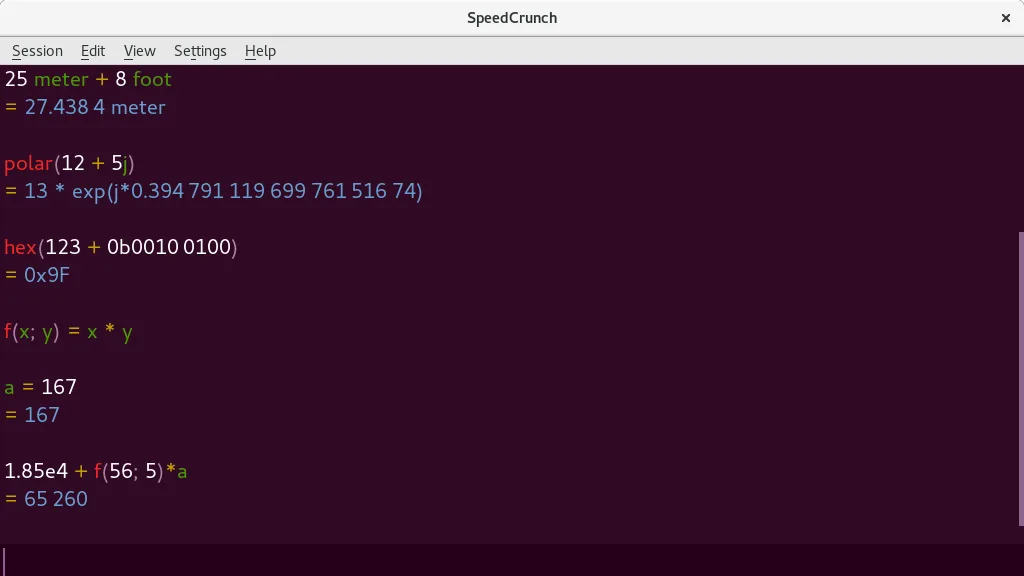
A fast, keyboard-driven scientific calculator with real-time evaluation and high precision.
SpeedCrunch is an excellent replacement for the scientific and programmer aspects of Windows Calculator, particularly for users who prefer keyboard-driven workflows. It handles trigonometry, exponents, and unit conversions with high precision, often exceeding the standard Windows utility. However…
Feature parity80%


What is Windows Calculator?
Windows Calculator is a pre-installed tool for everyday arithmetic, scientific functions, and programmer-specific base conversions. It serves general users, students, and developers who need quick calculations without opening a heavy spreadsheet or IDE. The interface is familiar to anyone who has used Windows, making it a default choice for quick mental math checks or verifying complex formulas.
The application is bundled with the Windows operating system, so there is no separate cost to acquire it. It operates under the standard Microsoft license terms associated with the OS. While it is free for users who already own Windows, it is not available as a standalone product for other platforms. Updates often arrive via Windows Update, introducing new features like the graphing mode added in recent years.
Linux users often seek alternatives because they want a native application that integrates with their desktop environment without relying on Windows compatibility layers. Some prefer open-source tools that respect privacy and system resources. Additionally, Linux users might want specific features like unit conversion or a more customizable interface that the standard Windows app does not provide, leading them to explore dedicated calculator distributions.
What a replacement for Windows Calculator must do
- Standard arithmetic operations
- Scientific functions (trig, exponents)
- Programmer mode (hex, binary, octal)
- Graphing capabilities
- Date calculation
- Unit conversion
- Keyboard support
Can you run Windows Calculator on Linux?
There is no official native Linux version of the Windows Calculator. You can run the Windows version using Wine or Proton, but performance may vary and integration with the Linux desktop is not guaranteed. Since the tool is simple, most Linux users find that native alternatives provide a smoother experience without the overhead of a compatibility layer. I am not certain if the latest graphing features work perfectly under Wine, so testing is recommended if you strictly need that specific mode.
Which alternative should you choose?
KCalc is a solid choice for users who want a standard calculator with a history log and simple scientific functions. gcalctool offers a more traditional interface with a wide range of scientific and engineering features, suitable for those who need detailed calculations. SpeedCrunch is ideal for users who prefer a lightweight, fast application with a clean interface and good keyboard support, often used for quick math tasks.
Moving your Windows Calculator files and habits
There is no significant data to migrate, as calculators typically do not store complex user data. If you use a history feature, you may need to manually copy recent calculations. File formats are not a concern since calculators do not generally save or load project files. The transition is straightforward, involving only the installation of the new application and adjusting to its specific interface layout.
Side-by-side comparison
| App | License | Flatpak | Latest version | Feature parity | Rating |
|---|---|---|---|---|---|
| KCalc | GPL-2.0+ | ✓ | 26.08.3 | 85% | 5/5 |
| gcalctool | GPL-3.0 | — | — | 85% | 4/5 |
| SpeedCrunch | GPL-2.0+ | ✓ | 1.2.0 | 80% | — |
Windows Calculator: frequently asked questions
Does KCalc have a graphing mode?
KCalc does not have a built-in graphing mode comparable to the Windows Calculator's graphing feature. For graphing, you might need a separate tool like GnuPlot or a specialized math application.
Can I use the Windows Calculator with Wine?
Yes, the Windows Calculator can generally run under Wine. However, the experience may not be as seamless as a native Linux app, and some advanced features might not render correctly.
Which alternative is best for programmer mode?
gcalctool and SpeedCrunch both support hexadecimal, binary, and octal calculations. gcalctool offers a more traditional scientific layout, while SpeedCrunch is faster and more minimal.
Is there a Linux calculator with unit conversion?
gcalctool includes unit conversion features. KCalc and SpeedCrunch focus more on arithmetic and scientific functions, so gcalctool is the better choice if unit conversion is a primary need.
How important is Windows Calculator to you?
Know a better alternative? Suggest an alternative