

Windows · Sound & Video
Best Linux alternatives to Windows Movie Maker
Windows Movie Maker was a free, entry‑level video editor bundled with Windows, now discontinued.
Updated
Quick answer
The best Linux alternative to Windows Movie Maker is PiTiVi. Other strong options: Cinelerra, OpenShot, Kdenlive.
5 Linux alternatives to Windows Movie Maker
-
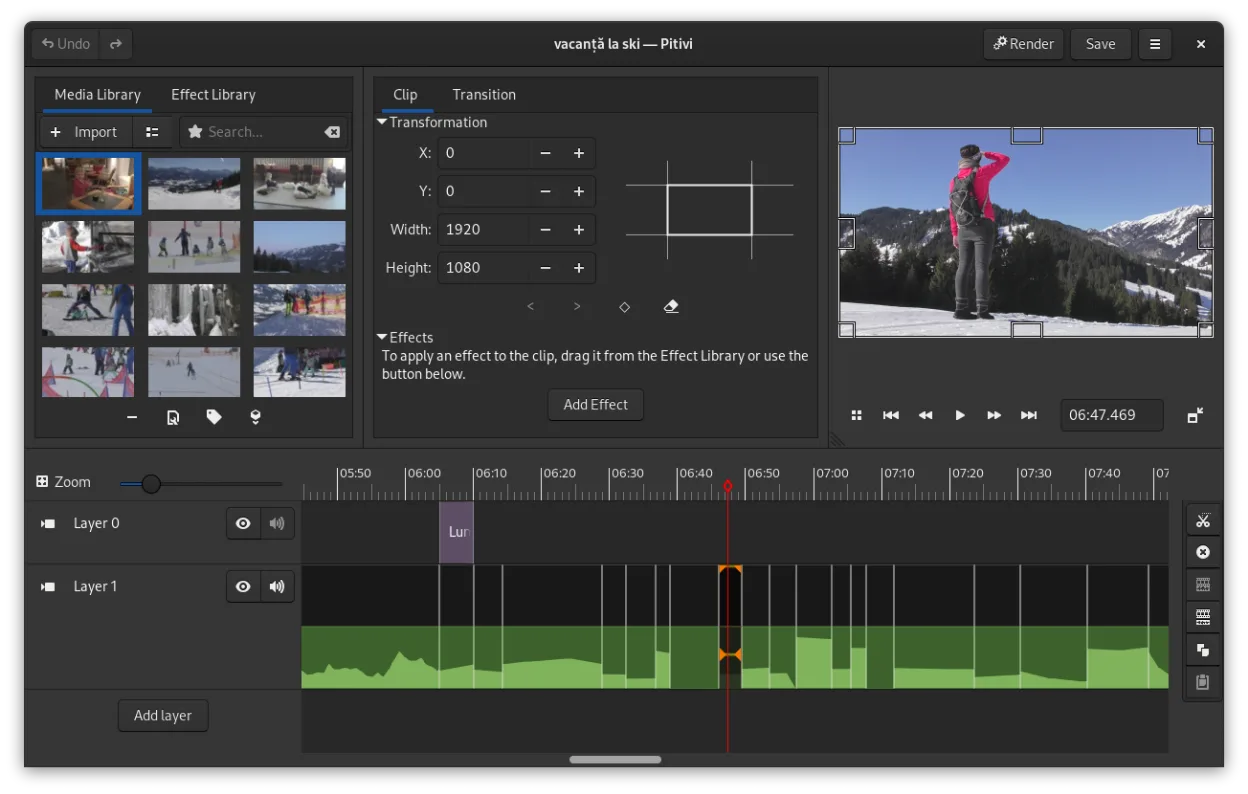
PiTiVi is a free, open-source, non-linear video editor for Linux built on GStreamer with a clean GNOME-integrated interface.
PiTiVi is a decent replacement for Windows Movie Maker for Linux users who want basic to intermediate video editing. It handles trimming, transitions, text overlays, and MP4/AVI exports well, and its interface is clean and beginner-friendly once you get used to the non-modal workflow. While it…
Feature parity80% -

Cinelerra is a professional‑grade, open‑source non‑linear video editor and compositor for Linux.
Cinelerra can replace Windows Movie Maker, but only for users willing to climb a steeper learning curve. It handles all the basic tasks—importing, trimming, adding transitions, titles and simple audio tweaks—so it will work for straightforward projects. However, its interface is geared toward…
Feature parity60% -

OpenShot is a free, open-source, non-linear video editor for Linux and other platforms, built with Python and MLT.
OpenShot is a solid Linux alternative for anyone who used Windows Movie Maker for basic video stitching, trimming, and simple effects. It keeps the drag‑and‑drop workflow, offers unlimited tracks, and adds more polish with keyframe animation and a richer set of transitions. Beginners will feel…
Feature parity80% -

Kdenlive is a free, feature‑rich non‑linear video editor built on the MLT framework.
Kdenlive is a strong replacement for Windows Movie Maker, though it targets a slightly more advanced user base. While Movie Maker was stripped-down and simple, Kdenlive offers a full non-linear editing experience with multi-track timelines and pro-level tools. For beginners, the interface may feel…
Feature parity95% -

Kino is a discontinued GTK+ DV video editor for Linux, aimed at simple capture and basic editing.
Kino can serve as a very basic replacement for Windows Movie Maker for users who need only simple cuts, trims and DV‑oriented exports. It works on Linux, has a straightforward GTK+ interface and handles capture, timeline editing and audio level tweaks. However, it lacks many of the conveniences…
Feature parity60%


What is Windows Movie Maker?
Windows Movie Maker was aimed at casual users who wanted to trim clips, add transitions, and publish videos online without learning complex tools. It shipped free with Windows Me, XP and later the Essentials suite, making it accessible to anyone with a Windows PC. The program’s simple interface appealed to beginners, families, and small‑business owners creating quick video slideshows.
The software was proprietary and distributed at no extra cost as part of the Windows operating system. Because it never required a separate purchase, users expected a fully functional editor without licensing concerns. Its discontinuation leaves a gap for those who still prefer a no‑frills, free editor.
People look for Linux replacements when they switch operating systems or want a native solution that respects open‑source principles. They need an editor that can handle basic cuts, transitions, text overlays, and common export formats without a steep learning curve or hidden fees.
What a replacement for Windows Movie Maker must do
- Import and trim video clips
- Add transitions and simple effects
- Overlay text and titles
- Export to common formats (MP4, AVI)
- Basic audio editing (volume, fade)
- Direct upload to online platforms (optional)
- User‑friendly interface for beginners
Can you run Windows Movie Maker on Linux?
There is no native Linux build of Windows Movie Maker. It can be run under Wine, though stability varies and some features may not work perfectly. No official web version exists, and there is no Proton or Bottles package maintained for it. If you need a reliable native solution, choose a Linux‑native editor instead.
Which alternative should you choose?
For a straightforward, beginner‑friendly experience, OpenShot or PiTiVi are good choices. Users who want more timeline control and effects should try Kdenlive. Kino suits very basic editing on older hardware, while Cinelerra and Kdenlive cater to advanced users needing finer control.
Moving your Windows Movie Maker files and habits
Export your finished Movie Maker project as an MP4 or AVI file before leaving Windows; those containers are universally supported. Import the exported file into the Linux editor of choice and continue editing. Simple project metadata (titles, transitions) will need to be recreated, as there is no direct project‑file compatibility.
Side-by-side comparison
Windows Movie Maker: frequently asked questions
Can I run the original Windows Movie Maker on Linux?
Only via Wine, and it’s not guaranteed to work reliably.
Is there a free Linux editor comparable to Movie Maker?
Yes, OpenShot and PiTiVi provide similar basic editing features at no cost.
Will my existing Movie Maker videos play on Linux?
Export them as MP4 or AVI; those formats play on any Linux video editor.
Do any of the alternatives support direct upload to YouTube?
Kdenlive and OpenShot include simple export presets that can be used with YouTube upload tools.
How important is Windows Movie Maker to you?
Know a better alternative? Suggest an alternative