
 PiTiViLinux
vs
PiTiViLinux
vs
 Windows Movie MakerWindows
PiTiVi as a Linux alternative to Windows Movie Maker
Updated
Our verdict
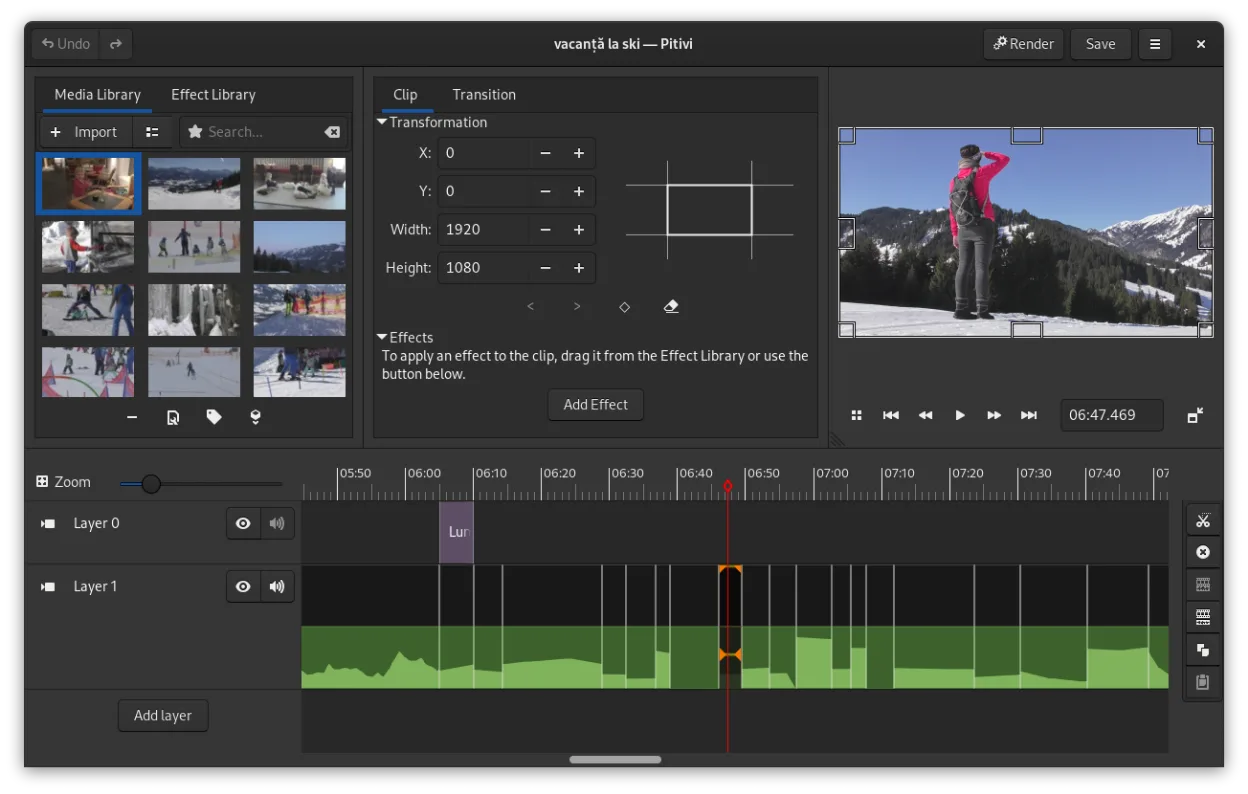
PiTiVi is a decent replacement for Windows Movie Maker for Linux users who want basic to intermediate video editing. It handles trimming, transitions, text overlays, and MP4/AVI exports well, and its interface is clean and beginner-friendly once you get used to the non-modal workflow. While it lacks direct upload to online platforms, it covers the core editing tasks reliably. Best suited for hobbyists and beginners on GNOME-based systems who value simplicity and integration over advanced features.
- License
- LGPL-2.0+
- Price
- Free
- Latest version
- 2023.03 (March 26, 2023)
- Rating
- —
What works the same
- Both support importing and trimming video clips on a timeline
- Offer basic transitions like crossfades and simple effects
- Allow text and title overlays
- Export to common formats including MP4 and AVI
- Provide basic audio editing such as volume adjustment
What is different
- PiTiVi has keyframe animation and ripple editing, which Windows Movie Maker lacks
- PiTiVi uses a non-modal workflow, differing from Movie Maker’s modal approach
- No direct upload to YouTube or other platforms in PiTiVi
- PiTiVi supports any GStreamer-compatible format, broader than Movie Maker’s support
- Windows Movie Maker had a simpler, more guided interface for absolute beginners
Opening your Windows Movie Maker files
PiTiVi cannot open Windows Movie Maker project files (.mswmm), as they are proprietary and not supported by the GStreamer framework. You would need to export videos from Movie Maker to a common format like MP4 or AVI before using them in PiTiVi. Once exported, PiTiVi can import those video files without issue. Project re-creation in PiTiVi is necessary for editing. There is no known tool to convert .mswmm files directly to PiTiVi projects.
Switching from Windows Movie Maker to PiTiVi, step by step
- Export your old Movie Maker projects to MP4 or AVI if you need the video
- Install PiTiVi via your distribution’s package manager or Flathub
- Import your video clips into PiTiVi and arrange them on the timeline
- Recreate transitions, titles, and audio edits using PiTiVi’s tools
- Use custom render presets to export in your desired format and quality
Key features of PiTiVi
- Non-linear editing with a framerate-independent timeline
- Supports any format handled by GStreamer
- Keyframe animation for effects and filters
- Ripple and roll editing for efficient timeline adjustments
- Custom aspect ratios, framerates, and render presets
- Crossfades and SMPTE-standard transitions
- Detachable UI panels for multi-monitor setups
- Non-modal editing workflow with playhead-centric design
How to install PiTiVi on Linux
flatpak install flathub org.pitivi.Pitivisudo apt install pitivisudo apt install pitivisudo dnf install pitivisudo pacman -S pitivisudo zypper install pitiviFrequently asked questions
Can PiTiVi run on non-GNOME Linux desktops?
Yes, PiTiVi runs on any Linux desktop environment, though it integrates best with GNOME. It may require additional libraries on non-GNOME systems like KDE or XFCE.
Does PiTiVi support keyboard shortcuts for faster editing?
Yes, PiTiVi includes customizable keyboard shortcuts for trimming, splitting, and timeline navigation, which helps speed up editing once learned.
Is PiTiVi actively maintained?
Yes, PiTiVi is actively developed, with the latest stable release in March 2023 and regular updates through distributions and Flathub.
4 other alternatives to Windows Movie Maker
 CinelerraCinelerra is a professional‑grade, open‑source non‑linear video editor and compositor for Linux.Open sourceFreeCinelerra vs Windows Movie Maker
 OpenShotOpenShot is a free, open-source, non-linear video editor for Linux and other platforms, built with Python and…Open sourceFreeFlatpakOpenShot vs Windows Movie Maker
 KdenliveKdenlive is a free, feature‑rich non‑linear video editor built on the MLT framework.Open sourceFreeFlatpakKdenlive vs Windows Movie Maker
 KinoKino is a discontinued GTK+ DV video editor for Linux, aimed at simple capture and basic editing.Open sourceFreeDiscontinuedKino vs Windows Movie Maker