

Windows · Graphics
Best Linux alternatives to Windows Paint
A simple raster image editor for basic drawing, cropping, and color manipulation, originally bundled with Windows.
Updated
2 Linux alternatives to Windows Paint
-

Pinta is a free, open‑source bitmap editor that mimics Paint.NET with a simple interface and layer support.
Pinta is a solid drop‑in for anyone who outgrows the very limited Windows Paint but still wants a lightweight editor. It offers the basic drawing tools, shape tools, color picker, fill bucket and text insertion that Paint users expect, and it runs quickly on most desktops. The extra layer support…
Feature parity80% -
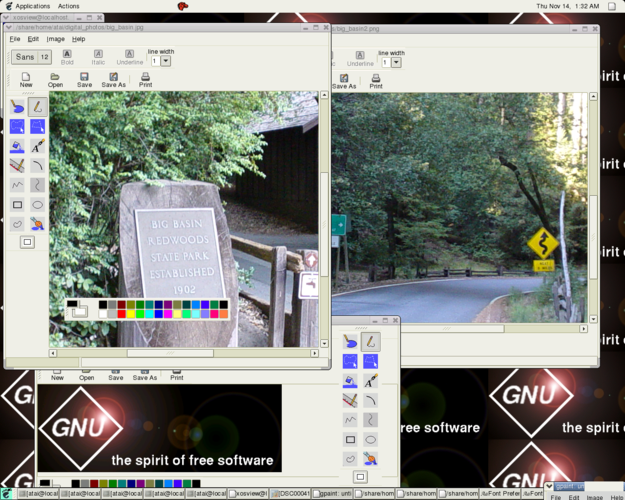
GNU Paint (Gpaint) is a simple, GPL‑licensed raster graphics editor for Linux, modeled after Microsoft Paint.
Gpaint is a solid replacement for Windows Paint for users who need basic drawing tools on Linux. It handles simple tasks like sketching, coloring, and minor image edits without bloat. The interface is straightforward, and it starts quickly, even on older hardware. If you're used to Paint's minimal…
Feature parity90%


What is Windows Paint?
Microsoft Paint is the default raster graphics editor in Windows, used for quick tasks like cropping screenshots, simple drawing, and basic color adjustments. It serves casual users, students, and IT support staff who need a lightweight tool for immediate image fixes without the complexity of professional software like Photoshop or GIMP. Its interface is intentionally minimal, focusing on core brush, fill, and shape tools.
Paint has always been free to use as part of the Windows operating system. There is no separate license fee or subscription model. It is included in every standard Windows installation, making it universally available on Windows PCs without additional cost or setup. This zero-cost model is a key part of its widespread adoption for simple tasks.
People seek Linux alternatives because Paint is not natively available on Linux distributions. While Wine can run some Windows apps, Paint is a system-integrated component that often fails to launch or function correctly under compatibility layers. Users need a native Linux application that offers the same straightforward workflow for basic image editing without relying on Windows emulation.
What a replacement for Windows Paint must do
- Basic drawing tools like pencil and brush
- Color picker and fill bucket
- Simple shape drawing (rectangles, lines)
- Image resizing and cropping
- Text insertion capability
- Support for common formats like PNG and BMP
- Lightweight and fast startup
Can you run Windows Paint on Linux?
There is no official native Linux version of Microsoft Paint. Running it via Wine or Proton is unreliable because Paint depends heavily on specific Windows system components and APIs that are not fully implemented in compatibility layers. You may encounter launch failures or missing features. For a stable experience, you should use a native Linux application rather than attempting to run the Windows version.
Which alternative should you choose?
Pinta is the better choice if you want a modern interface that feels similar to Paint but includes slightly more advanced features like layers and filters. It is well-maintained and user-friendly. Gpaint is a lighter option if you prefer a very basic, no-frills editor that closely mimics the original Paint interface. Choose Pinta for a more polished experience or Gpaint for maximum simplicity.
Moving your Windows Paint files and habits
Migration is straightforward because both Pinta and Gpaint support common image formats like PNG, JPG, BMP, and GIF. You do not need to convert files; simply open your existing images in the new application. If you have saved Paint files in the proprietary .msp format, you may need to convert them to PNG or JPG first, as Linux alternatives typically do not support this legacy format. Your workflow remains the same: open, edit, save.
Side-by-side comparison
Windows Paint: frequently asked questions
Can I use Windows Paint on Linux via Wine?
It is not recommended. Paint often fails to run correctly under Wine due to missing system dependencies. Native Linux alternatives like Pinta are more reliable and perform better.
Is Pinta suitable for beginners?
Yes, Pinta is designed to be simple and intuitive. It has a clean interface that does not overwhelm new users, making it a good replacement for Paint.
Does Gpaint support layers?
Gpaint is a very basic editor and does not support layers. If you need layers, Pinta is the better choice among the listed alternatives.
Which format should I use for saving?
Use PNG for images with transparency or if you plan to edit them again later. Use JPG for photos where file size is a concern. Both Pinta and Gpaint handle these formats well.
How important is Windows Paint to you?
Know a better alternative? Suggest an alternative