
Windows · Graphics
Best Linux alternatives to Adobe Camera Raw
Adobe Camera Raw is a Photoshop plugin that decodes raw images and offers non‑destructive editing.
Updated
Quick answer
The best Linux alternative to Adobe Camera Raw is darktable. Other strong options: RawTherapee, GIMP, Krita.
5 Linux alternatives to Adobe Camera Raw
-

darktable is a free, open‑source photo editor that manages raw files and offers a full non‑destructive workflow.
darktable is a solid replacement for Adobe Camera Raw for Linux users who need a free, open‑source, non‑destructive raw workflow. It covers the core tasks of opening raw files, adjusting exposure, white balance, contrast, sharpening, and exporting to JPEG/TIFF/PNG. It is best suited for…
Feature parity85% -

RawTherapee is an open‑source, cross‑platform raw photo development program.
RawTherapee is a strong, honest replacement for Adobe Camera Raw if you need deep control over raw processing without proprietary lock-in. It handles non-destructive editing, color management, and batch processing effectively. However, it lacks the polished, integrated workflow of Adobe’s…
Feature parity85% -

GIMP is a free, open-source raster graphics editor for photo editing, digital painting, and image composition.
GIMP is a viable replacement for Adobe Camera Raw if you are comfortable with a different workflow. It handles RAW decoding via plugins like Darktable or RawTherapee, which you can integrate or use alongside GIMP for the heavy lifting. GIMP excels at the final retouching, compositing, and export…
Feature parity65% -

Krita is a full‑featured open‑source digital painting and illustration program.
Krita can serve as a practical replacement for Adobe Camera Raw for users who need to open and edit raw files on Linux, especially photographers who already use Krita for painting or illustration. It handles most common raw formats, offers non‑destructive editing via layers and masks, and provides…
Feature parity70% -
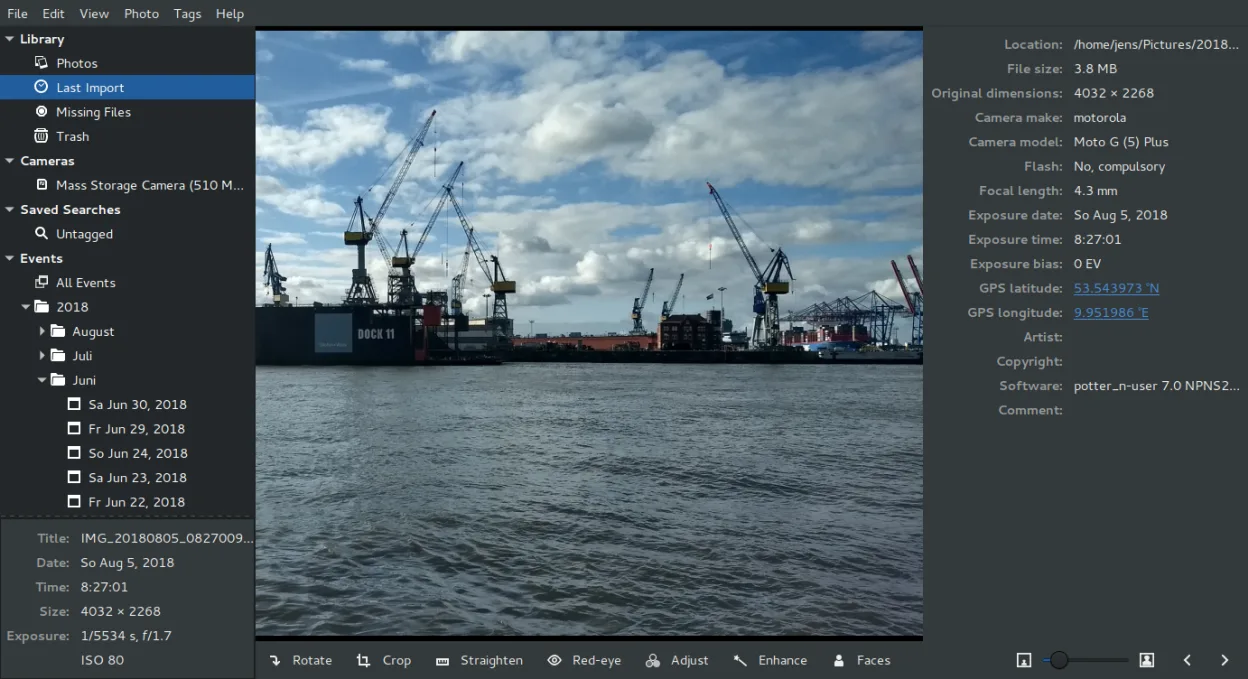
Shotwell is a GNOME photo manager for importing, organizing, and lightly editing images.
Shotwell is not a direct replacement for Adobe Camera Raw. ACR is a specialized raw converter and non-destructive editor, while Shotwell is a photo organizer with only basic editing tools. If you need deep raw processing, precise color management, or batch conversion of raw files, Shotwell will…
Feature parity35%



What is Adobe Camera Raw?
Adobe Camera Raw lets photographers open and edit raw files from many cameras, applying color profiles and basic adjustments before exporting to JPEG, TIFF or other formats. The tool is bundled with Adobe Photoshop, which is subscription‑based and runs only on Windows and macOS. Linux users need a native application that can read raw files and provide similar editing features.
Photographers and studio staff use Camera Raw to process images quickly and maintain a non‑destructive workflow. Because the software is proprietary and tied to Photoshop, it is unavailable on Linux, forcing users to look for open‑source or free alternatives.
The main reasons for searching a Linux replacement are the lack of a native app, the need for raw support, and the desire to keep editing workflows on a single platform without running Windows or a virtual machine.
What a replacement for Adobe Camera Raw must do
- Open raw image formats from many cameras
- Non‑destructive editing (history stack)
- Color management and ICC profile support
- Basic adjustments: exposure, white balance, contrast, sharpening
- Export to common formats (JPEG, TIFF, PNG)
- Batch processing capability
- User interface that integrates with the rest of the Linux image stack
Can you run Adobe Camera Raw on Linux?
Darktable, RawTherapee, GIMP, Krita, and Shotwell all run natively on Linux. None of them is a direct drop‑in for Adobe Camera Raw, but they provide comparable raw handling and editing features. No Wine, Proton, or Bottles version is required because the applications are native.
Which alternative should you choose?
If you need a full‑featured raw editor with advanced color management, Darktable is the best fit. RawTherapee offers a similar feature set with a different workflow and is good for users who prefer its interface. GIMP and Krita are more general‑purpose image editors; use them if you already work with them and only need occasional raw support. Shotwell is suitable for simple photo management and light editing, but it lacks advanced raw processing.
Moving your Adobe Camera Raw files and habits
Export your raw files to a common format like TIFF or JPEG before moving to Linux, or use the native raw support in the chosen application. All listed alternatives can open Adobe DNG and most camera raw formats directly, so you can open the files without conversion. When moving presets or adjustment histories, you may need to recreate them manually, as the proprietary settings are not transferable.
Side-by-side comparison
| App | License | Flatpak | Latest version | Feature parity | Rating |
|---|---|---|---|---|---|
| darktable | GPL-3.0+ | ✓ | 5.6.2 | 85% | — |
| RawTherapee | GPL-3.0+ | ✓ | 5.13 | 85% | — |
| GIMP | GPL-3.0+ AND LGPL-3.0+ | ✓ | 3.2.6 | 65% | — |
| Krita | GPL-3.0-only | ✓ | 5.3.4.1 | 70% | — |
| Shotwell | LGPL-2.1+ | ✓ | 33.0 | 35% | — |
Adobe Camera Raw: frequently asked questions
Can I open DNG files with Darktable?
Yes, Darktable supports DNG and most other raw formats out of the box.
Is RawTherapee free?
RawTherapee is free and open source under the GPL.
Do I need to install Wine to run Camera Raw on Linux?
No, Camera Raw is not available on Linux; use a native alternative instead.
Can I use Shotwell for advanced editing?
Shotwell is mainly a photo manager; it offers basic adjustments but not full raw editing.
How important is Adobe Camera Raw to you?
Know a better alternative? Suggest an alternative