
Windows · Sound & Video
Best Linux alternatives to WinX DVD Ripper
WinX DVD Ripper copies DVDs to digital files, often bypassing copy protection, used mainly for personal backups.
Updated
Quick answer
The best Linux alternative to WinX DVD Ripper is HandBrake. Other strong options: VLC, MakeMKV, FFmpeg.
5 Linux alternatives to WinX DVD Ripper
-
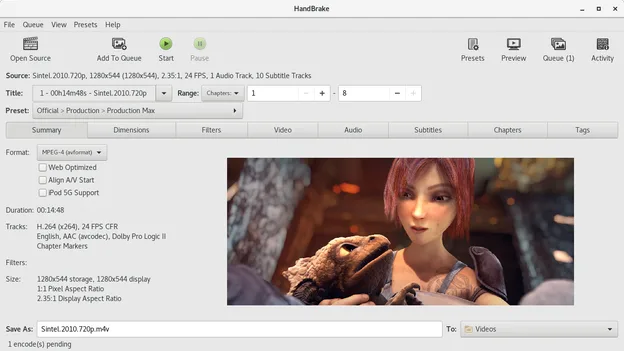
HandBrake is a free, open‑source video transcoder that converts almost any video format to modern codecs.
HandBrake is not a direct replacement for WinX DVD Ripper if you need to read encrypted DVDs, as it cannot bypass copy protection. It excels at converting already-decoded video into MP4 or MKV with good quality and speed, supports subtitles and audio track selection, and handles batch jobs well…
Feature parity65% -

VLC is a free, open‑source multimedia player that handles virtually any audio or video format.
VLC can technically rip DVDs, but it's not designed as a dedicated DVD ripper like WinX DVD Ripper. It handles unencrypted DVDs well and can convert video to MP4 or MKV, but struggles with encrypted commercial DVDs unless libdvdcss is manually installed. It lacks hardware acceleration for ripping…
Feature parity45% -
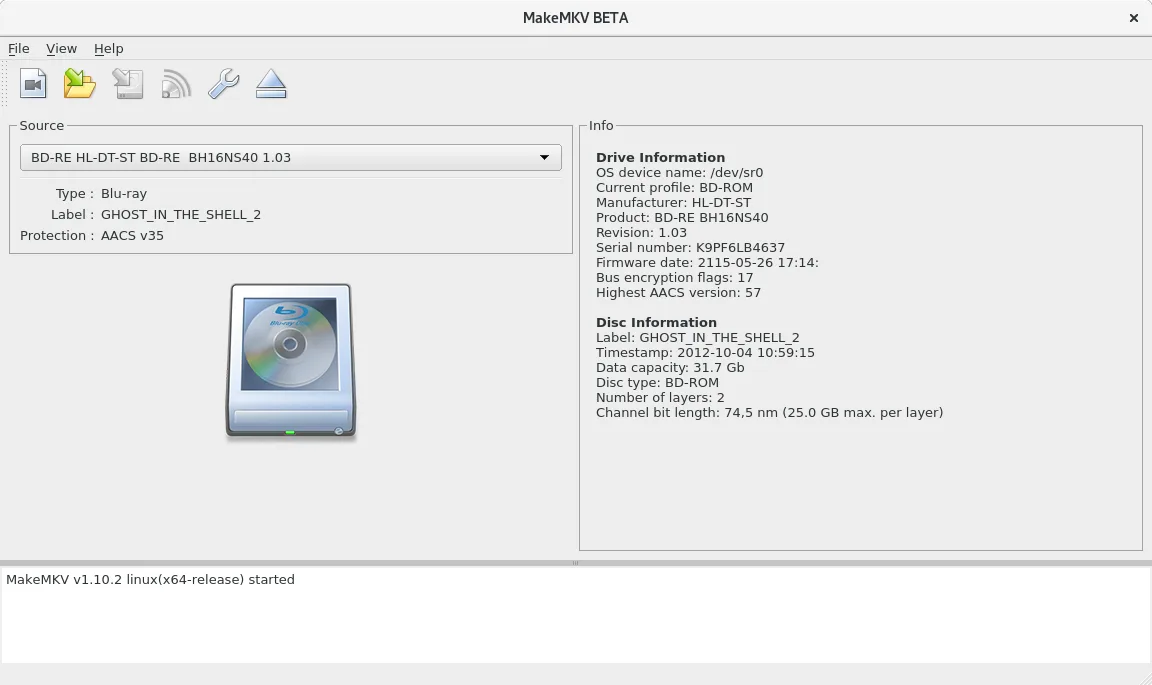
MakeMKV converts DVDs and Blu-rays to MKV files or streams them decrypted over the network.
MakeMKV is a solid replacement for WinX DVD Ripper on Linux, especially for users who want to back up DVDs and Blu-rays without re-encoding. It handles encrypted discs, preserves audio tracks, subtitles, and chapters, and outputs to MKV without quality loss. While it lacks hardware acceleration and…
Feature parity80% -
FFmpeg is a powerful command-line toolkit for converting, streaming, and processing audio and video files.
FFmpeg is not a direct replacement for WinX DVD Ripper for most average users, but it can be a good replacement for experienced Linux users comfortable with the command line. While FFmpeg handles format conversion and batch processing well, it cannot natively read encrypted DVDs without additional…
Feature parity50% -

K9Copy is a KDE utility for backing up and compressing DVDs on Linux.
K9Copy is a partial replacement for WinX DVD Ripper, suitable only for basic DVD backups on Linux. It can read unprotected DVDs and create ISO images or compressed copies, preserving selected titles and audio tracks. However, it does not reliably handle encrypted DVDs, lacks hardware acceleration…
Feature parity45%




What is WinX DVD Ripper?
WinX DVD Ripper is a Windows tool designed to rip DVDs into digital video formats like MP4, MKV, or AVI. It's commonly used by individuals who want to back up their DVD collections or convert them for use on devices that don't support physical discs. The software handles encrypted DVDs, making it popular for copying commercial movies.
The program is proprietary and sold as paid software, with a free version available that includes ads and feature limitations. The Pro version unlocks full functionality, including faster ripping and broader format support. There are no subscription fees—just a one-time purchase.
People seek Linux alternatives because WinX DVD Ripper doesn't run natively on Linux, and many Linux users prefer open-source tools. Additionally, some want more control over encoding settings or better integration with their existing workflows. Legal concerns around circumventing DRM also push users toward transparent, community-maintained tools.
What a replacement for WinX DVD Ripper must do
- Read encrypted DVDs
- Convert to common formats (MP4, MKV)
- Preserve subtitles and audio tracks
- Fast ripping with hardware acceleration
- Support for ISO and folder-based DVD images
- Simple GUI for beginners
- Batch processing
Can you run WinX DVD Ripper on Linux?
No native Linux version of WinX DVD Ripper exists. It does not have a web version. Running it via Wine is unlikely to work reliably due to DRM and codec dependencies. Proton and Bottles are not suitable for this type of application. Users should rely on native Linux alternatives instead.
Which alternative should you choose?
For most users, HandBrake is the best starting point—it's user-friendly and handles basic DVD ripping well. VLC can rip and convert DVDs but requires manual setup. MakeMKV excels at reading encrypted DVDs and preserving all tracks. FFmpeg is ideal for scripting and advanced users. K9Copy (if available) offers a GUI similar to older DVD rippers but is outdated and not actively maintained.
Moving your WinX DVD Ripper files and habits
There's no direct data to migrate since WinX DVD Ripper doesn't store libraries. Any ripped files in MP4 or MKV format will play on Linux. Ensure your new tool outputs compatible formats. If you used custom presets, recreate them in HandBrake or FFmpeg. DVD decryption keys are handled automatically by tools like libdvdcss, which MakeMKV and VLC use when installed.
Side-by-side comparison
WinX DVD Ripper: frequently asked questions
Can I rip copy-protected DVDs on Linux?
Yes, with tools like MakeMKV or VLC if libdvdcss is installed. These handle most commercial DVD encryption.
Is HandBrake enough for ripping DVDs?
HandBrake works well if the DVD isn't encrypted. For protected discs, pair it with libdvdcss or use MakeMKV first.
Do I need to buy anything?
No. All recommended Linux tools are free and open-source. No paid versions or subscriptions are required.
Why doesn't WinX DVD Ripper work in Wine?
It relies on Windows-specific DRM handling and codecs that Wine doesn't fully support, leading to crashes or failures.
How important is WinX DVD Ripper to you?
Know a better alternative? Suggest an alternative