
Windows · System Tools
Best Linux alternatives to Corsair iCUE
Corsair iCUE controls Corsair RGB devices, fans, and peripherals on Windows, but lacks full native Linux support.
Updated
Quick answer
The best Linux alternative to Corsair iCUE is OpenRGB.
1 Linux alternatives to Corsair iCUE
-
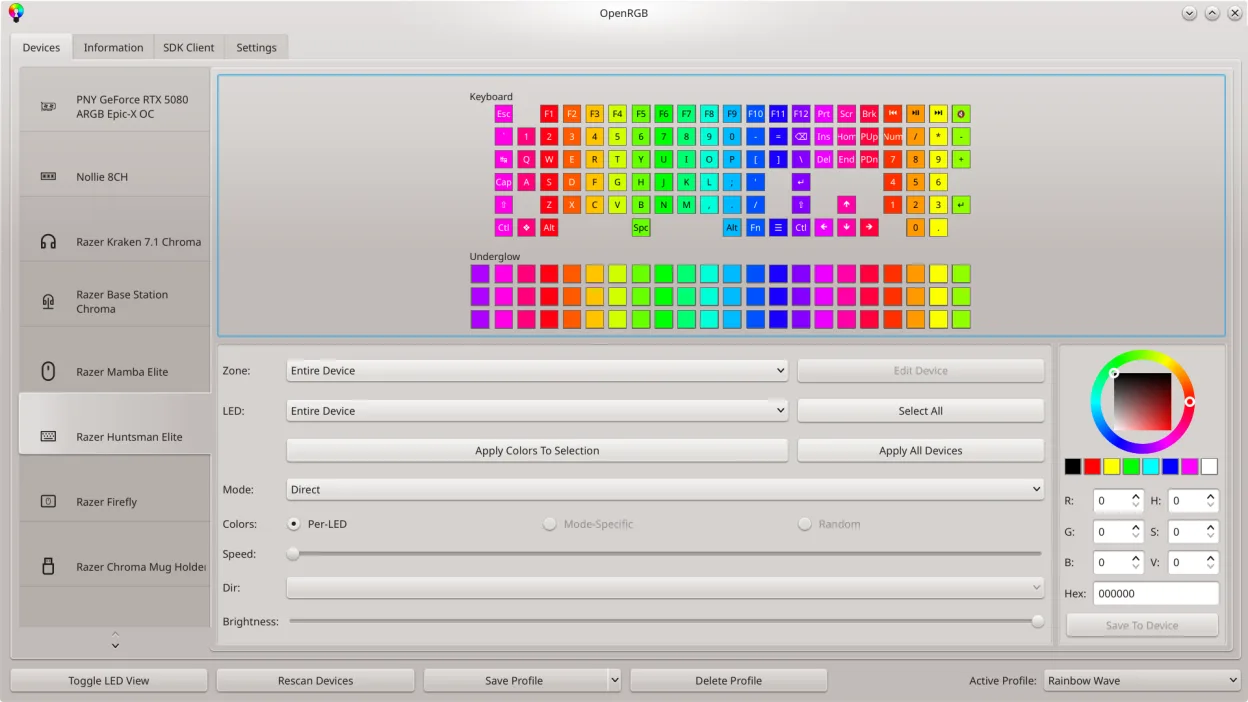
OpenRGB lets you control RGB lighting on Linux without vendor apps.
OpenRGB is a solid replacement for Corsair iCUE on Linux if your main goal is RGB control and fan management without being locked into Windows. It supports Corsair devices and many other brands, offering unified lighting effects, custom profiles, and scripting via CLI. While firmware updates and…
Feature parity80%

What is Corsair iCUE?
Corsair iCUE is used by PC enthusiasts to manage Corsair hardware, including RGB lighting, cooling fans, keyboards, and mice. It allows synchronized lighting effects, fan curve customization, and firmware updates through a single interface. Users often rely on it to maintain aesthetic and thermal control over custom-built systems.
The software is free to use but only officially supports Windows. It's tied to Corsair hardware ownership—functionality is limited without compatible devices. There's no subscription, but advanced features require specific Corsair products. No Linux version is officially supported.
People seek Linux alternatives because iCUE lacks native Linux support and doesn't run reliably via compatibility layers. Linux users with Corsair RGB gear want similar control over lighting and devices. As more users switch to Linux for daily use, demand grows for open tools that support Corsair and other brand peripherals.
What a replacement for Corsair iCUE must do
- Control Corsair RGB lighting on memory, coolers, and cases
- Manage fan speeds with custom curves
- Synchronize lighting across multiple Corsair devices
- Update firmware on Corsair peripherals
- Support for other brands of RGB hardware
- Monitor device temperatures and status
- Run without requiring Windows
Can you run Corsair iCUE on Linux?
Corsair iCUE does not have a native Linux version and runs poorly under Wine or Proton. Some users report partial functionality with Bottles, but device detection and RGB control are unreliable. Firmware updates and fan control often fail. There is no web version. For stable Linux use, third-party tools like OpenRGB are preferred, though they don't support all Corsair features.
Which alternative should you choose?
OpenRGB is best for users with Corsair RAM, coolers, or other RGB gear needing cross-brand control. It supports many devices and offers lighting synchronization. Argon2 GUI is unrelated to RGB or fan control—it's a password hashing tool, not a valid alternative. rkhunter is a security scanner and irrelevant here. Only OpenRGB meaningfully replaces iCUE's core lighting functionality on Linux.
Moving your Corsair iCUE files and habits
There's no direct way to export iCUE profiles to Linux. Configuration files from iCUE aren't compatible with OpenRGB. Users must recreate lighting effects and fan curves manually. OpenRGB supports importing some profiles from other brands, but Corsair-specific settings don't transfer. Start by updating device firmware in Windows before switching.
Corsair iCUE: frequently asked questions
Can OpenRGB control all Corsair devices?
OpenRGB supports many Corsair devices, especially RGB RAM and coolers, but not all. Check OpenRGB's device compatibility list for specifics. Some newer models may lack support.
Does iCUE work under Wine?
iCUE rarely works under Wine. Users report crashes, missing device detection, and non-functional RGB or fan controls. It's not a reliable option on Linux.
Can I update Corsair firmware on Linux?
Firmware updates usually require Windows. Run updates in Windows before switching to Linux, or use a dual-boot setup when updates are released.
Is OpenRGB safe to use?
Yes, OpenRGB is open-source and widely used. It doesn't modify firmware unless instructed. Always verify device detection to avoid misconfigurations.
How important is Corsair iCUE to you?
Know a better alternative? Suggest an alternative