
 DBeaver CommunityLinux
vs
Microsoft Azure Data StudioWindows
DBeaver Community as a Linux alternative to Microsoft Azure Data Studio
Updated
Our verdict
DBeaver Community is a strong, functional replacement for most Azure Data Studio users who need a general-purpose SQL IDE. It handles SQL Server, PostgreSQL, and MySQL connections well, offering a robust query editor and metadata browser. However, it lacks the tight Azure integration and specific cloud management features found in ADS. If your work is primarily local or on-premise SQL Server, DBeaver is excellent. If you rely heavily on Azure-specific tooling or notebook-style scripting, you may find the gap noticeable. It is best for developers who want one tool for many database types rather than a cloud-centric workflow.
- License
- Apache-2.0
- Price
- Free
- Latest version
- 26.2.3 (October 18, 2026)
- Rating
- —
What works the same
- Supports SQL Server, MySQL, and PostgreSQL connections
- Provides a SQL editor with syntax highlighting and autocompletion
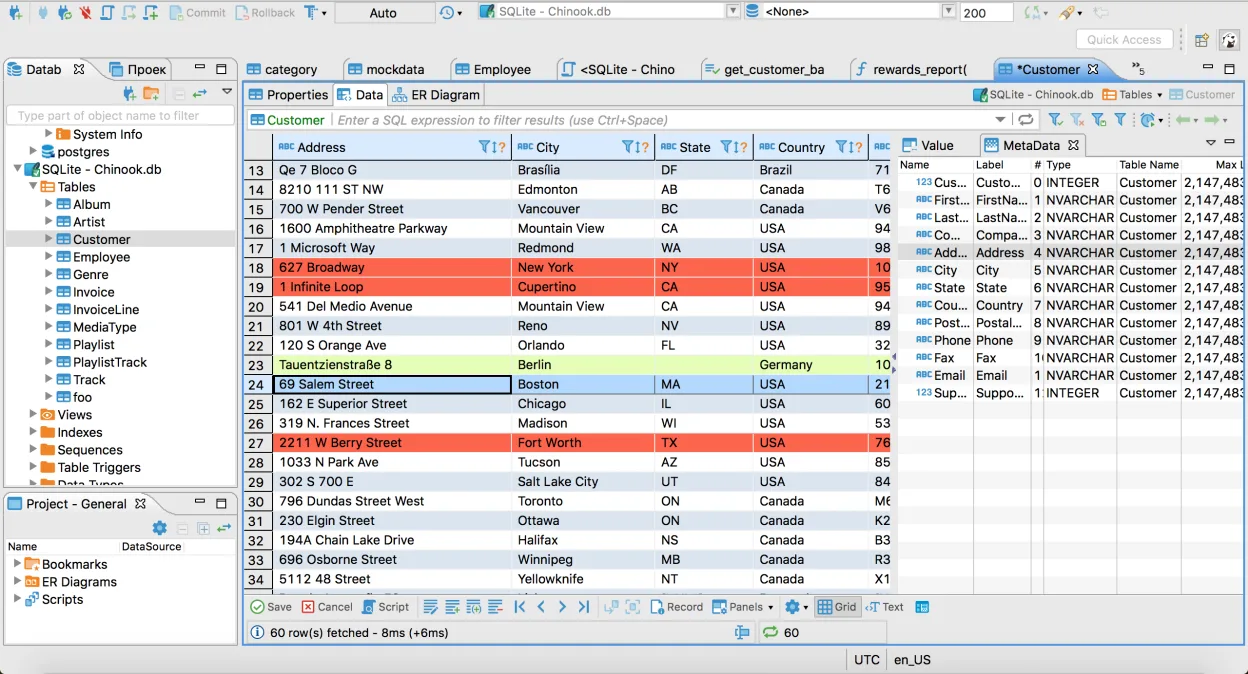
- Includes a visual grid for viewing and editing table data
- Allows browsing database objects like tables, views, and procedures
- Supports multiple simultaneous database connections in one workspace
What is different
- Lacks native Azure portal integration and specific cloud service management tools
- No built-in Jupyter notebook support for data science workflows
- Different interface layout and navigation logic compared to the VS Code-based ADS
- Fewer built-in extensions for specific cloud provider tasks
Opening your Microsoft Azure Data Studio files
DBeaver does not natively open Microsoft Azure Data Studio workspace files (.code-workspace) or its specific notebook formats. You will need to manually recreate your connection settings and copy your SQL scripts into DBeaver's project structure. Saved queries in ADS are typically plain .sql files, which DBeaver can open directly, but any complex workspace configurations or extension states will not transfer.
Switching from Microsoft Azure Data Studio to DBeaver Community, step by step
- Export your SQL scripts from Azure Data Studio as .sql files
- Install DBeaver Community via your package manager or Flathub
- Create new connections in DBeaver for your SQL Server and other databases
- Import your .sql files into DBeaver's project folder
- Configure connection properties such as authentication and server details
- Test a few queries to verify connectivity and performance
Key features of DBeaver Community
- Supports MySQL, PostgreSQL, Oracle, SQL Server, SQLite, and many other databases
- Universal SQL editor with syntax highlighting and autocompletion
- Visual data grid for viewing and editing table contents
- ER diagram generation for database schema visualization
- Data import and export tools supporting CSV, XML, and JSON
- Built-in database metadata browser for tables, views, and procedures
- Support for multiple database connections in a single workspace
- Plugin architecture for extending functionality with additional drivers
How to install DBeaver Community on Linux
flatpak install flathub io.dbeaver.DBeaverCommunitysudo pacman -S dbeaverFrequently asked questions
Can DBeaver connect to Azure SQL Database?
Yes, DBeaver supports SQL Server connections, which includes Azure SQL Database. You just need the correct JDBC driver, which DBeaver can usually download automatically.
Is DBeaver Community free for commercial use?
Yes, DBeaver Community is licensed under Apache-2.0, allowing free use for both personal and commercial purposes without licensing fees.
Does DBeaver support database schema diagrams?
Yes, it includes an ER diagram generation tool that visualizes the relationships between tables in your database schema.
4 other alternatives to Microsoft Azure Data Studio
 DataGripJetBrains' multi-database IDE for SQL developers, supporting JDBC connections to major DBMS with smart…FlatpakDataGrip vs Microsoft Azure Data Studio
 pgAdmin 4pgAdmin 4 is a web‑based administration and development platform for PostgreSQL.Open sourceFreeFlatpakpgAdmin 4 vs Microsoft Azure Data Studio
 Beekeeper StudioA cross‑platform SQL editor that replaces HeidiSQL on Linux with a modern UI and advanced features.Open sourceFreeFlatpakBeekeeper Studio vs Microsoft Azure Data Studio
 SQuirreL SQL ClientA Java-based GUI SQL client for browsing data and running queries on any JDBC-compliant database.Open sourceFreeFlatpakSQuirreL SQL Client vs Microsoft Azure Data Studio