
Windows · Sound & Video
Best Linux alternatives to GarageBand
GarageBand is Apple's beginner-friendly DAW for creating music and podcasts using loops, synths, and multi-track recording.
Updated
Quick answer
The best Linux alternative to GarageBand is LMMS. Other strong options: Ardour, Audacity, MuseScore.
5 Linux alternatives to GarageBand
-

LMMS is a free digital audio workstation for composing, sequencing, and mixing music using synths and samples.
LMMS is a solid, free replacement for GarageBand if you focus on electronic music production and MIDI sequencing. It covers the core needs: multitrack mixing, built-in synths, drum machines, and loop libraries. However, it is not a direct 1:1 swap. GarageBand is famously beginner-friendly with a…
Feature parity75% -

Ardour is a professional open-source digital audio workstation for recording, editing, and mixing audio and MIDI.
Ardour is a strong, professional-grade replacement for GarageBand, though it targets a different user level. It covers all core needs: multitrack recording, MIDI sequencing, and mixing. However, it lacks the immediate, drag-and-drop simplicity and bundled beginner-friendly loop library that makes…
Feature parity85% -

Audacity is a free, cross‑platform audio editor and recorder used for editing, mixing and restoring sound.
Audacity is a solid replacement for GarageBand if your focus is recording, editing, and mixing audio. It handles multitrack sessions, applies effects, and exports standard formats well. However, it lacks GarageBand's built-in virtual instruments, drum machines, and loop library. If you rely heavily…
Feature parity60% -

MuseScore is free, open-source music notation software for creating and playing back professional-quality sheet music.
MuseScore is not a direct replacement for GarageBand. It is a notation program, not a full‑featured DAW. If you need to write sheet music, add chords, and listen to playback with a mix of virtual instruments, MuseScore works well. For recording, multi‑track audio editing, podcasting, or using…
Feature parity30% -
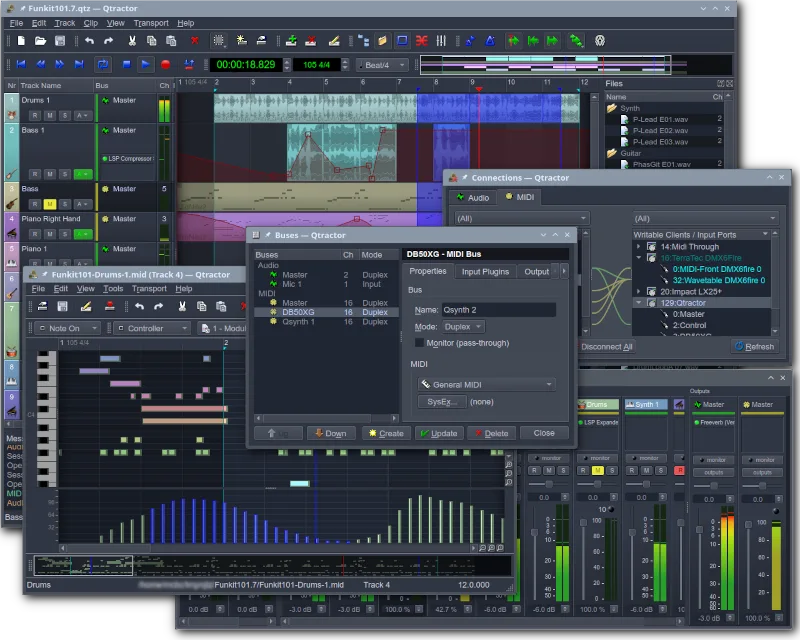
Qtractor is a free, open-source Audio/MIDI multi-track sequencer for Linux, designed as a desktop audio workstation.
Qtractor is a solid, free replacement for GarageBand if you are comfortable with Linux audio infrastructure. It handles multitrack recording, MIDI sequencing, and mixing well, making it suitable for hobbyists who want a dedicated DAW. However, it lacks GarageBand’s intuitive, drag-and-drop…
Feature parity75%





What is GarageBand?
GarageBand serves as an entry-level digital audio workstation for hobbyists, students, and aspiring producers. It simplifies music creation by providing pre-made loops, software synthesizers, and a straightforward multitrack interface. Users typically start here to learn basic mixing and arrangement before moving to professional tools, making it a popular first step for many in the music production world.
The software is exclusively available from Apple, included free with new Macs and iPads, or purchasable from the App Store. It operates on a closed ecosystem, meaning it only runs on macOS and iOS. There is no subscription model; once installed, you have full access to its features without additional fees, though updates are tied to Apple's release cycles.
Linux users seek alternatives because GarageBand is not available on the platform. Many Linux users are musicians or podcasters who prefer the open-source ecosystem for its flexibility and lack of vendor lock-in. They need a tool that offers similar loop-based creation and multitrack recording capabilities without requiring a Mac or relying on compatibility layers that may not support audio drivers well.
What a replacement for GarageBand must do
- Multitrack recording and mixing interface
- Access to software synthesizers and drum machines
- Library of pre-made audio loops
- Basic audio editing and effects processing
- Support for MIDI instruments and sequencing
- Export options for standard audio formats
Can you run GarageBand on Linux?
There is no native Linux version of GarageBand. It is a proprietary Apple application designed specifically for macOS and iOS. Running it via Wine or Proton is not a viable option due to its deep integration with Apple's audio frameworks and hardware drivers. You cannot use it on Linux without significant technical hurdles that are not recommended for average users. You must use a native Linux application to achieve similar results.
Which alternative should you choose?
If you want the closest experience to GarageBand's loop-based, beat-making workflow, LMMS is the best fit. For users who need a more professional, multitrack recording and mixing environment similar to Logic Pro, Ardour is the superior choice. Audacity is ideal if your primary need is simple audio editing and recording rather than full music production. MuseScore is for sheet music notation, so only choose it if you need to write out compositions. Qtractor is a solid option for MIDI sequencing and lightweight project management if you prefer a modular approach.
Moving your GarageBand files and habits
Migrating from GarageBand to Linux involves converting project files, as GarageBand's .band format is proprietary and not directly compatible with Linux DAWs. You should export your final mixes as WAV or AIFF files for high-quality audio transfer. For MIDI data, export individual tracks as Standard MIDI Files (SMF) to import into LMMS or Ardour. Note that specific Apple plugins and loop libraries will not transfer; you will need to recreate sounds using the native instruments available in your chosen Linux application.
Side-by-side comparison
GarageBand: frequently asked questions
Can I open GarageBand projects directly in LMMS?
No, you cannot open .band files directly. You must export audio tracks as WAV and MIDI tracks as SMF files from GarageBand, then import those into LMMS to rebuild the project.
Is there a free alternative that has a loop library?
LMMS is free and includes a built-in library of loops and samples. Ardour is also free but focuses more on recording and mixing, so you may need to source your own loops for that workflow.
Which Linux DAW is best for beginners?
LMMS is generally considered the most beginner-friendly because its interface is similar to GarageBand, focusing on pattern-based creation and visual sequencing, making it easier to learn than complex multitrack editors.
Does Audacity support MIDI?
Audacity has limited MIDI support, primarily for importing and viewing, but it is not a full sequencer. For serious MIDI composition and software instrument control, use LMMS or Ardour instead.
How important is GarageBand to you?
Know a better alternative? Suggest an alternative