
 GeanyLinux
vs
Visual Studio CodeWindows
GeanyLinux
vs
Visual Studio CodeWindows
Geany as a Linux alternative to Visual Studio Code
Updated
Our verdict
Geany is a solid replacement for VS Code if you prioritize speed and low resource usage over a massive plugin ecosystem. It handles syntax highlighting, basic refactoring, and terminal access well for C, Python, and PHP developers. However, it lacks the deep integration and advanced debugging tools VS Code offers. Choose Geany if you find VS Code too heavy or if you work on older hardware. Do not switch if you rely on complex JavaScript/TypeScript tooling or extensive third-party extensions that Geany does not support natively.
- License
- GPL-2.0+
- Price
- Free
- Latest version
- 2.1.0 (July 6, 2025)
- Rating
- —
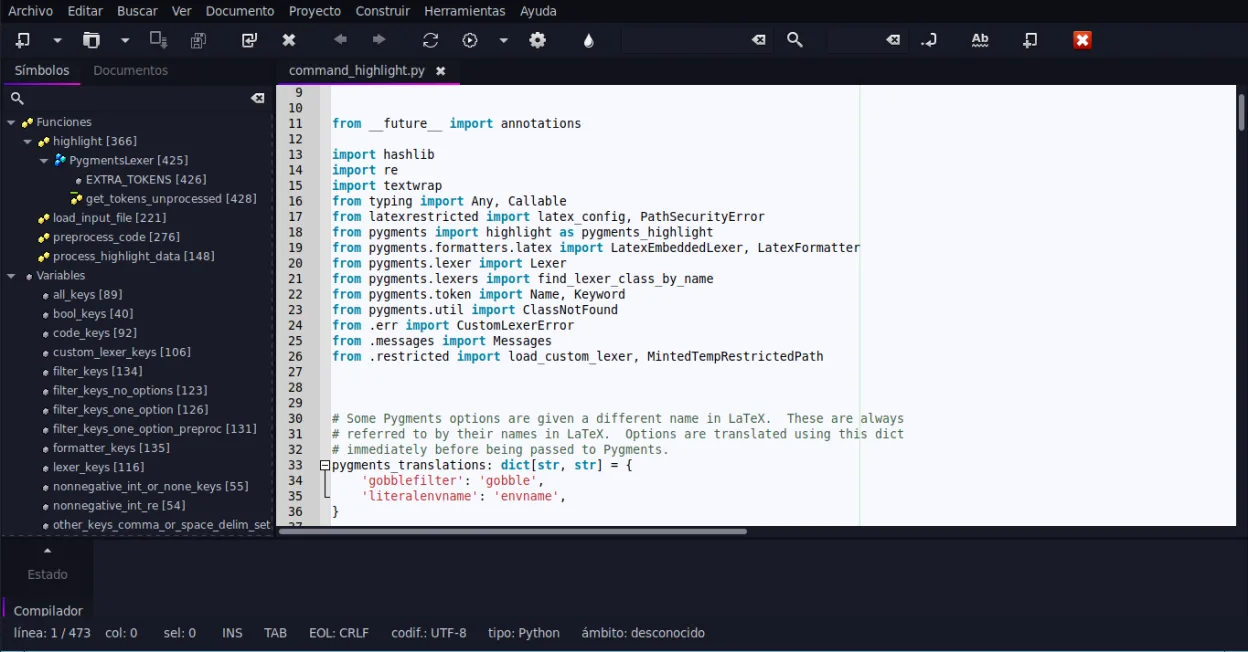
What works the same
- Supports syntax highlighting for a wide range of programming languages
- Includes an integrated terminal emulator for running commands
- Offers code completion and auto-completion for common constructs
- Features a plugin architecture for extending functionality
- Provides code folding and symbol lists for navigation
What is different
- Geany has a much smaller plugin ecosystem compared to VS Code's vast marketplace
- VS Code offers more robust and integrated debugging capabilities across many languages
- VS Code has deeper Git integration with visual diffs and branch management
- Geany is significantly lighter and faster on startup, while VS Code is heavier
- VS Code has a more modern, customizable UI with themes and layouts
Opening your Visual Studio Code files
Geany opens standard source code files (.c, .py, .js, etc.) without issue, as these are plain text. It does not natively open VS Code workspace files (.code-workspace) or settings files (.vscode), but you can recreate the project structure in Geany. Geany uses its own project file format (.geany) for saving project-specific settings, which is not compatible with VS Code's format.
Switching from Visual Studio Code to Geany, step by step
- Install Geany via your distribution's package manager or Flathub
- Open your source code files directly in Geany
- Configure syntax highlighting and code completion for your specific languages in the Preferences menu
- Enable necessary plugins via the Plugin Manager if you need extra features
- Set up your terminal emulator preferences to match your shell environment
- Create a Geany project file (.geany) to save your workspace settings
Key features of Geany
- Syntax highlighting for over 30 languages
- Code completion and auto‑completion of common constructs
- Embedded terminal emulator
- Plugin manager with pre‑installed plugins
- Code folding and symbol lists
- Support for XML/HTML tag completion
How to install Geany on Linux
flatpak install flathub org.geany.Geanysudo apt install geanysudo apt install geanysudo dnf install geanysudo pacman -S geanysudo zypper install geanyFrequently asked questions
Can Geany run VS Code extensions?
No, Geany has its own plugin system and cannot run VS Code extensions. You will need to find equivalent Geany plugins or rely on its built-in features.
Is Geany good for JavaScript development?
It is basic. While it supports syntax highlighting and simple completion, it lacks the advanced tooling, linters, and debugging integration that VS Code provides for JavaScript and TypeScript.
How does Geany's performance compare to VS Code?
Geany is much faster and uses significantly less RAM. It starts almost instantly and remains responsive even on older hardware, whereas VS Code can be sluggish on low-end systems.
4 other alternatives to Visual Studio Code
 Sublime TextSublime Text is a lightweight, fast source code editor with a minimal interface and powerful extensibility.FlatpakSublime Text vs Visual Studio Code
 KateKate is a feature-rich, programmer-focused text editor from KDE with support for 300+ languages and advanced…Open sourceFreeFlatpakKate vs Visual Studio Code
 VimVim is a highly configurable, modal text editor for efficient editing on Linux.Open sourceFreeFlatpakVim vs Visual Studio Code
 GNU EmacsGNU Emacs is a highly extensible text editor and Lisp interpreter that functions as a complete development…Open sourceFreeFlatpakGNU Emacs vs Visual Studio Code