
 HomeBankLinux
vs
GnuCashWindows
HomeBank as a Linux alternative to GnuCash
Updated
Our verdict
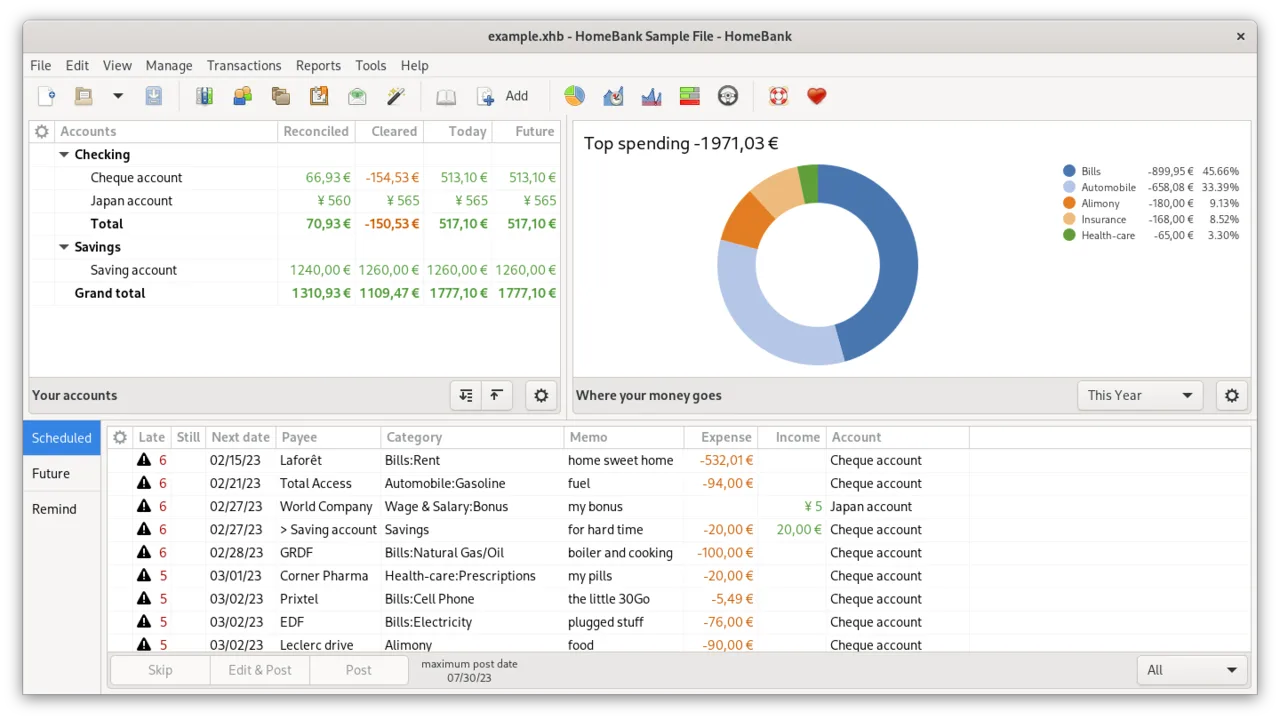
HomeBank can replace GnuCash for users who need personal‑finance tracking and basic double‑entry bookkeeping. It covers the essential features—multiple accounts, transaction imports, budgeting and simple reports—while offering a cleaner UI and stronger filtering. It falls short for small‑business owners who rely on GnuCash's more extensive accounting reports, multi‑currency handling and scheduled transactions. If your use case is personal budgeting or light bookkeeping, HomeBank is a solid, easier‑to‑learn alternative; for full‑featured small‑business accounting, GnuCash remains the better choice.
- License
- GPL-2.0+
- Price
- Free
- Latest version
- 5.10.4 (November 13, 2026)
- Rating
- —
What works the same
- Double‑entry transaction handling
- Import/export of QIF, OFX and CSV
- Multiple accounts with transfer support
- Budgeting tools and alerts
- Basic financial reports (balance sheet, income statement)
What is different
- HomeBank lacks built‑in scheduled/recurring transaction automation
- Multi‑currency support is limited compared to GnuCash
- GnuCash provides more detailed business‑oriented reports and tax‑ready statements
- HomeBank’s budgeting is simpler and less customizable
- GnuCash offers a richer set of plug‑ins and extensions for small‑business workflows
Opening your GnuCash files
HomeBank cannot open GnuCash's native .gnucash files directly. It can import the same exchange formats (QIF, OFX, CSV) that GnuCash can export, so you can migrate data by exporting from GnuCash to one of those formats and then importing into HomeBank. No native conversion tool is provided, so some manual cleanup may be needed.
Switching from GnuCash to HomeBank, step by step
- Export your GnuCash data to QIF, OFX, or CSV.
- Install HomeBank from your distribution's repository or via Flathub.
- Launch HomeBank and create a new file.
- Import the exported file using HomeBank's Import wizard.
- Review categories, payees and account hierarchies; adjust as needed.
- Set up budgets and alerts in HomeBank to match your previous GnuCash setup.
Key features of HomeBank
- Import and export of QIF, OFX and CSV files
- Customizable categories and payees
- Powerful filtering and search of transactions
- Automatic balance reconciliation
- Multiple account support with transfer handling
- Graphical reports: cash flow, expense distribution, trends
- Budget planning with alerts
- Command‑line tools for batch processing
How to install HomeBank on Linux
flatpak install flathub fr.free.Homebanksudo apt install homebanksudo apt install homebanksudo dnf install homebanksudo pacman -S homebanksudo zypper install homebankFrequently asked questions
Can HomeBank handle business invoicing?
No, HomeBank is focused on personal finance; it does not provide invoicing or accounts‑receivable features.
Is there a command‑line way to automate imports?
HomeBank includes command‑line tools for batch processing, but they are limited compared to GnuCash's scripting capabilities.
Will my existing GnuCash reports be available in HomeBank?
HomeBank offers its own set of graphical reports; you will need to recreate any custom GnuCash reports using HomeBank's reporting tools.
3 other alternatives to GnuCash
 KMyMoneyKMyMoney is a free, double‑entry personal finance manager for Linux.Open sourceFreeFlatpakKMyMoney vs GnuCashLedgerLedger is a plain‑text double‑entry accounting tool for the command line.Open sourceFreeLedger vs GnuCash
 SkroogeSkrooge is a KDE‑based personal finance manager for simple bookkeeping on Linux.Open sourceFreeFlatpakSkrooge vs GnuCash