

Linux · System Tools
CPU-X
CPU-X is a free, open‑source tool that collects detailed CPU, motherboard, and system information on Linux and BSD.
- License
- GPL-3.0+
- Latest version
- 5.4.1 (September 27, 2026)
- Developer
- The Tumultuous Unicorn Of Darkness
- Installs
- 12,819 (Flathub, 30 days)

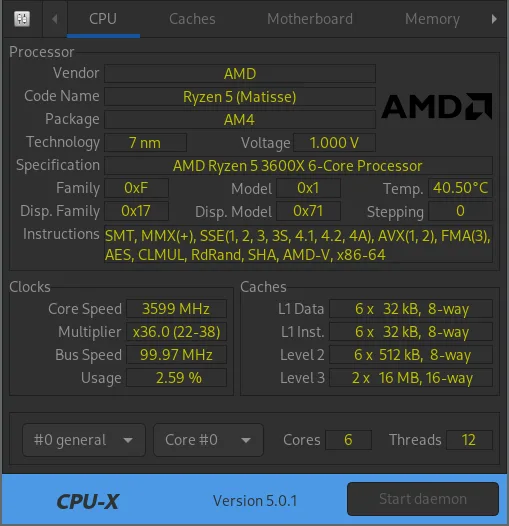
What is CPU-X?
CPU‑X was created to fill the gap left by the Windows‑only CPU‑Z, providing a native Linux alternative that is fully free and open source. It has been in development for several years, with its latest stable release 5.4.1 available for Debian, Arch, Fedora, openSUSE, and Ubuntu. The tool is written in C++ and uses CMake for building, offering both a GTK graphical interface and a text‑based NCurses mode.
The target users are system administrators, enthusiasts, and anyone who needs a quick way to audit hardware specs without installing a full‑blown monitoring suite. It is lightweight, runs from the terminal or a desktop icon, and outputs data in a readable table.
Compared to CPU‑Z, CPU‑X feels more integrated into the Linux ecosystem: it can be launched from a terminal, piped into scripts, and its output can be redirected to files. It lacks some of the visual polish of CPU‑Z, but its simplicity and cross‑platform support make it a solid choice for Linux users.
Best for: Users who need quick, scriptable hardware diagnostics on Linux or BSD without installing heavy monitoring tools.
Key features of CPU-X
- Collects CPU, motherboard, BIOS, and chipset data
- Supports both GTK and NCurses interfaces
- Command‑line dump mode for scripting
- Cross‑platform: works on Linux and BSD
- Built with CMake, written in C++
- Free and open source under GPL‑3.0+
- Available in major distro repositories
- Can output data to plain text or CSV
Pros
- Free and open source, no hidden costs
- Lightweight and fast
- Cross‑platform compatibility
- Scriptable output for automation
Cons
- No built‑in graphical performance graphs
- Limited to hardware info, no real‑time monitoring
- Interface can feel dated compared to newer GUIs
Windows programs CPU-X replaces
How to install CPU-X on Linux
flatpak install flathub io.github.thetumultuousunicornofdarkness.cpu-xsudo apt install cpu-xsudo apt install cpu-xsudo dnf install cpu-xsudo pacman -S cpu-xsudo zypper install cpu-xTips for Windows users
If you’re moving from CPU‑Z, note that CPU‑X does not import or export any files; it simply displays data. Use the command line option cpu-x -dump to generate a plain‑text report that can be saved or emailed. Keyboard shortcuts differ: in GTK mode use Ctrl+Q to quit, while in NCurses mode use q or Ctrl+C. The workflow is more manual, but the output is easily parsed by other tools.
Recent releases
- 5.4.1 —
- 5.4.0 —
- 5.3.1 —
- 5.3.0 —
CPU-X: frequently asked questions
Is CPU‑X available on my distro?
Yes, it is packaged for Debian, Arch, Fedora, openSUSE, and Ubuntu. Use your distro’s package manager to install it.
Can I use CPU‑X on a server without a GUI?
Absolutely. The NCurses mode works perfectly in a terminal, and the dump mode can be run over SSH.
Does CPU‑X support GPUs?
No, it focuses on CPU, motherboard, and related hardware. For GPU info use tools like lspci or glxinfo.
Is there a way to get real‑time CPU usage?
CPU‑X does not provide real‑time monitoring. Use tools like htop or glances for that purpose.
Updated