

Linux · Others
Reminders
A lightweight GNOME app for setting recurring reminders, managing lists, and syncing with Microsoft To Do.
- License
- GPL-3.0-or-later
- Latest version
- 4.0 (April 18, 2023)
- Developer
- Sasha Hale
- Installs
- 449 (Flathub, 30 days)
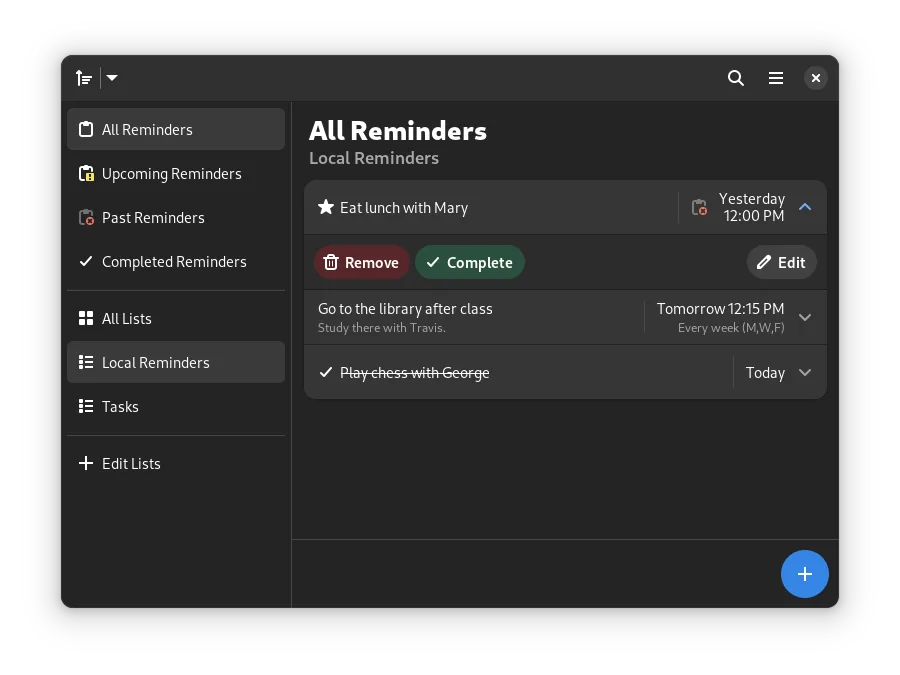

What is Reminders?
Reminders is a straightforward task manager built for the GNOME environment. Developed by Sasha Hale, it focuses on simplicity rather than complex project management. The latest release, version 4.0, came out in April 2023, indicating it is a relatively recent but stable project. It is packaged in major distributions like Fedora, Ubuntu, and Arch, making it easy to install via standard package managers or Flathub.
This tool is ideal for users who find full-featured project management tools like Todoist too heavy or cluttered. It suits people who need a clean, distraction-free interface to track daily tasks, appointments, or simple to-do lists. If you prefer a native Linux look and feel over a web-based or Electron app, Reminders provides that experience without sacrificing core functionality.
Compared to Todoist, Reminders is less feature-dense but more integrated with the GNOME desktop. It lacks the extensive automation and multi-device cloud sync of Todoist, but it offers a direct, local-first approach. The optional Microsoft To Do sync is a unique bridge for users who want to keep their tasks in one place across different ecosystems. It feels lighter and faster, though you will miss some of the advanced filtering and natural language input of its Windows counterpart.
Best for: GNOME users who want a simple, native reminder app with optional Microsoft To Do sync.
Key features of Reminders
- Set recurring reminders with custom intervals
- Schedule notifications for specific times
- Sort, filter, and search through your tasks
- Mark reminders as important or complete
- Organize tasks into custom lists
- Optional sound alerts for notifications
- Optional two-way sync with Microsoft To Do
- Native GNOME/GTK interface
Pros
- Lightweight and fast, running natively on Linux
- Clean, uncluttered GNOME interface
- Direct integration with Microsoft To Do
- Fully open-source with no tracking or ads
Cons
- Limited compared to Todoist in terms of automation and natural language input
- Sync is limited to Microsoft To Do, not a proprietary cloud
- Fewer customization options for views and layouts
Windows programs Reminders replaces
How to install Reminders on Linux
flatpak install flathub io.github.dgsasha.Remembrancesudo apt install remindsudo apt install remindsudo dnf install remindsudo pacman -S remindsudo zypper install remindTips for Windows users
Coming from Todoist, you will notice the lack of natural language date parsing (e.g., typing 'tomorrow 5pm'). You must manually set the date and time for each reminder. Your Todoist data will not import directly; you will need to recreate your lists or use the Microsoft To Do sync if you have your tasks there. The workflow is more manual but faster for simple tasks. There are no specific file formats to migrate; the app stores data locally in your home directory.
Recent releases
- 4.0 —
- Fix versioning by bumping to 4.0
- 3.10 —
- Remove warning about cloud syncing being in beta - Fix issue where you could make reminder recurring when it shouldn't be
- 3.9 —
- Change delete icon - Fix some ui bugs - Some tiny performance improvements - Improve logging
- 3.8 —
- UI Improvements to sidebar - Fix issues when moving reminders between lists - Fix issue with error dialogs
Reminders: frequently asked questions
Does Reminders sync with Todoist?
No, it does not sync directly with Todoist. It only supports optional syncing with Microsoft To Do.
Is Reminders available on Flathub?
Yes, it is available on Flathub, which is the recommended way to install it on many distributions.
Can I use Reminders on Wayland?
Yes, being a GTK application, it works well on Wayland compositors like GNOME Shell.
Does it have a mobile app?
There is no official mobile app for Reminders. You would need to use Microsoft To Do on your phone if you rely on the sync feature.
Updated