

Linux · Internet
Signal Desktop
End-to-end encrypted messenger for text, voice, and video calls, requiring a paired phone account.
- License
- AGPL-3.0-only
- Latest version
- 8.33.0 (October 28, 2026)
- Developer
- Signal Foundation
- Installs
- 25,948 (Flathub, 30 days)
What is Signal Desktop?
Signal Desktop is the official Linux client for the Signal messaging protocol. It has been a staple in the privacy-focused community for years, with a long history of regular updates and feature parity with mobile. The application is open-source and maintained by the Signal Foundation, ensuring that the code is auditable and the service remains independent of corporate advertising models.
It is designed for anyone who prioritizes privacy in their communications. Whether you are a journalist, a developer, or just someone tired of surveillance capitalism, Signal provides a straightforward way to talk to friends and family without metadata harvesting. It is not a social network; it is a tool for direct, secure conversation.
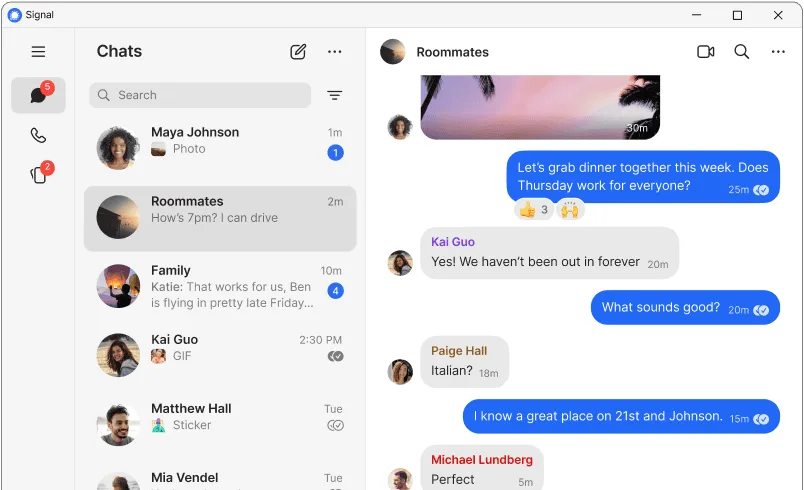
Compared to the Windows version, the Linux client feels identical in functionality. The interface is clean, responsive, and familiar. You get the same high-fidelity media support and call quality. The main difference is the installation method, often via Flatpak or native packages, but once running, the experience is indistinguishable from other desktop platforms.
Best for: Users who need reliable, private messaging and are willing to link their account to a mobile device.
Key features of Signal Desktop
- End-to-end encryption for all messages and calls
- HD voice and video calls
- Group chats with up to 1,000 members
- Disappearing messages
- File sharing with no size limits
- Screen sharing during calls
- Stickers and animated emojis
- No ads, no tracking, no data mining
Pros
- Strong privacy guarantees with open-source code
- Free to use with no premium tiers
- Consistent performance across platforms
- Active development and regular updates
Cons
- Requires a paired smartphone account
- No native Linux build in some repositories, relying on Flatpak
- Limited integration with non-Signal contacts
Windows programs Signal Desktop replaces
How to install Signal Desktop on Linux
flatpak install flathub org.signal.Signalsudo pacman -S signal-desktopTips for Windows users
If you are coming from Windows, your account, contacts, and message history will sync automatically once you log in with your phone. There are no file format issues since Signal uses standard media types. The workflow is identical: click the app icon, scan the QR code with your phone, and start chatting. Note that unlike Windows, you may need to install the Flatpak runtime if you are using the Flathub version, but most modern Linux distributions handle this transparently.
Recent releases
- 8.33.0 —
- 8.32.0 —
- 8.31.0 —
- 8.30.0 —
Signal Desktop: frequently asked questions
Does Signal Desktop work without a phone?
No, you must have Signal installed and active on a smartphone to link the desktop app. The phone acts as the primary account holder.
Is Signal Desktop free?
Yes, it is completely free. Signal is a nonprofit organization and does not charge for its services or show ads.
Can I use Signal on multiple computers?
Yes, you can link multiple desktop devices (Windows, macOS, Linux) to your phone account simultaneously.
Is my metadata hidden?
Signal minimizes metadata collection. It does not store message content on servers, and it collects very little information about your usage compared to mainstream messengers.
Updated