

Linux · Sound & Video
Strawberry Music Player
Strawberry is a free, open-source Qt-based music player and collection organizer for Linux.
- License
- GPL-3.0+
- Latest version
- 1.2.31 (October 3, 2026)
- Developer
- Jonas Kvinge
- Installs
- 9,386 (Flathub, 30 days)

What is Strawberry Music Player?
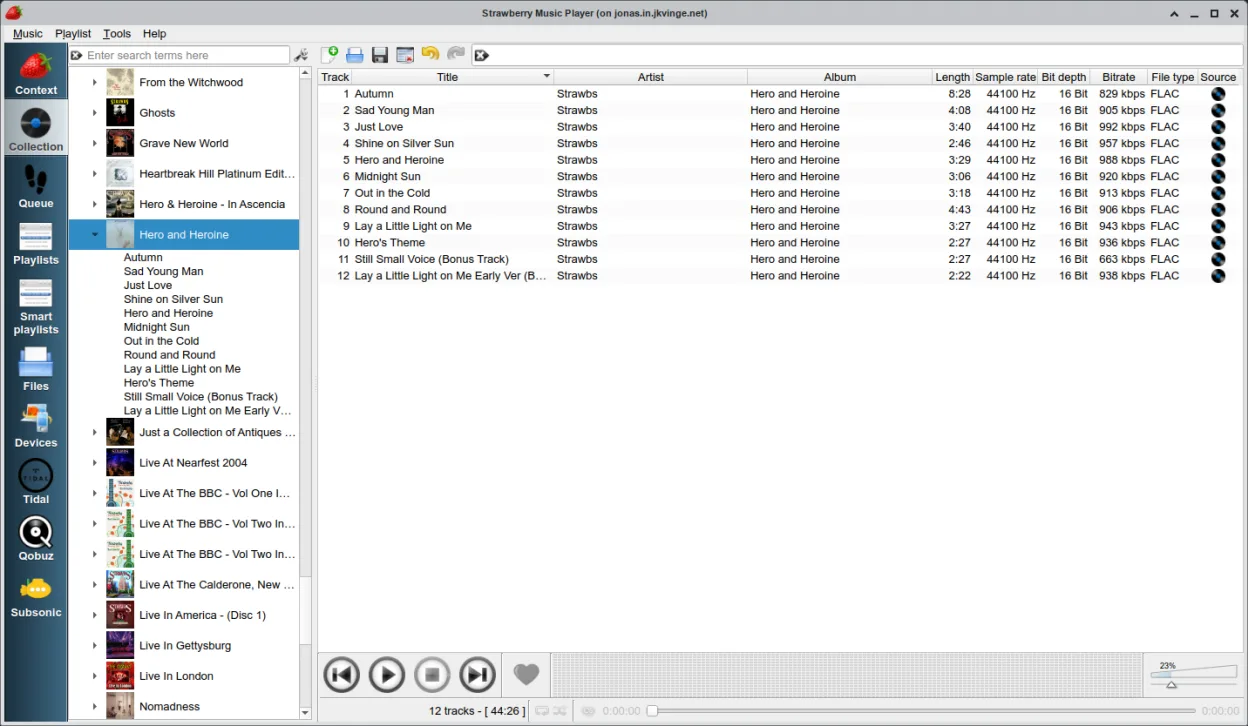
Strawberry is a mature music player written in C++ using Qt and GStreamer. It focuses on organizing large local libraries and supports most common audio formats. The project has been active for years, with regular releases and broad distribution across major Linux distros like Debian, Fedora, and Arch.
It targets music collectors and audiophiles who need more control than a basic media player offers. If you care about tag editing, album art, and precise audio output settings, this tool fits that niche. It is not a streaming service, but it does integrate with several online databases for metadata.
Compared to Spotify, the workflow is different. Spotify is a subscription-based streaming service, while Strawberry is a local-first player. You cannot stream Spotify directly with a subscription inside Strawberry, though it has unofficial support. For pure local playback and library management, Strawberry offers more depth and customization than typical Windows media players.
Best for: Linux users who manage large local music libraries and want advanced control over playback and metadata.
Key features of Strawberry Music Player
- Supports most popular audio formats and CD playback
- Edit tags and retrieve metadata from MusicBrainz
- Fetch album art from Last.fm, Discogs, and Spotify
- Advanced audio output configuration for bit-perfect playback
- Smart and dynamic playlist management
- Built-in equalizer and audio analyzer
- Scrobbling support for Last.fm and ListenBrainz
- Transfer music to USB players and iPods
Pros
- Highly customizable audio output settings
- Extensive metadata and tag editing tools
- Free and open-source with no ads or subscriptions
- Good support for various Linux desktop environments
Cons
- Unofficial streaming support for services like Spotify can be unstable
- Interface may feel less polished than commercial streaming apps
- Requires manual setup for optimal audio device configuration
Windows programs Strawberry Music Player replaces
How to install Strawberry Music Player on Linux
flatpak install flathub org.strawberrymusicplayer.strawberrysudo apt install strawberrysudo apt install strawberrysudo dnf install strawberrysudo pacman -S strawberrysudo zypper install strawberryTips for Windows users
If you are coming from Spotify, note that Strawberry does not replace the streaming service itself; it replaces the local media player component. You will need to import your local files into the library. Shortcuts and workflows differ from Windows Media Player or Spotify, so take time to map your preferred keys. For metadata, ensure you have an internet connection to fetch tags and cover art from online sources.
Recent releases
- 1.2.31 —
- 1.2.30 —
- 1.2.29 —
- 1.2.28 —
Strawberry Music Player: frequently asked questions
Can I use my Spotify account in Strawberry?
Strawberry has unofficial streaming support for Spotify, but it is not a replacement for the official app. It may work for basic playback but lacks full feature parity and stability.
Does Strawberry support FLAC and other lossless formats?
Yes, it supports most popular audio formats, including lossless types like FLAC, thanks to its GStreamer backend.
How do I get album art in Strawberry?
You can automatically retrieve album cover art from sources like Last.fm, MusicBrainz, and Discogs via the built-in metadata features.
Is Strawberry available on my distro?
It is packaged in major distributions including Debian, Fedora, Ubuntu, openSUSE, and Arch, as well as available via Flathub.
Updated