

Linux · Others
SugarCRM
SugarCRM is a web‑based CRM platform that can be self‑hosted on Linux, offering sales, marketing and support tools.
- License
- —
- Latest version
- —
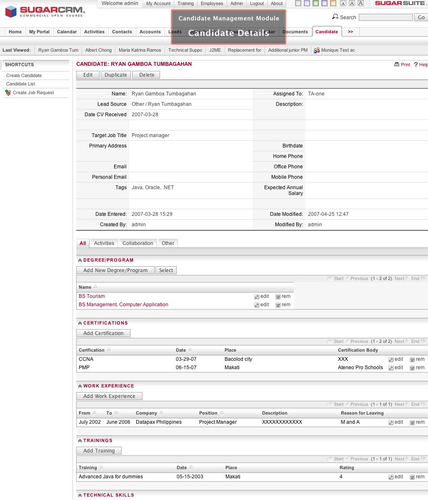
What is SugarCRM?
SugarCRM started as an open‑source project in the mid‑2000s and later split into a commercial suite and a community edition. The community edition was phased out, leaving the proprietary SugarCRM Cloud and on‑premise versions that still run on Linux servers. It’s a mature product with a long track record in midsize and enterprise environments.
The software targets sales teams, marketers and support staff who need a centralized database for contacts, leads, opportunities and cases. It integrates with email, phone systems and third‑party apps, and provides dashboards and reporting out of the box. Users accustomed to Microsoft Dynamics CRM will find similar concepts—accounts, contacts, pipelines—but with a different UI layout.
Compared with Dynamics, SugarCRM feels less tied to the Windows ecosystem and more configurable through PHP modules and REST APIs. The interface is web‑only, so there’s no native Windows client to replace; you simply point your browser at the Linux server. The learning curve is moderate, especially if you’ve used other CRM tools, but the lack of a free community edition means you’ll be paying for a license or using an older fork.
Best for: Organizations that need a full‑featured, on‑premise CRM and are willing to pay for a commercial license.
Key features of SugarCRM
- Lead and opportunity management
- Customizable sales pipelines
- Email integration and templates
- Reporting and analytics dashboards
- Workflow automation with triggers
- RESTful API for third‑party integration
- Role‑based access control
- Mobile‑responsive web UI
Pros
- Runs on standard LAMP stacks, easy to host on Linux
- Mature feature set for sales and support
- Extensible via modules and APIs
- Good documentation and vendor support
Cons
- No free community edition; requires a paid license
- UI can feel dated compared with newer SaaS CRMs
- Customization may need PHP development
Tips for Windows users
Export your Dynamics data to CSV or Excel first; SugarCRM can import those files via its built‑in import wizard. Expect to replace Windows‑only shortcuts with browser shortcuts (e.g., Ctrl+S to save a record). Workflow steps may differ—set up pipelines and automation rules in SugarCRM’s admin panel before retiring Dynamics.
SugarCRM: frequently asked questions
Can I run SugarCRM on a typical LAMP server?
Yes, the on‑premise version works on Apache, MySQL/MariaDB and PHP, which are standard on most Linux distributions.
Is there a free version of SugarCRM for Linux?
The original open‑source Community Edition is discontinued; only the commercial editions are actively maintained.
How do I migrate data from Microsoft Dynamics CRM?
Export your data to CSV or Excel, then use SugarCRM’s import tool to map fields and load the records.
Does SugarCRM support LDAP authentication on Linux?
Yes, the on‑premise version can be configured to authenticate users against LDAP or Active Directory.
Updated