

Linux · Others
Tryton 8.0
Tryton is a 100% open-source ERP suite for business management, serving as a lightweight alternative to Microsoft Dynamics 365.
- License
- GPL-3.0-or-later
- Latest version
- 8.0.9 (September 16, 2026)
- Developer
- The Tryton Project
- Installs
- 66 (Flathub, 30 days)
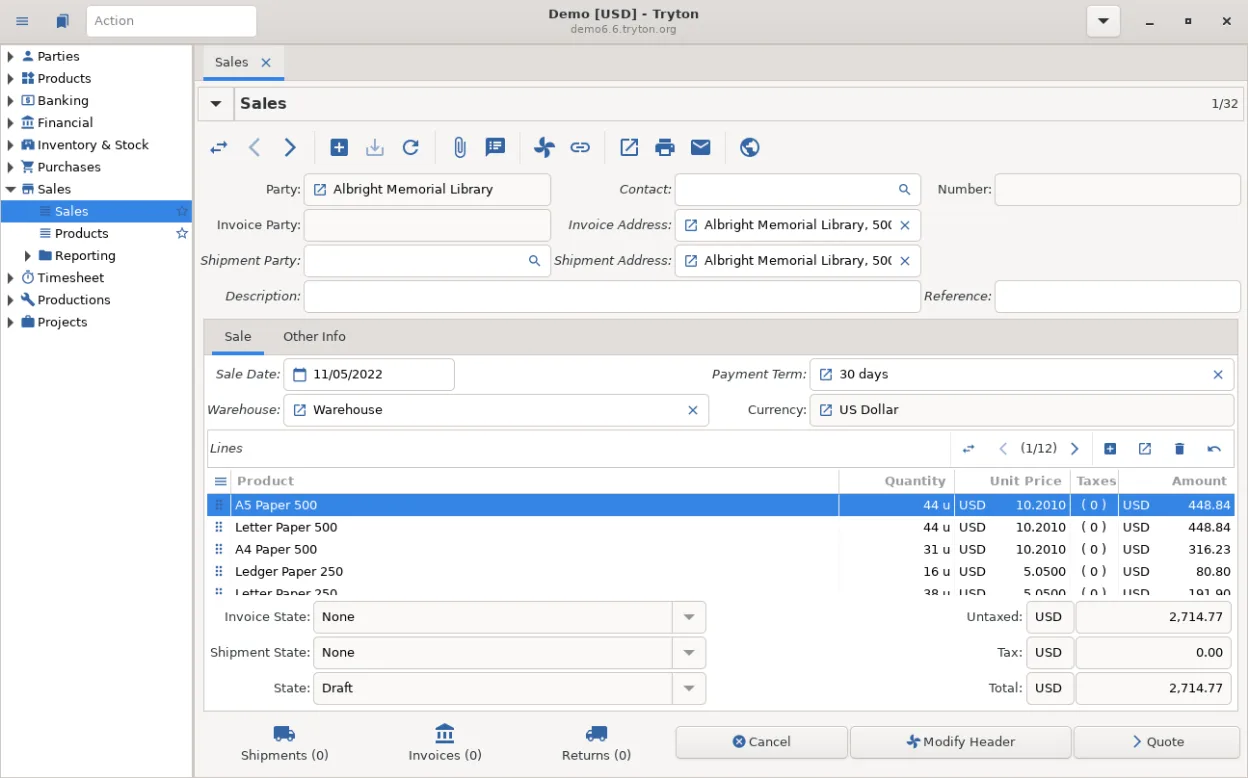
What is Tryton 8.0?
Tryton is a comprehensive business application suite that handles accounting, inventory, sales, and human resources. It has been under active development for over a decade, making it a mature and stable choice. The software is designed to be modular, allowing companies to enable only the features they need, which keeps the system lightweight and easy to maintain without the bloat of larger enterprise solutions.
This tool is best suited for small to medium-sized businesses, non-profits, and accountants who need a full-featured backend but want to avoid the high licensing costs of proprietary ERPs. It is also popular among developers and IT administrators because the entire stack is open source, allowing for deep customization and direct integration with other Linux-based services without vendor lock-in.
Compared to Microsoft Dynamics 365 Business Central, Tryton feels significantly lighter and more transparent. While Dynamics offers a polished, cloud-first experience with extensive pre-built reports, Tryton requires more initial setup to reach the same level of functionality. However, once configured, it offers a cleaner, less cluttered interface that is easier to navigate for daily tasks, giving users full control over their data and workflow logic.
Best for: Small to medium businesses and IT teams seeking a cost-effective, fully controllable ERP solution without proprietary licensing fees.
Key features of Tryton 8.0
- Modular architecture allowing selective installation of accounting, HR, or inventory modules
- Full double-entry accounting system with multi-currency and multi-company support
- Inventory and warehouse management with barcode scanning support
- Sales and purchase order processing with customizable approval workflows
- Human resources module for employee records, contracts, and payroll basics
- Extensible via Python, allowing custom modules and integrations
- Client-server architecture supporting multiple users and remote access
- Comprehensive reporting tools with customizable queries and exports
Pros
- 100% free and open source, eliminating per-user licensing fees
- Lightweight and fast, running efficiently on modest hardware
- Highly customizable with a stable API for developers
- No vendor lock-in; full data ownership and export capabilities
Cons
- Steeper learning curve for non-technical users compared to Dynamics
- Smaller community and fewer pre-built third-party integrations
- Documentation can be sparse for advanced customization tasks
- Lacks the polished, out-of-the-box user experience of major commercial ERPs
Windows programs Tryton 8.0 replaces
How to install Tryton 8.0 on Linux
flatpak install flathub org.tryton.Tryton-80sudo zypper install trytonTips for Windows users
Moving from Dynamics 365 to Tryton requires a mindset shift from a pre-configured cloud service to a self-managed system. You will need to set up the database and server components yourself, typically using PostgreSQL. Data migration is not automatic; export your charts of accounts, item lists, and customer records from Dynamics as CSV or Excel files, then import them into Tryton using its import tools. Expect to spend time mapping your specific business workflows to Tryton’s modular structure, as it does not come with pre-loaded industry templates like Dynamics does.
Recent releases
- 8.0.9 —
- 8.0.8 —
- 8.0.7 —
- 8.0.6 —
Tryton 8.0: frequently asked questions
Can I use Tryton as a standalone client without a server?
No, Tryton is designed as a client-server application. You must run the Tryton server (usually with a PostgreSQL database) on a machine or VM, and connect to it via the client application.
Is Tryton suitable for large enterprises?
It is generally recommended for small to medium businesses. While it can scale, very large enterprises often prefer more established ERPs with extensive pre-built industry-specific features and larger support ecosystems.
Does Tryton support multi-currency accounting?
Yes, Tryton natively supports multi-currency and multi-company accounting, allowing you to manage transactions in different currencies and maintain separate ledgers for different entities.
How difficult is it to customize Tryton?
Customization requires Python knowledge. You can create new modules to add fields, change workflows, or integrate with other systems. It is more complex than clicking through a GUI but offers far more flexibility than proprietary lock-in.
Updated