

Linux · Others
YACReader
YACReader is a cross‑platform comic book reader that lets you view, organize and tweak your digital comics.
- License
- GPL-3.0-only
- Latest version
- 10.4.0 (October 9, 2026)
- Developer
- Luis Ángel San Martín Rodríguez
- Installs
- 2,123 (Flathub, 30 days)
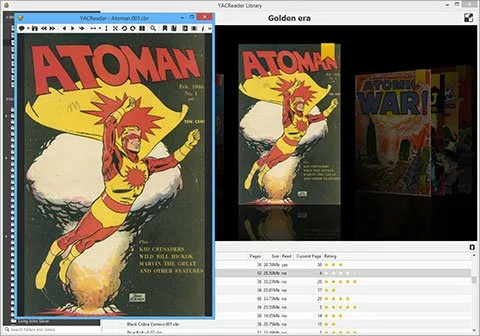
What is YACReader?
YACReader started as a simple viewer for comic files and grew into a full library manager. It has been maintained for over a decade, with the latest release 10.4.0 in October 2026. The project is open source and runs on major Linux distributions.
It is aimed at comic enthusiasts who want a lightweight, feature‑rich reader. It supports the same file types as ComicBookLibrarian, including rar, zip, cbr, cbz, tar, pdf, 7z, cb7, and common image formats.
Compared to the Windows tools, YACReader feels more native on Linux. It offers a smooth “comic flow” transition, customizable backgrounds, and image adjustments that are not always available in Windows readers.
Best for: Comic readers who need a robust, cross‑platform viewer with library management and image tweaking features.
Key features of YACReader
- Wide file support (rar, zip, cbr, cbz, tar, pdf, 7z, cb7, jpeg, gif, png, tiff, bmp)
- Customizable reading experience: rotation, double‑page, full‑size, fullscreen, background color, page‑fitting
- Image adjustments: brightness, contrast, gamma sliders
- Library management with reading progress tracking
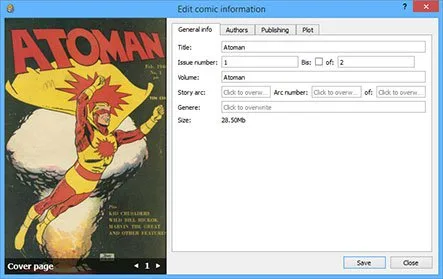
- Automatic metadata download from Comic Vine
- Built‑in search engine for large collections
- Bookmarks and resume reading
- Keyboard shortcuts for navigation
Pros
- Free and open source
- Cross‑platform (Linux, Windows, macOS)
- Rich feature set for a reader
- Active community support
- Good performance on large collections
Cons
- UI can feel dated compared to newer readers
- Occasional bugs when opening very large archives
- Limited support for DRM‑protected comics
- No native integration with some Linux desktop environments
Windows programs YACReader replaces
How to install YACReader on Linux
flatpak install flathub com.yacreader.YACReadersudo dnf install yacreadersudo zypper install yacreaderTips for Windows users
If you’re moving from ComicBookLibrarian, most of your comic files (zip, rar, cbr, cbz, tar, pdf, 7z, cb7) will open without issue. YACReader uses the same keyboard shortcuts as CBL for navigation: left/right arrows for page turns, F for fullscreen, B for bookmarks. The library view replaces CBL’s database; you can import your existing collection by adding the folder path. Note that YACReader’s metadata fetching relies on Comic Vine, so you may need an internet connection for fresh data. The workflow is more visual: you browse comics in a grid and open them directly, rather than managing a database first.
Recent releases
- 10.4.0 —
YACReader - Avoid duplicated images in double page mode after a layout adjustment. - Add a setting to draw a fold shadow in double page mode. YACReaderLibrary - Reload views only when a remote client changes the open library and a sync has changed something…
- 10.3.2 —
YACReader - Improve double page layout stability and zooming performance. - Fix unnecessary flow animation and continuous scroll mode flow updates. - Fix bookmarks and page saving in continuous scroll mode. - Fix saving and exporting while pages are still…
- 10.3.1 —
YACReader - Fix the continuous vertical scroll mode shortcut not being saved. - Improve handling of invalid characters when renaming files. - Improve the layout of the renaming and organizing dialog. - Add a software-rendered go to flow option for systems…
- 10.3.0 —
YACReaderLibrary - Unify folder and comic browsing in the grid view, with settings to show folders alongside comics and keep them visually separated. - Show information about folders, lists, and selected items in the side information panel. - Fix drag and…
YACReader: frequently asked questions
Does YACReader support comic archives with password protection?
No, YACReader cannot open password‑protected archives. You must decrypt them before opening.
Can I use YACReader on my Raspberry Pi?
Yes, it runs on ARM architectures. Install the package from your distro’s repositories or build from source.
How do I change the background color?
Open the settings dialog (Edit → Settings), choose the Background tab, and pick your preferred color.
Is there a way to export my library to another format?
YACReader can export the library as a CSV file via the Library → Export option.
Updated