
 MattermostLinux
vs
Microsoft Teams (2026 updated client)Windows
Mattermost as a Linux alternative to Microsoft Teams (2026 updated client)
Updated
Our verdict
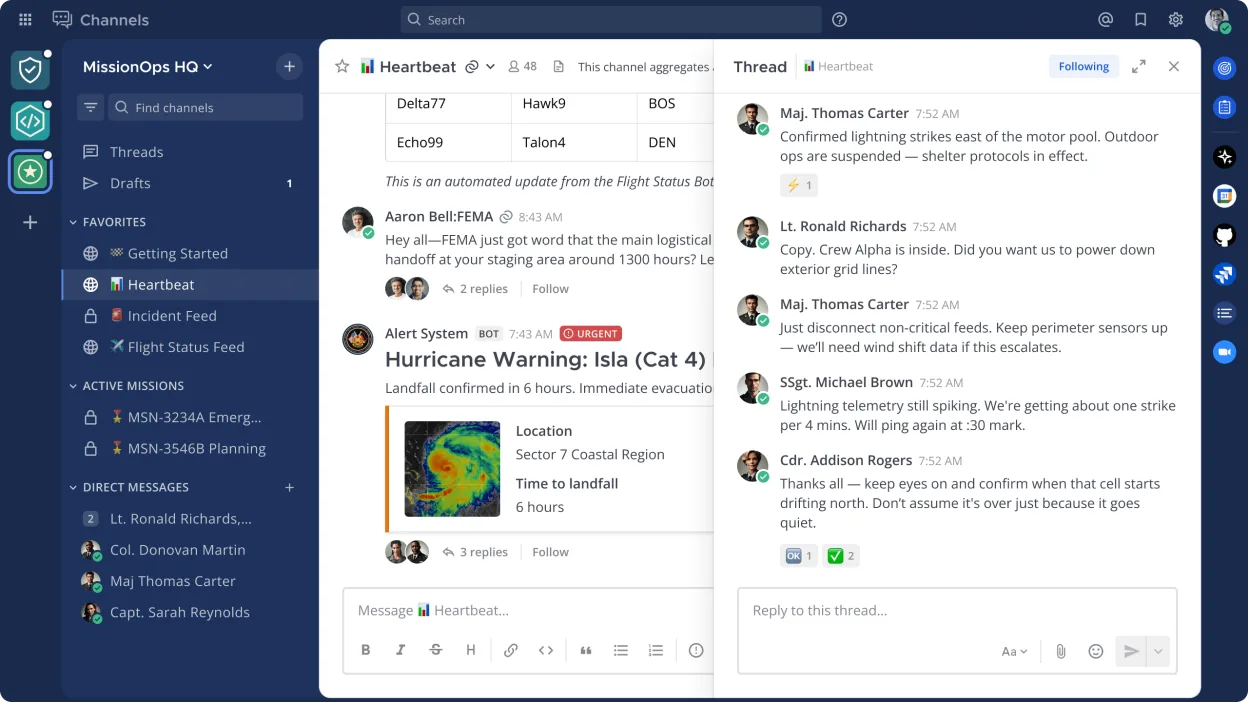
Mattermost is a solid replacement for Microsoft Teams (2026 updated client) if you prioritize self-hosting, security, and integration with developer tools. It covers core collaboration features like persistent chat, file sharing, and searchable history, and supports mobile and desktop clients. However, it lacks built-in video and audio conferencing unless paired with external tools. Best suited for technical teams comfortable managing their own server. For organizations needing out-of-the-box calling and meetings, it's not a direct substitute.
- License
- Apache-2.0
- Price
- Free
- Latest version
- 6.4.0 (November 16, 2026)
- Rating
- —
What works the same
- Persistent group and direct messaging with searchable history
- File sharing within channels and direct messages
- Cross-platform clients including Linux, Windows, macOS, iOS, and Android
- Support for Markdown formatting and code snippets
- Integration with external tools via REST API and plugins
What is different
- Mattermost does not include built-in video or audio conferencing; requires external tools like Jitsi or Zoom
- No native calendar or task integration comparable to Outlook or Planner
- Self-hosting required, increasing setup and maintenance overhead
- Limited interoperability with Microsoft 365 services
- Fewer user-friendly features for non-technical users
Opening your Microsoft Teams (2026 updated client) files
Mattermost supports uploading and sharing common file types, but there is no direct compatibility with Microsoft Teams-specific formats or export tools. Files shared in Teams can generally be downloaded and re-uploaded to Mattermost manually. Exporting chat history or files in bulk from Teams requires Microsoft's data export tools, and no automated import process into Mattermost exists. Migration of historical data must be handled externally.
Switching from Microsoft Teams (2026 updated client) to Mattermost, step by step
- Set up a Mattermost server on a Linux host with PostgreSQL or MySQL
- Configure authentication (SAML or LDAP) to match existing user directories
- Invite users and organize them into teams and channels
- Migrate important files manually or via script from Teams exports
- Train users on Mattermost workflows and integrations
- Deploy desktop and mobile clients across the organization
Key features of Mattermost
- Self-hosted messaging with team channels and direct messages
- Integrates with Git, CI/CD pipelines, and monitoring tools
- Custom slash commands and bot automation
- File sharing and Markdown support
- Role-based access control and audit logging
- RESTful API and plugin system
- Mobile apps for iOS and Android
- SAML and LDAP authentication support
How to install Mattermost on Linux
flatpak install flathub com.mattermost.Desktopsudo pacman -S mattermost-desktopFrequently asked questions
Can Mattermost replace Microsoft Teams for video meetings?
Not directly. Mattermost has no built-in video calling. You must integrate third-party services like Jitsi or Zoom via links or plugins to enable conferencing.
Is Mattermost free to use?
Yes, the open source edition is free under the Apache-2.0 license. Mattermost, Inc. also offers paid enterprise editions with additional features and support.
Can we migrate our Microsoft Teams chat history to Mattermost?
No automated tool exists. You can export data from Teams using Microsoft's compliance tools, but importing into Mattermost requires custom scripting and is not officially supported.
3 other alternatives to Microsoft Teams (2026 updated client)
 ElementElement is an open‑source, matrix‑based chat and video‑conference client for Linux.Open sourceFreeFlatpakElement vs Microsoft Teams (2026 updated client)
 FranzFranz is a desktop messenger that combines multiple chat services into one interface.Open sourceFreeFlatpakFranz vs Microsoft Teams (2026 updated client)
 Signal DesktopSignal Desktop is a free, open‑source private messenger for Linux, syncing messages and calls with the Signal…Open sourceFreeFlatpakSignal Desktop vs Microsoft Teams (2026 updated client)